
The Tech Savvy Lawyer
  • Tech-Savvy Saturdays
  • *Award Winning Podcast*
  • Appearances
  • Blog
  • Support the Blog!
  • Meet Michael
  • Contact
The Tech Savvy Lawyer
  • Tech-Savvy Saturdays/
  • *Award Winning Podcast*/
  • Appearances/
  • Blog/
  • Support the Blog!/
  • About/
    • Meet Michael
  • Contact/
podcast%2Bappearance%2Bcopy.jpg
The Tech Savvy Lawyer

Helping Lawyers with their Tech Questions

Blog

Helping lawyers with their everyday computer needs.

The Tech Savvy Lawyer
  • Tech-Savvy Saturdays/
  • *Award Winning Podcast*/
  • Appearances/
  • Blog/
  • Support the Blog!/
  • About/
    • Meet Michael
  • Contact/

June 10, 2020

Wednesday Tech Tip: Eliminating Your Microsoft Document's Metadata from Opposing Parties' eyes!!!!

June 10, 2020/ The Tech Savvy Lawyer.Page/ Michael D.J. Eisenberg

When you’re sending around Word documents (to opposing parties), there’s a lot happening behind the scenes that you may not realize. Not evident from the face of a document, you are likely sending metadata.

AdobeStock_98518505.jpeg

So what is metadata? Think of it this way: data is the “stuff” you send, and metadata is information about that “stuff.” The information can include the author’s name, the company, updates when someone edits the document, comments and revisions that were logged, and other information on “how” the document was handled.

Inadvertently sending documents containing metadata can compromise client confidentiality or privacy within your own practice. The Model Rules of Professional Conduct are unclear on how a scenario like that would play out, but taking precautions can only benefit you.

The easiest way to remove metadata from your MS document is by saving it as a pdf!

Mac

MetaData Mac1.jpg

First

Word > Preferences . . . > User Information

MetaData Mac2.jpg.png

Second

Summary > Remove/Delete Personal/Confidential/Privileged Information.

Once again, eliminate any information you don’t want there. Review the other tabs in the bar to ensure your document is clean.

Last, Save the Document.

Windows

Capiture.jpg

First

File >

Capture.jpg

Second

Info >

Capiture2.jpg

Third

Check for Issues under Inspect Document >

Capiture3.jpg

Fourth

Inspect Document >

Capiture4.jpg

Fifth

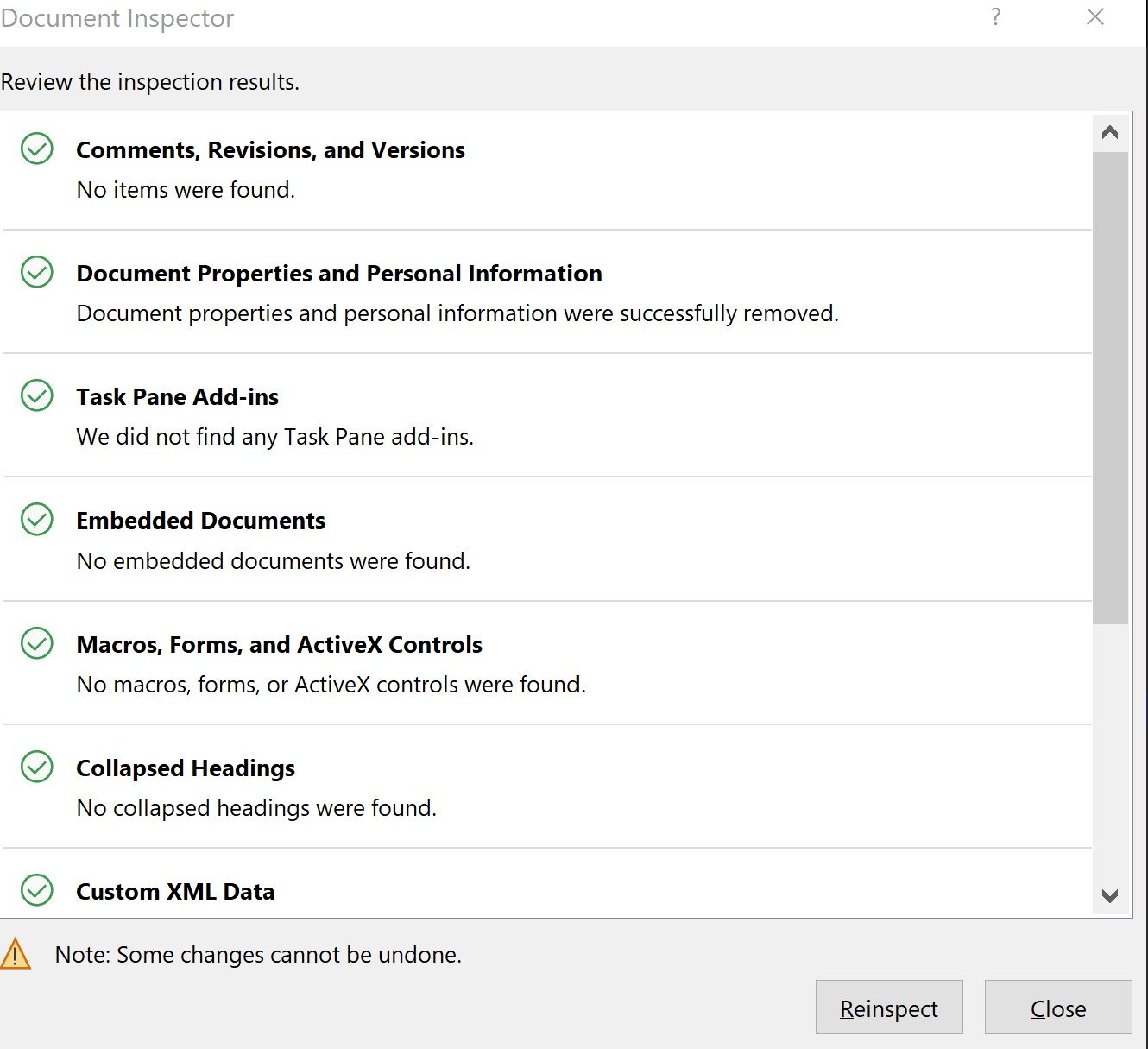
Document Properties and Personal Information > Remove All
Capiture5.jpg

Last

Click Close > Save the document.

Voila, you have cleared the Metadata and you should be good to go and share the document!

Power Tip: If you don’t need or have to share the word document (ideal when you are not working on sharing edits back and forth), just save the document as a PDF. Saving a word document as a pdf should remove all Metadata!


June 10, 2020/ The Tech Savvy Lawyer.Page/ Michael D.J. Eisenberg/ Comment
Malpractice Alert!, Universal
Word, Metadata

Michael D.J. Eisenberg

  • Podcast #9: Getting connected with ...
  • Keep Wi-Fi Internet Signal Strength ...
  • Tech-Savvy Saturdays/
  • *Award Winning Podcast*/
  • Appearances/
  • Blog/
  • Support the Blog!/
  • About/
    • Meet Michael
  • Contact/

The Tech Savvy Lawyer

Like what I'm doing?
Buy Me A Coffee
  • Appearances
  • Be On the Look Out (BOLO)
  • Editorial
  • Home Office
  • How to . . .
  • Humor
  • Podcasts
  • Shout Out!
  • Travel
  • Word of the Week!

Subscribe

Sign up with your email address to receive news and updates.

We respect your privacy.

Thank you!

MICHAEL D.J. EISENBERG IS A WASHINGTON, DC LEGAL PROFESSIONAL WHO LOVES HIS TECH. 

I've spent decades helping lawyers—young and old—tackle their tech challenges. Now, I’m bringing that knowledge to a broader audience with this blog. My posts are inspired by real questions I’ve been asked and the trends shaping the future.

Whether you're a tech novice or a pro, you'll find practical insights here to streamline your legal practice and improve your daily life. Let’s make technology work for you, not against you. 😀

Disclaimer

The Tech‑Savvy Lawyer.Page blog and podcast are for informational and educational purposes only. The content reflects the insights and opinions of a legal professional with extensive experience in law and technology. Nothing published on this site or shared through the podcast should be construed as legal advice, nor does it create any attorney‑client relationship.

Readers and listeners should consult a licensed attorney for legal advice tailored to their specific circumstances. References to software, services, or products are provided for discussion purposes only and do not constitute endorsements, guarantees, or warranties.

Disclosure

As required by the IRS and FTC, please note that this blog and podcast may include affiliate links. The Tech‑Savvy Lawyer.Page may earn a commission from qualifying purchases or referrals, at no additional cost to you.



