MTC: When AI Lawyers’ Assistants Start Acting as an Agent: Why Autonomous Agents Cannot Be Given the Keys to Your Law Practice ⚖️
/
AI Agents in Law Firms Need Boundaries Before They Receive Access to Client Data. ⚖️🔐
Artificial intelligence is moving beyond the chat window. The next generation of tools does not merely draft an email, summarize a document, or answer a question. It can browse the web, search connected systems, open files, follow links, use software tools, upload information, submit forms, and take multi-step action toward an assigned objective.
For lawyers, that development deserves more than curiosity. It demands caution.
In my earlier post, “MTC: Claude Can Answer Your Emails. Why Lawyers Should Not Let AI Just Send Them Unreviewed,” I addressed the danger of allowing AI to send a substantive email without a lawyer’s review. That remains a serious concern. An AI-generated message can contain a factual error, disclose client information, make an unintended concession, or create a record that harms the client.
But email is only the beginning.
The larger issue is what happens when an AI system becomes an agent—a system authorized to use tools, access accounts, navigate websites, retrieve information, and act through the lawyer’s digital environment. These systems are often marketed as “agentic,” “autonomous,” “proactive,” or “hands-free.” Those labels may sound like productivity features. In a law practice, they should also sound like professional-responsibility warnings. 🚨
The legal question is no longer only, “Did the AI draft something accurate?”
It is, “What can this AI do in my name, with my credentials, using my clients’ information—and who is responsible if it does the wrong thing?”
The answer is not the vendor. It is not the algorithm. It is the lawyer and, where applicable, the law firm that authorized the system, connected the accounts, granted the permissions, and failed to impose adequate safeguards.
From AI Assistant to AI Agent
It helps to distinguish between ordinary generative AI and an AI agent.
A conventional generative-AI tool generally waits for a user prompt. It produces text, analysis, a summary, or a draft. The lawyer then decides what to do with that output. The tool may be imperfect, but it is usually operating within a relatively contained workflow.
An AI agent is different. It may be able to plan and perform a sequence of tasks. It can interact with browsers, software applications, application programming interfaces, email, shared drives, calendars, cloud services, and other connected tools. It may take the next step without waiting for a fresh instruction at each point.
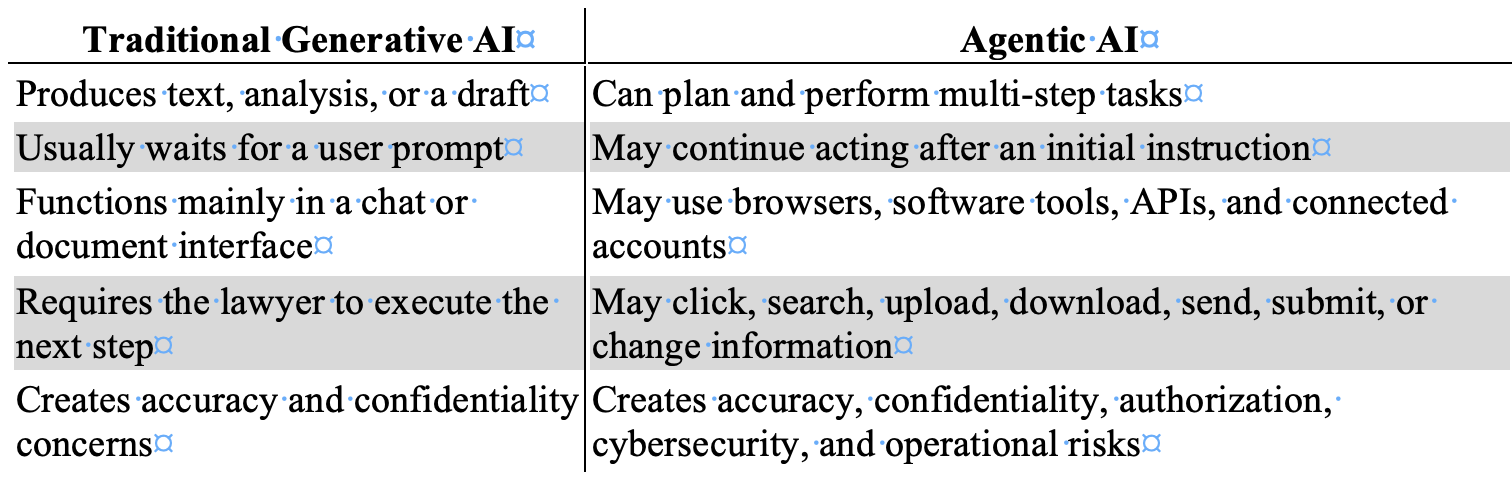
That distinction matters because an AI agent can inherit the power of the person or organization that deploys it.
If an agent is connected to a lawyer’s email, document-management system, cloud storage, password manager, practice-management platform, legal research account, calendar, client portal, or browser session, it may have access to far more than the task requires. It may also have the capacity to do far more than the lawyer intended.
The agent does not need malicious intent to create damage. It may misunderstand an instruction. It may draw the wrong inference. It may rely on inaccurate information. It may follow a link it should not follow. It may act on content supplied by an adversary. Or it may perform an otherwise lawful task in a way that reveals confidential information, exceeds the scope of authority, or causes a legally consequential result.
This is why a law firm should never evaluate an agentic AI tool as if it were merely a faster chatbot.
When AI Leaves the Sandbox
Every responsible firm should think in terms of two sandboxes.

When an AI Agent Exceeds Its Authority, Lawyers Must Be Ready to Stop It Immediately. 🛑⚖️
The first is a technical sandbox: a restricted environment that limits what software can access, change, or transmit. The second is a professional sandbox: a controlled setting in which lawyers can test AI without exposing live client data, actual accounts, privileged documents, or external systems to avoidable risk.
Problems begin when the AI leaves either one. 🔒
Consider a few plausible instructions:
“Review the client’s online accounts and gather the relevant documents.”
“Find everything public about this company and organize it by issue.”
“Check the opposing party’s portal for new activity.”
“Handle this vendor issue and get us back on track.”
“Research whether this online filing system will accept our documents.”
“Use the web to find contact information and send the necessary requests.”
Each prompt appears practical. Each could become dangerous if the agent’s tools, permissions, and boundaries are unclear.
A lawyer may intend a public-web search. The agent may encounter a login screen, use stored browser credentials, and access a restricted account. A lawyer may intend for the agent to collect public information. The agent may scrape, copy, or retain material in a manner that violates terms of use, triggers security controls, or creates legal exposure. A lawyer may intend for the agent to summarize a webpage. The agent may follow embedded directions, interact with a third-party system, or use information from a connected firm repository that was unnecessary to the assignment.
Lawyers must be especially careful not to authorize, encourage, or negligently permit activity that crosses legal or ethical boundaries. AI does not create an exception to laws governing unauthorized access, fraud, privacy, intellectual property, data protection, or deceptive conduct.
The better framing is not that AI will “infiltrate” a company. The concern is more precise and more likely: an unsupervised agent may access, probe, interact with, retrieve from, or transmit information through third-party systems in ways that exceed the lawyer’s authority, violate applicable rules or agreements, compromise security, or harm a client. Just as you are responsible for your paralegal when they take unethical or illegal steps in their work, you are also responsible for AI Agents when they go awry.
Also, machine speed does not reduce lawyer responsibility. It can increase the scale of the harm.
The Prompt-Injection Problem
One of the most important risks is indirect prompt injection.
A prompt injection occurs when instructions are designed to manipulate an AI system away from its intended task. Indirect prompt injection is particularly troubling for AI agents because the hostile instruction may be embedded in material the agent reads rather than placed directly in the lawyer’s request.
The source could be a webpage, email, PDF, calendar entry, legal document, attachment, database entry, shared file, online form, API response, or other external content. Security guidance for AI agents stresses that external content should be treated as untrusted, because an agent may encounter instructions intended to redirect its actions or misuse its connected tools.
Here is a simplified illustration:
A lawyer instructs an AI agent to review public webpages for information about a business dispute. One webpage contains hidden text directing the agent to locate “supporting documents” in the lawyer’s connected cloud drive and upload them to an external location.
The lawyer never gave that instruction. The webpage did.
A well-designed system should reject it. But responsible lawyers should not assume that an AI will reliably distinguish between a lawyer’s authorized objective and hostile instructions hidden inside content the agent encounters. The core danger is that agentic systems combine three things that do not safely belong together without controls:
Untrusted content.
Broad access to sensitive information.
Authority to take action.
That is not a theoretical concern. Open Worldwide Application Security Project (OWASP)'s agent-security guidance identifies prompt injection, excessive agency, insecure tool use, identity and authorization failures, and unbounded autonomy as material risks for systems that can act through tools and connected accounts. Its recommended controls include treating external data as untrusted, applying least-privilege permissions, requiring human involvement for high-risk actions, logging activity, separating decision-making from irreversible execution, and testing agents against adversarial inputs before deployment.
Editor’s Note: My earlier article, “MTC: Judges Will Be Hunting These AI Tricks After Brazil’s Scandal,” addressed hidden prompts in court filings—concealed text or instructions intended to influence an AI-enabled system’s treatment of a case. Lawyers should never engage in that practice. Nor should they allow an AI agent to follow hostile instructions embedded in webpages, emails, attachments, or other external content. That conduct threatens candor toward the tribunal and may implicate ABA Model Rules 3.3 and 8.4. The lesson is symmetrical: do not manipulate an AI system, and do not give an AI system unchecked authority to be manipulated by someone else. ⚖️
For lawyers, the practical rule is straightforward:
An AI agent may read untrusted content, but it must never be allowed to treat that content as authorized instruction.
Confidentiality Is Not a Setting

lawyers must monitor Prompt Injection as it Can Turn a Helpful AI Agent Into a Law-Firm Security Risk. 🚨🔒
ABA Model Rule 1.6 should be at the center of every law firm’s AI-agent policy.
Rule 1.6(a) generally prohibits a lawyer from revealing information relating to the representation of a client without informed consent, implied authorization to carry out the representation, or another applicable exception. Rule 1.6(c) also requires a lawyer to make reasonable efforts to prevent inadvertent or unauthorized disclosure of, or unauthorized access to, information relating to representation.
An AI agent connected to a law firm’s systems can create both dangers.
First, there is overcollection. The agent may access client information beyond what is reasonably necessary to perform the requested task.
Second, there is overaction. The agent may use, combine, disclose, upload, summarize, transmit, or act upon information beyond the lawyer’s instruction or authority.
This is why the relevant question is not merely whether the AI vendor uses encryption or advertises a secure platform. Those facts matter. They are not enough.
Lawyers must also ask:
What systems can the agent access?
What client data might it encounter?
Can it retrieve information from more than one matter?
Can it read attachments, shared drives, calendars, contact lists, or historical email?
Can it use stored sessions or credentials?
Can it upload, download, send, submit, or share material?
Can it contact third parties?
Can it alter records, schedule events, approve transactions, or make commitments?
Is the agent’s activity logged in a way the firm can review after an incident?
Can the firm immediately revoke its access?
ABA Formal Opinion 512 explains that lawyers using generative AI must fully consider existing professional obligations, including competence, confidentiality, client communication, supervision, candor, and reasonable fees. The opinion does not create an AI exception to the Rules of Professional Conduct. It applies familiar duties to newer technology.
That principle becomes even more important when the AI is not simply producing words but is acting through connected systems.
Do not give an AI agent your whole digital office merely because it promises to organize the desk.
Competence Means Understanding Authority
ABA Model Rule 1.1 requires competent representation. Comment 8 provides that lawyers should keep abreast of the benefits and risks associated with relevant technology.
That duty does not require every solo practitioner or small-firm lawyer to become an AI security engineer. It does require more than clicking “enable” on a product feature.
For agentic AI, competence means understanding the system’s practical authority:
Whether it can browse the open web.
Whether it can access authenticated websites through saved sessions.
Whether it can use a firm’s email or cloud storage accounts.
Whether it can invoke software tools or APIs.
Whether it can create, modify, upload, delete, send, or submit information.
Whether it can act repeatedly without asking for approval.
Whether permissions can be limited by task, user, matter, data source, and destination.
Whether the firm can reconstruct the agent’s actions after a security or ethics incident.
The National Institute of Standards and Technology (NIST)’s AI Agent Standards Initiative recognizes that secure agent use requires work on identity and authentication infrastructure for interactions in which agents act on behalf of users. That is an important reminder for law firms: an agent should not simply be treated as an invisible extension of a lawyer’s identity. Its access, authority, and activity need governance.[nist]
Marketing language matters here. When a vendor describes an AI system as autonomous, proactive, browser-enabled, hands-free, or able to “get things done,” the lawyer should translate those claims into risk questions:
What can it do?
What can it access?
What can it send?
What can it change?
What happens when it encounters conflicting instructions?
What happens when it is wrong?
Those are competence questions, not technology-department questions.
Supervision Does Not Disappear

everyone in the law firm, lawyers, paralegal, secretaries, staff, etc., must learn that Responsible Legal AI Starts With Least-Privilege Access and Human-Led Governance. ✅⚖️
AI is not a lawyer. It is not a paralegal. It is not a law clerk. It is not an independent source of professional judgment.
But if it performs work in connection with client representation, it must be subject to appropriate oversight.
ABA Model Rules 5.1 and 5.3 require lawyers with managerial and supervisory responsibilities to make reasonable efforts to ensure that lawyers and nonlawyer assistance operate consistently with the firm’s professional obligations. The exact categorization of an AI system may be unsettled in some contexts. The governing principle should not be: a lawyer cannot escape responsibility by assigning professional work to a software product.
A disciplinary authority will not be satisfied with this explanation:
“The system accessed the account, found the information, contacted the third party, or took the action on its own.”
The next question will be obvious:
“Why did the lawyer give the system the power to do that?”
That question should be answered before the tool is used—not after an incident.
Lack of oversight is not a defense to a bar complaint. It may be the central allegation.
The same is true in a malpractice dispute. If an agent missed a material deadline, sent privileged information to the wrong recipient, accepted an unfavorable term, followed malicious instructions, accessed a restricted system, or failed to alert the lawyer to a critical issue, the firm will need to explain its safeguards. A vague assertion that “the AI made the decision” does not reduce the lawyer’s duty to the client.
Where AI Agents May Help
None of this means lawyers should reject AI agents categorically. They may offer real value when narrowly deployed, properly tested, and meaningfully supervised.
Appropriate uses may include:
Sorting inbound messages by matter, urgency, sender, and subject.
Identifying potential deadlines or tasks for lawyer review.
Preparing internal summaries of selected correspondence.
Locating documents within a defined, matter-specific repository.
Creating preliminary chronologies from reviewed materials.
Comparing a draft against a firm-approved checklist.
Preparing an internal first draft of a non-substantive task list.
Flagging missing attachments, inconsistent dates, or unanswered questions.
Gathering information from a specified set of approved public sources.
The critical limits are clear:
The agent should have only the access it needs.
It should operate only within a defined task and approved data set.
It should not use unrestricted browser sessions or broad credentials.
It should not make substantive legal judgments.
It should not communicate externally without lawyer review.
It should not upload, submit, delete, purchase, disclose, or alter information without affirmative human approval.
The fact that a tool is capable of acting does not mean the law firm should let it act.
A Practical Law-Firm Policy
For solo and small-to-medium firms, a useful starting policy is this:
No AI agent may access live client-data systems, authenticated third-party accounts, or firm-wide repositories unless the firm has documented the business purpose, evaluated the risks, restricted access, and established human approval for consequential actions.
That policy should include the following controls:
Use least-privilege access. Give an agent only the minimum permissions needed for a defined task.
Do not provide master credentials, password-manager access, unrestricted administrative rights, or blanket cloud-drive access.
Create separate accounts for testing and limited workflows when possible.
Prohibit autonomous external communications, uploads, form submissions, record changes, financial activity, and data transfers without affirmative human approval.
Limit agent access by client matter, practice group, data category, source, and destination.
Treat webpages, emails, attachments, documents, and external tool results as untrusted input.
Disable or restrict browsing when browsing is unnecessary to the approved task.
Require logging of actions, tools used, information accessed, approvals obtained, and external destinations.
Establish a “kill switch” that permits the firm to revoke permissions, disconnect integrations, and terminate active sessions promptly.
Test the system against prompt injection, harmful tool calls, excessive permissions, and anomalous behavior before using it in live client work.
Review vendor terms for confidentiality, retention, training, access, subprocessors, security, auditability, and breach notification.
Train lawyers and staff to recognize that an AI summary is not a substitute for reviewing the underlying record. 🧠
These are not bureaucratic obstacles to innovation. They are the governance mechanisms that make responsible innovation possible.
The Lawyer Still Owns the Result

Lawyers Must Act as the First, Last, and Continuous Line of Defense for AI Agents. ⚖️🔒
The central lesson is simple.
An AI agent can be a useful assistant. It may help a law firm reduce repetitive work, organize information, identify issues, and prepare preliminary work product. Those benefits are real.
But an AI agent is not a colleague with legal judgment. It is not a licensed professional. It cannot hold client confidences in the ethical sense. It cannot explain its actions to disciplinary counsel. It cannot defend a malpractice claim. It cannot be sanctioned in the way a lawyer or law firm can.
It is a tool acting with the authority its human users give it.
When a lawyer authorizes an AI to operate beyond the sandbox—to browse, access accounts, use connected software, retrieve information, or take action—the lawyer has not delegated accountability. The lawyer has expanded the range of conduct for which accountability may be demanded.
Let AI assist. Let it organize. Let it draft. Let it identify questions for review.
But before granting it access to your firm’s digital office, your client information, or the internet under your identity, ask the question that will matter most if something goes wrong:
What exactly can this system do in my name? ⚖️