MTC: 2025 Year in Review: The "AI Squeeze," Redaction Disasters, and the Return of Hardware!

As we close the book on 2025, the legal profession finds itself in a dramatically different landscape than the one we predicted back in January. If 2023 was the year of "AI Hype" and 2024 was the year of "AI Experimentation," 2025 has undeniably been the year of the "AI Reality Check."

Here at The Tech-Savvy Lawyer.Page, we have spent the last twelve months documenting the friction between rapid innovation and the stubborn realities of legal practice. From our podcast conversations with industry leaders like Seth Price and Chris Dralla to our deep dives into the ethics of digital practice, one theme has remained constant: Competence is no longer optional; it is survival.

Looking back at our coverage from this past year, three specific highlights stand out as defining moments for legal technology in 2025. These aren't just news items; they are signals of where our profession is heading.

Highlight #1: The "Black Box" Redaction Wake-Up Call

Just days ago, on December 23, 2025, the legal world learned of a catastrophic failure of basic technological competence. As we covered in our recent post, How To: Redact PDF Documents Properly and Recover Data from Failed Redactions: A Guide for Lawyers After the DOJ Epstein Files Release “Leak”, the Department of Justice’s release of the Jeffrey Epstein files became a case study in what not to do.

The failure was simple but devastating: relying on visual "masks" rather than true data sanitization. Tech-savvy readers—and let’s be honest, anyone with a basic knowledge of copy-paste—were able to lift the "redacted" names of associates and victims directly from the PDF.

Why this matters for you: This event shattered the illusion that "good enough" tech skills are acceptable in high-stakes litigation. In 2025, we learned that the duty of confidentiality (Model Rule 1.6) is inextricably linked to the duty of technical competence (Model Rule 1.1 and its Comment 8). As we move into 2026, firms must move beyond basic PDF tools and invest in purpose-built redaction software that "burns in" changes and scrubs metadata. If the DOJ can fail this publicly, your firm is not immune.

Highlight #2: The "AI Squeeze" on Hardware

Throughout the year, we’ve heard complaints about sluggish laptops and crashing applications. In our December 22nd post, The 2026 Hardware Hike: Why Law Firms Must Budget for the 'AI Squeeze' Now, we identified the culprit. It isn’t just your imagination—it’s the supply chain.

We are currently facing a global shortage of DRAM (Dynamic Random Access Memory), driven by the insatiable appetite of data centers powering the very AI models we use daily. Manufacturers like Dell and Lenovo are pivoting their supply to these high-profit enterprise clients, leaving consumer and business laptops with a supply deficit.

Why this matters for you: The era of the 16GB RAM laptop for lawyers is dead. Running local, privacy-focused AI models (a major trend in 2025) and heavy eDiscovery platforms now requires 32GB or even 64GB of RAM as a baseline (which means you may want more than the “baseline”). The "AI Squeeze" means that in 2026, hardware will be 15-20% more expensive and harder to find. The lesson? Buy now. If your firm has a hardware refresh cycle planned for Q2 2026, accelerate it to Q1. Budgeting for technology is no longer just about software subscriptions; it’s about securing the physical silicon needed to do your job.

Highlight #3: From "Chat" to "Doing" (The Rise of Agentic AI)

Earlier this year, on the Tech-Savvy Lawyer Podcast, we spoke with Chris Dralla of TypeLaw and discussed the evolution of AI tools. 2025 marked the shift from "Chatbot AI" (asking a bot a question) to "Agentic AI" (telling a bot to do a job).

Tools like TypeLaw didn't just "summarize" cases this year; they actively formatted briefs, checked citations against local court rules, and built tables of authorities with minimal human intervention. This is the "boring" automation we have always advocated for—technology that doesn't try to be a robot lawyer, but acts as a tireless paralegal.

Why this matters for you: The novelty of chatting with an LLM has worn off. The firms winning in 2025 were the ones adopting tools that integrated directly into Microsoft Word and Outlook to automate specific, repetitive workflows. The "Generalist AI" is being replaced by the "Specialist Agent."

Moving Forward: What We Can Learn Today for 2026

As we look toward the new year, the profession must internalize a critical lesson: Technology is a supply chain risk.

Whether it is the supply of affordable memory chips or the supply of secure software that properly handles redactions, you are dependent on your tools. The "Tech-Savvy" lawyer of 2026 is not just a user of technology but a manager of technology risk.

What to Expect in 2026:

Is your firm budgeted for the anticipated 2026 hardware price hike?

  1. The Rise of the "Hybrid Builder": I predict that mid-sized firms will stop waiting for vendors to build the perfect tool and start building their own "micro-apps" on top of secure, private AI models.

  2. Mandatory Tech Competence CLEs: rigorous enforcement of tech competence rules will likely follow the high-profile data breaches and redaction failures of 2025.

  3. The Death of the Billable Hour (Again?): With "Agentic AI" handling the grunt work of drafting and formatting, clients will aggressively push back on bills for "document review" or "formatting." 2026 will force firms to bill for judgment, not just time.

As we sign off for the last time in 2025, remember our motto: Technology should make us better lawyers, not lazier ones. Check your redactions, upgrade your RAM, and we’ll see you in 2026.

Happy Lawyering and Happy New Year!

🎙️ Ep. #127: Mastering Legal Storytelling and AI Automation with Joshua Altman 🎙️⚖️

In Episode 127, I sit down with Joshua Altman, Managing Director of Beltway.Media, to decode the intersection of legal expertise and narrative strategy. 🏛️ We dive deep into the tech stack that powers a modern communications firm and explore how lawyers can leverage AI without losing their unique professional voice. Joshua shares actionable insights on using tools like Gumloop and Abacus.AI to automate workflows, the critical mistakes to avoid during high-stakes crisis management, and the real metrics you need to track to prove marketing ROI. 📊 Whether you are a solo practitioner or part of a large firm, this conversation bridges the gap between complex legal work and compelling public communication.

Join Joshua Altman and me as we discuss the following three questions and more!

  1. What are the top three technology tools or platforms you recommend that would help attorneys transform a single piece of thought leadership into multiple content formats across channels, and how can they use AI to accelerate this process without sacrificing their professional voice?

  2. What are the top three mistakes attorneys and law firms make when communicating during high-stakes situations—whether that’s managing negative publicity, navigating a client crisis, or pitching to potential investors—and how can technology help them avoid these pitfalls while maintaining their ethical obligations?

  3. What are the top three metrics for their online marketing technology investments that attorneys should actually be tracking to demonstrate return on investment, and what affordable technology solutions would you recommend to help them capture and analyze this data?

In our conversation, we cover the following:

  • [00:00] Introduction to Joshua Altman and Beltway.Media.

  • [01:06] Joshua’s current secure tech stack: From Mac setups to encrypted communications.

  • [03:52] Strategic content repurposing: Using AI as a tool, not a replacement for your voice.

  • [05:30] The "Human in the Loop" necessity: Why lawyers must proofread AI content.

  • [10:00] Tech Recommendation #1: using Abacus.AI and Root LLM for model routing.

  • [11:00] Tech Recommendation #2: Automating workflows with Gumloop.

  • [15:43] Tech Recommendation #3: The "Low Tech" solution of human editors.

  • [16:47] Crisis Communications: Navigating the Court of Public Opinion vs. the Court of Law.

  • [20:00] Using social listening tools for litigation support and witness tracking.

  • [24:30] Metric #1: Analyzing Meaningful Engagement (comments vs. likes).

  • [26:40] Metric #2: Understanding Impressions and network reach (1st vs. 2nd degree).

  • [28:40] Metric #3: Tracking Clicks to validate interest and sales funnels.

  • [31:15] How to connect with Joshua.

RESOURCES:

Connect with Joshua Altman

Mentioned in the episode

Hardware mentioned in the conversation

Software & Cloud Services mentioned in the conversation

  • Abacus.AI - AI platform mentioned for its "Root LLM" model routing feature.

  • ChatGPT - AI language model.

  • Claude - AI language model.

  • Constant Contact - Email marketing platform.

  • Gumloop - AI automation platform for newsletters and social listening.

  • LinkedIn - Professional social networking.

  • MailChimp - Email marketing platform.

  • Proton Mail - Encrypted email service.

  • Tresorit - End-to-end encrypted file sharing (secure Dropbox alternative).

MTC: The 2026 Hardware Hike: Why Law Firms Must Budget for the "AI Squeeze" Now!

Lawyers need to be ready for $prices$ in tech to go up next year due to increased AI use!

A perfect storm is brewing in the hardware market. It will hit law firm budgets harder than expected in 2026. Reports from December 2025 confirm that major manufacturers like Dell, Lenovo, and HP are preparing to raise PC and laptop prices by 15% to 20% early next year. The catalyst is a global shortage of DRAM (Dynamic Random Access Memory). This shortage is driven by the insatiable appetite of AI servers.

While recent headlines note that giants like Apple and Samsung have the supply chain power to weather this surge, the average law firm does not. This creates a critical strategic challenge for managing partners and legal administrators.

The timing is unfortunate. Legal professionals are adopting AI tools at a record pace. Tools for eDiscovery, contract analysis, and generative drafting require significant computing power to run smoothly. In 2024, a laptop with 16GB of RAM was standard. Today, running local privacy-focused AI models or heavy eDiscovery platforms makes 32GB the new baseline. 64GB is becoming the standard for power users.

Don’t just meet today’s AI demands—exceed them. Upgrade to 32GB or 64GB of RAM now, not later. AI adoption in legal practice is accelerating exponentially. The memory you think is “enough” today will be the bottleneck tomorrow. Firms that overspec their hardware now will avoid costly mid-cycle replacements and gain a competitive edge in speed and efficiency.
— 💡 PRO TIP: Future-Proof Your Firm's Hardware Now

We face a paradox. We need more memory to remain competitive, but that memory is becoming scarce and expensive. The "AI Squeeze" is real. Chipmakers are prioritizing high-profit memory for data center AI over the standard memory used in law firm laptops. This supply shift drives up the bill of materials for every new workstation (low end when you compare them “high-profit memory data centers) you plan to buy.

Update your firm’s tech budget for 2026 by prioritizing ram for your next technology upgrade.

Law firms should act immediately. First, audit your hardware refresh cycles. If you planned to upgrade machines in Q1 or Q2 of 2026, accelerate those purchases to the current quarter. You could save 20% per unit by buying before the price hikes take full effect.

Second, adjust your 2026 technology budget. A flat budget will buy you less power next year. You cannot afford to downgrade specifications. Buying underpowered laptops will frustrate fee earners and throttle the efficiency gains you expect from your AI investments.

Finally, prioritize RAM over storage. Cloud storage is cheap and abundant. Memory is not. When configuring new machines, allocate your budget to 32GB or 64GB (or more) of RAM rather than a larger hard drive.

The hardware market is shifting. The cost of innovation is rising. Smart firms will plan for this reality today rather than paying the premium tomorrow.

🧪🎧 TSL Labs Bonus Podcast: Open vs. Closed AI — The Hidden Liability Trap in Your Firm ⚖️🤖

Welcome to TSL Labs Podcast Experiment. 🧪🎧 In this special "Deep Dive" bonus episode, we strip away the hype surrounding Generative AI to expose a critical operational risk hiding in plain sight: the dangerous confusion between "Open" and "Closed" AI systems.

Featuring an engaging discussion between our Google Notebook AI hosts, this episode unpacks the "Swiss Army Knife vs. Scalpel" analogy that every managing partner needs to understand. We explore why the "Green Light" tools you pay for are fundamentally different from the "Red Light" public models your staff might be using—and why treating them the same could trigger an immediate breach of ABA Model Rule 5.3. From the "hidden crisis" of AI embedded in Microsoft 365 to the non-negotiable duty to supervise, this is the essential briefing for protecting client confidentiality in the age of algorithms.

In our conversation, we cover the following:

  • [00:00] – Introduction: The hidden danger of AI in law firms.

  • [01:00] – The "AI Gap": Why staff confuse efficiency with confidentiality.

  • [02:00] – The Green Light Zone: Defining secure, "Closed" AI systems (The Scalpel).

  • [03:45] – The Red Light Zone: Understanding "Open" Public LLMs (The Swiss Army Knife).

  • [04:45] – "Feeding the Beast": How public queries actively train the model for everyone else.

  • [05:45]The Duty to Supervise: ABA Model Rules 5.3 and 1.1[8] implications.

  • [07:00] – The Hidden Crisis: AI embedded in ubiquitous tools (Microsoft 365, Adobe, Zoom).

  • [09:00] – The Training Gap: Why digital natives assume all prompt boxes are safe.

  • [10:00] – Actionable Solutions: Auditing tools and the "Elevator vs. Private Room" analogy.

  • [12:00] – Hallucinations: Vendor liability vs. Professional negligence.

  • [14:00] – Conclusion: The final provocative thought on accidental breaches.

RESOURCES

Mentioned in the episode

Software & Cloud Services mentioned in the conversation

MTC: The Hidden Danger in Your Firm: Why We Must Teach the Difference Between “Open” and “Closed” AI!

Does your staff understand the difference between “free” and “paid” aI? Your license could depend on it!

I sit on an advisory board for a school that trains paralegals. We meet to discuss curriculum. We talk about the future of legal support. In a recent meeting, a presentation by a private legal research company caught my attention. It stopped me cold. The topic was Artificial Intelligence. The focus was on use and efficiency. But something critical was missing.

The lesson did not distinguish between public-facing and private tools. It treated AI as a monolith. This is a dangerous oversimplification. It is a liability waiting to happen.

We are in a new era of legal technology. It is exciting. It is also perilous. The peril comes from confusion. Specifically, the confusion between paid, closed-system legal research tools and public-facing generative AI.

Your paralegals, law clerks, and staff use these tools. They use them to draft emails. They use them to summarize depositions. Do they know where that data goes? Do you?

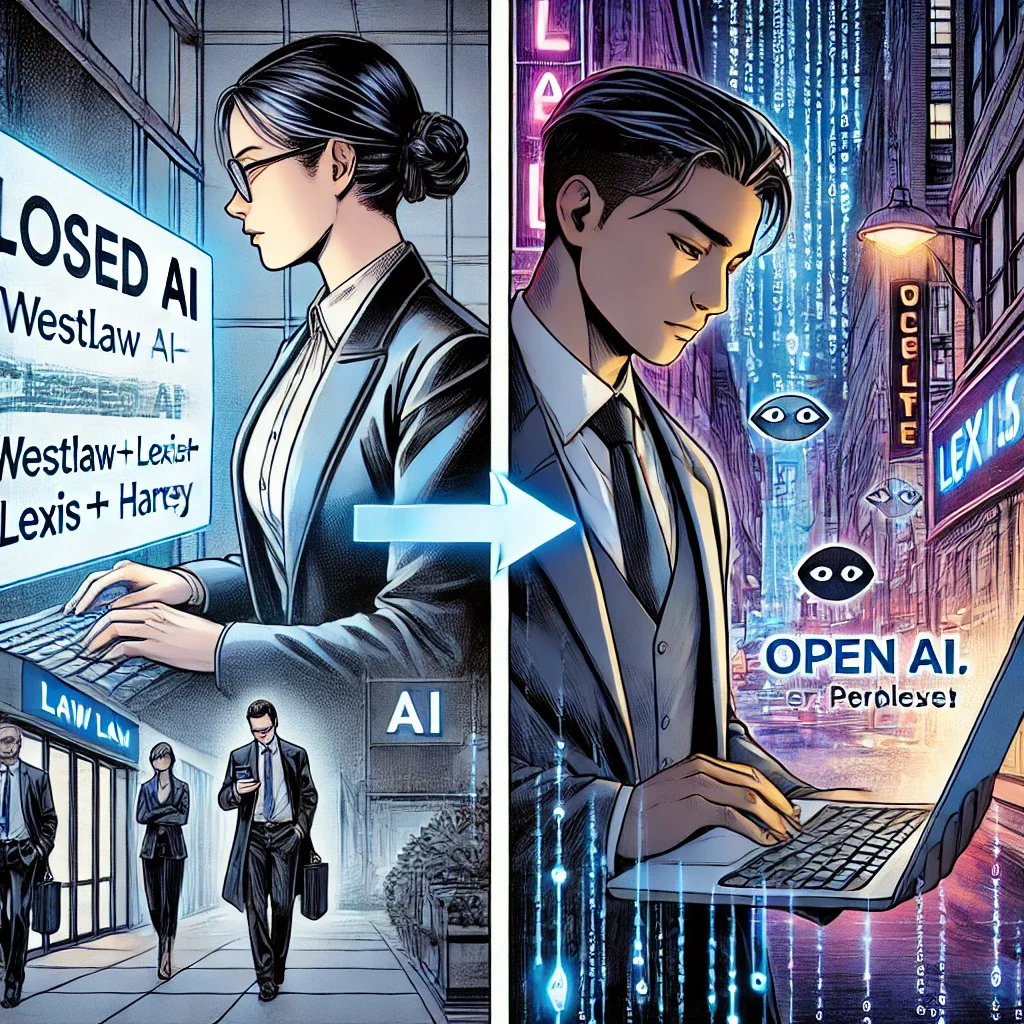
The Two Worlds of AI

There are two distinct worlds of AI in our profession.

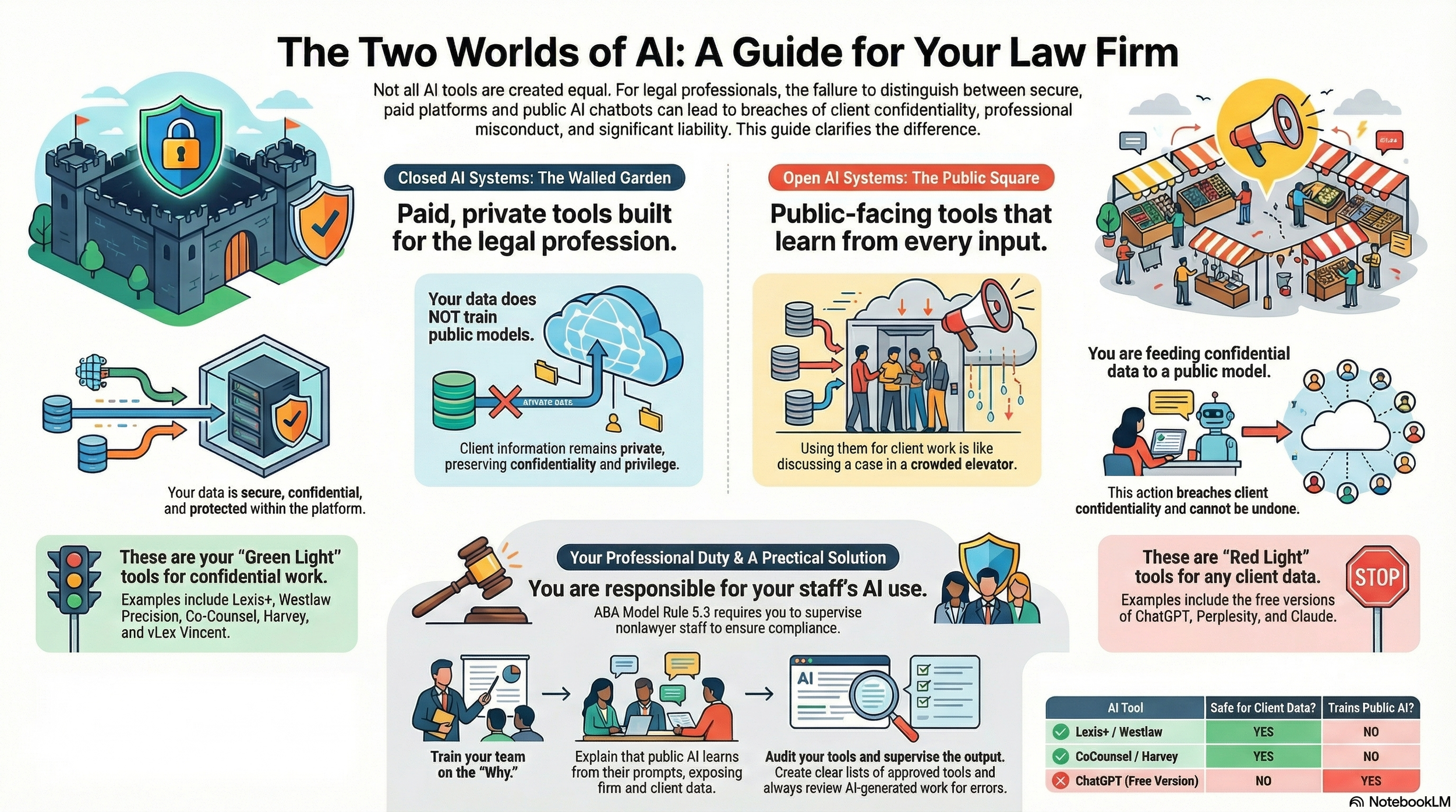
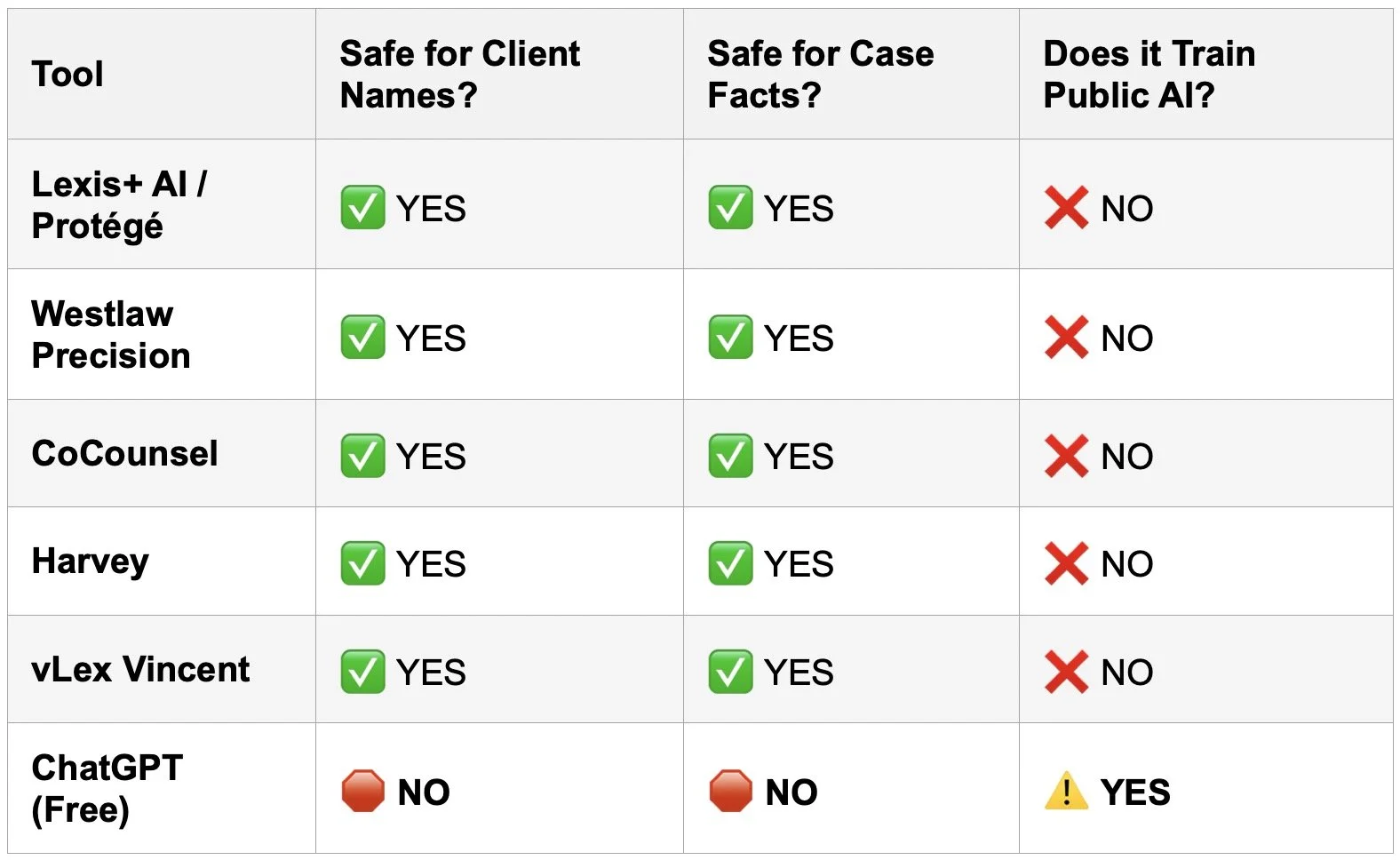
First, there is the world of "Closed" AI. These are the tools we pay for - i.e., Lexis+/Protege, Westlaw Precision, Co-Counsel, Harvey, vLex Vincent, etc. These platforms are built for lawyers. They are walled gardens. You pay a premium for them. (Always check the terms and conditions of your providers.) That premium buys you more than just access. It buys you privacy. It buys you security. When you upload a case file to Westlaw, it stays there. The AI analyzes it. It does not learn from it for the public. It does not share your client’s secrets with the world. The data remains yours. The confidentiality is baked in.

Then, there is the world of "Open" or "Public" AI. This is ChatGPT. This is Perplexity. This is Claude. These tools are miraculous. But they are also voracious learners.

When you type a query into the free version of ChatGPT, you are not just asking a question. You are training the model. You are feeding the beast. If a paralegal types, "Draft a motion to dismiss for John Doe, who is accused of embezzlement at [Specific Company]," that information leaves your firm. It enters a public dataset. It is no longer confidential.

This is the distinction that was missing from the lesson plan. It is the distinction that could cost you your license.

The Duty to Supervise

Do you and your staff know when you can and can’t use free AI in your legal work?

You might be thinking, "I don't use ChatGPT for client work, so I'm safe." You are wrong.

You are not the only one doing the work. Your staff is doing the work. Your paralegals are doing the work.

Under the ABA Model Rules of Professional Conduct, you are responsible for them. Look at Rule 5.3. It covers "Responsibilities Regarding Nonlawyer Assistance." It is unambiguous. You must make reasonable efforts to ensure your staff's conduct is compatible with your professional obligations.

If your paralegal breaches confidentiality using AI, it is your breach. If your associate hallucinates a case citation using a public LLM, it is your hallucination.

This connects directly to Rule 1.1, Comment 8. This represents the duty of technology competence. You cannot supervise what you do not understand. You must understand the risks associated with relevant technology. Today, that means understanding how Large Language Models (LLMs) handle data.

The "Hidden AI" Problem

I have discussed this on The Tech-Savvy Lawyer.Page Podcast. We call it the "Hidden AI" crisis. AI is creeping into tools we use every day. It is in Adobe. It is in Zoom. It is in Microsoft 365.

Public-facing AI is useful. I use it. I love it for marketing. I use it for brainstorming generic topics. I use it to clean up non-confidential text. But I never trust it with a client's name. I never trust it with a very specific fact pattern.

A paid legal research tool is different. It is a scalpel. It is precise. It is sterile. A public chatbot is a Swiss Army knife found on the sidewalk. It might work. But you don't know where it's been.

The Training Gap

The advisory board meeting revealed a gap. Schools are teaching students how to use AI. They are teaching prompts. They are teaching speed. They are not emphasizing the where.

The "where" matters. Where does the data go?

We must close this gap in our own firms. You cannot assume your staff knows the difference. To a digital native, a text box is a text box. They see a prompt window in Westlaw. They see a prompt window in ChatGPT. They look the same. They act the same.

They are not the same.

One protects you. The other exposes you.

A Practical Solution

I have written about this in my blog posts regarding AI ethics. The solution is not to ban AI. That is impossible. It is also foolish. AI is a competitive advantage.

* Always check the terms of use in your agreements with private platforms to determine if your client confidential data and PII are protected.

The solution is policies and training.

  1. Audit Your Tools. Know what you have. Do you have an enterprise license for ChatGPT? If so, your data might be private. If not, assume it is public.

  2. Train on the "Why." Don't just say "No." Explain the mechanism. Explain that public AI learns from inputs. Use the analogy of a confidential conversation in a crowded elevator versus a private conference room.

  3. Define "Open" vs. "Closed." Create a visual guide. List your "Green Light" tools (Westlaw, Lexis, etc.). List your "Red Light" tools for client data (Free ChatGPT, personal Gmail, etc.).

  4. Supervise Output. Review the work. AI hallucinates. Even paid tools can make mistakes. Public tools make up cases entirely. We have all seen the headlines. Don't be the next headline.

The Expert Advantage

The line between “free” and “paid” ai could be a matter of keeping your bar license!

On The Tech-Savvy Lawyer.Page, I often say that technology should make us better lawyers, not lazier ones.

Using Lexis+/Protege, Westlaw Precision, Co-Counsel, Harvey, vLex Vincent, etc. is about leveraging a curated, verified database. It is about relying on authority. Using a public LLM for legal research is about rolling the dice.

Your license is hard-earned. Your reputation is priceless. Do not risk them on a free chatbot.

The lesson from the advisory board was clear. The schools are trying to keep up. But the technology moves faster than the curriculum. It is up to us. We are the supervisors. We are the gatekeepers.

Take time this week. Gather your team. Ask them what tools they use. You might be surprised. Then, teach them the difference. Show them the risks.

Be the tech-savvy lawyer your clients deserve. Be the supervisor the Rules require.

The tools are here to stay. Let’s use them effectively. Let’s use them ethically. Let’s use them safely.

MTC

TSL.P Lab's Initiative: 🤖 Hidden AI in Legal Practice: A Tech-Savvy Lawyer Labs Initiative Analysis

In this Tech-Savvy Lawyer Labs Initiative analysis, we use Google NotebookLM to break down the "Hidden AI" crisis affecting every legal professional. Microsoft 365, Zoom, and your practice management software may be processing client data without your knowledge—and without your explicit consent. We explain what ABA Formal Opinion 512 actually requires from you. We also provide a practical 5-step playbook to audit your tech stack and protect your license.

What you'll discover:
✅ Why "I didn't know" is no longer a valid defense
✅ Hallucination rates in legal research tools (17-33% error rates)
✅ How the Mata v. Avianca sanctions case proves verification is mandatory
✅ Tactical steps to identify and disable dangerous default settings
✅ Ethical guidelines for billing AI-assisted work

‼️ Don't let an "invisible assistant" trigger an ethics violation or put your professional license at risk.

Enjoy!

*Remember the presentation, like all postings on The Tech-Savvy Lawyer.Page, is for informational purposes only, does not offer legal advice or create attorney-client relationship.