🎙Bonus Episode: TSL Labs's 🧪 Deep Dive into our July 13, 2026, Editorial, Law School, Laptops, and AI: Why Banning Computers Misses the Point!

Join us for an AI-powered deep dive into the ethical challenges facing legal professionals in the age of generative AI. 🤖 In this episode, we unpack our editorial “Law School, Laptops and AI: Why Banning Computers Misses the Point,” and explore why laptop bans in law schools are less about ethics and more about administrative convenience — and how that choice could leave future lawyers unprepared for a fully digital profession.

In our conversation, we cover the following

00:00:00 — From “no calculators” to “no laptops”: how old tech panics mirror today’s AI fears in legal education 📚🧮

00:01:00 — AI panic hits law schools: blanket bans on generative AI and even laptops in the classroom 🎓⚠️

00:02:00 — Why Michael supports limiting AI in 1L while still opposing laptop bans: building foundational legal judgment 💪⚖️

00:03:00 — ABA Model Rule 1.1 and competence: why early overreliance on AI short-circuits “intellectual muscle” 🧠

00:05:00 — Why banning laptops “misses the point”: the scalpel vs leeches analogy and modern legal training 🩺🖥️

00:06:00 — Accessibility and fairness: Michael’s 2002 law school story and laptops as essential accessibility tools ✍️💻

00:07:00 — Digital-native students and analog exams: how bans unfairly shift the playing field instead of leveling it 🎯

00:08:00 — Law practice is 100% digital: e‑discovery, e‑filing, and why stripping laptops undermines tech competence 🌐📑

00:08:30 — ABA Model Rule 1.1, Comment 8: the ethical duty to understand the benefits and risks of relevant technology 📘

00:09:30 — Lazy enforcement: why laptop bans are about visual policing, not thoughtful AI policy 🧍‍♂️👀

00:10:00 — ABA Model Rule 5.3: supervising AI as a “digital clerk” and why hiding the tech creates ethical gaps 🤖📎

00:11:30 — Guardrails, not prohibitions: network geofencing, offline laptops, and locked‑down software environments 🧱📶

00:12:30 — Clear AI policies in assignments: when AI is permitted, when it is prohibited, and how disclosure builds discipline 📝

00:13:00 — Teaching prompt engineering as a core legal skill: delegation, context, and structured AI use 🧩

00:13:30 — ABA Model Rule 1.6 and confidentiality: the risks of pasting client secrets into public AI tools 🔐

00:14:30 — Cognitive offloading vs cognitive atrophy: why tech can strengthen legal reasoning when used wisely 🧠⚙️

00:16:00 — Verifying AI outputs: hallucinations, fake cases, and training students to check everything against primary law 📚

00:17:00 — Temptation vs discipline: why bans don’t teach judgment, but supervised AI use can 🎯

00:18:00 — The false dichotomy: foundational human judgment vs tech competence and why future lawyers must have both ⚖️💡

00:19:00 — The future horizon: when AI becomes the “senior partner” and the lawyer becomes the supervisor‑in‑chief 🧑‍⚖️🤖

00:20:00 — Final challenge: law schools can’t ban their way out of the future — they have to teach students to wield the tools safely 🔍🚀

RESOURCES

Mentioned in the episode

Software & Cloud Services mentioned in the conversation

If you care about the future of legal education, client protection, and real‑world tech competence, hit play now and then share this episode with a colleague who still thinks “just ban the laptops” is a solution. 🎧💬
HOW TO: How Lawyers Can Protect Themselves on LinkedIn from New Phishing 🎣 Scams!

Fake LinkedIn warnings target lawyers!

LinkedIn has become an essential networking tool for lawyers, making it a high‑value target for sophisticated phishing campaigns.⚖️ Recent scams use fake “policy violation” comments that mimic LinkedIn’s branding and even leverage the official lnkd.in URL shortener to trick users into clicking on malicious links. For legal professionals handling confidential client information, falling victim to one of these attacks can create both security and ethical problems.

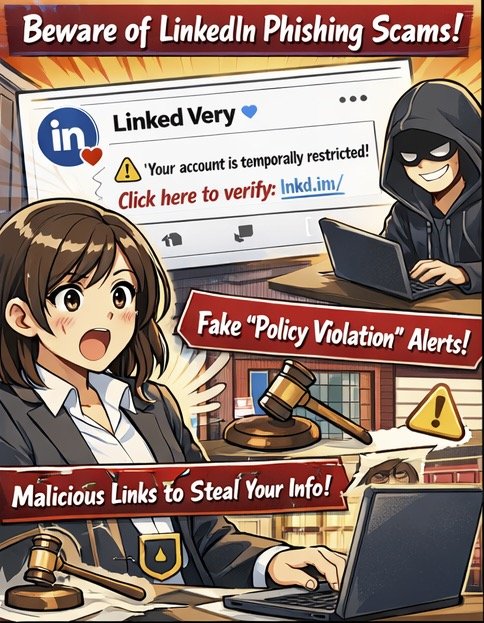
First, understand how this specific scam works.💻 Attackers create LinkedIn‑themed profiles and company pages (for example, “Linked Very”) that use the LinkedIn logo and post “reply” comments on your content, claiming your account is “temporarily restricted” for non‑compliance with platform rules. The comment urges you to click a link to “verify your identity,” which leads to a phishing site that harvests your LinkedIn credentials. Some links use non‑LinkedIn domains, such as .app, or redirect through lnkd.in, making visual inspection harder.

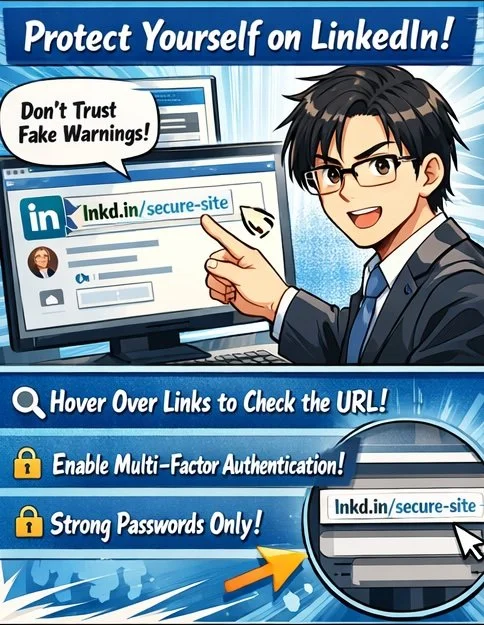
To protect yourself, treat all public “policy violation” comments as inherently suspect.🔍 LinkedIn has confirmed it does not communicate policy violations through public comments, so any such message should be considered a red flag. Instead of clicking, navigate directly to LinkedIn in your browser or app, check your notifications and security settings, and only interact with alerts that appear within your authenticated session. If the comment uses a shortened link, hover over it (on desktop) to preview the destination, or simply refuse to click and report it.

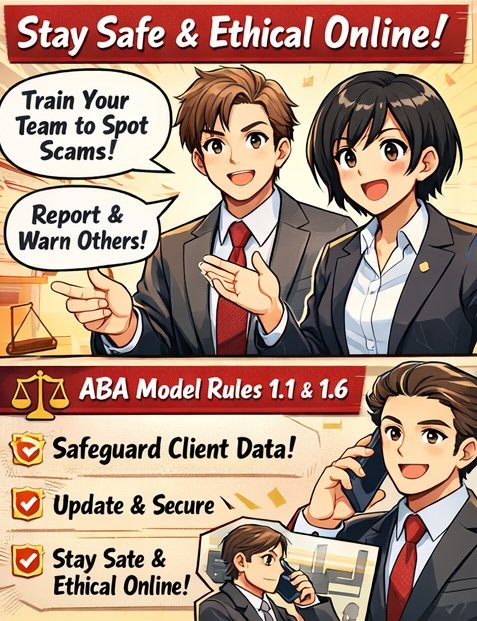
From an ethics standpoint, these scams directly implicate your duties under ABA Model Rules 1.1 and 1.6.⚖️ Comment 8 to Rule 1.1 stresses that competent representation includes understanding the benefits and risks associated with relevant technology. Failing to use basic safeguards on a platform where you communicate with clients and colleagues can fall short of that standard. Likewise, Rule 1.6 requires reasonable efforts to prevent unauthorized access to client information, which includes preventing account takeover that could expose your messages, contacts, or confidential discussions.

Public “policy violations” are a red flag!

Practically, you should enable multi‑factor authentication (MFA) on LinkedIn, use a unique, strong password stored in a reputable password manager, and review active sessions regularly for unfamiliar devices or locations.🔐 If you suspect you clicked a malicious link, immediately change your LinkedIn password, revoke active sessions, enable or confirm MFA, and run updated anti‑malware on your device. Then notify your firm’s IT or security contact and consider whether any client‑related disclosures are required under your jurisdiction’s ethics rules and breach‑notification laws.

Finally, build a culture of security awareness in your practice.👥 Brief colleagues and staff about this specific comment‑reply scam, show screenshots, and explain that LinkedIn does not resolve “policy violations” via comment threads. Encourage a “pause before you click” mindset and make reporting easy—internally to your IT team and externally to LinkedIn’s abuse channels. Taking these steps not only protects your professional identity but also demonstrates the technological competence and confidentiality safeguards the ABA Model Rules expect from modern legal practitioners.

From an ethics standpoint, these scams directly implicate your duties under ABA Model Rules 1.1 and 1.6.⚖️ Comment 8 to Rule 1.1 stresses that competent representation includes understanding the benefits and risks associated with relevant technology. Failing to use basic safeguards on a platform where you communicate with clients and colleagues can fall short of that standard. Likewise, Rule 1.6 requires reasonable efforts to prevent unauthorized access to client information, which includes preventing account takeover that could expose your messages, contacts, or confidential discussions.

Train your team to pause and report!

Practically, you should enable multi‑factor authentication (MFA) on LinkedIn, use a unique, strong password stored in a reputable password manager, and review active sessions regularly for unfamiliar devices or locations.🔐 If you suspect you clicked a malicious link, immediately change your LinkedIn password, revoke active sessions, enable or confirm MFA, and run updated anti‑malware on your device. Then notify your firm’s IT or security contact and consider whether any client‑related disclosures are required under your jurisdiction’s ethics rules and breach‑notification laws.

Finally, build a culture of security awareness in your practice.👥 Brief colleagues and staff about this specific comment‑reply scam, show screenshots, and explain that LinkedIn does not resolve “policy violations” via comment threads. Encourage a “pause before you click” mindset and make reporting easy—internally to your IT team and externally to LinkedIn’s abuse channels. Taking these steps not only protects your professional identity but also demonstrates the technological competence and confidentiality safeguards the ABA Model Rules expect from modern legal practitioners.