Why Macstock 2026 Should Be on Every Tech-Savvy Lawyer’s Calendar (and How to Save $50 with My Code) ⚖️💻

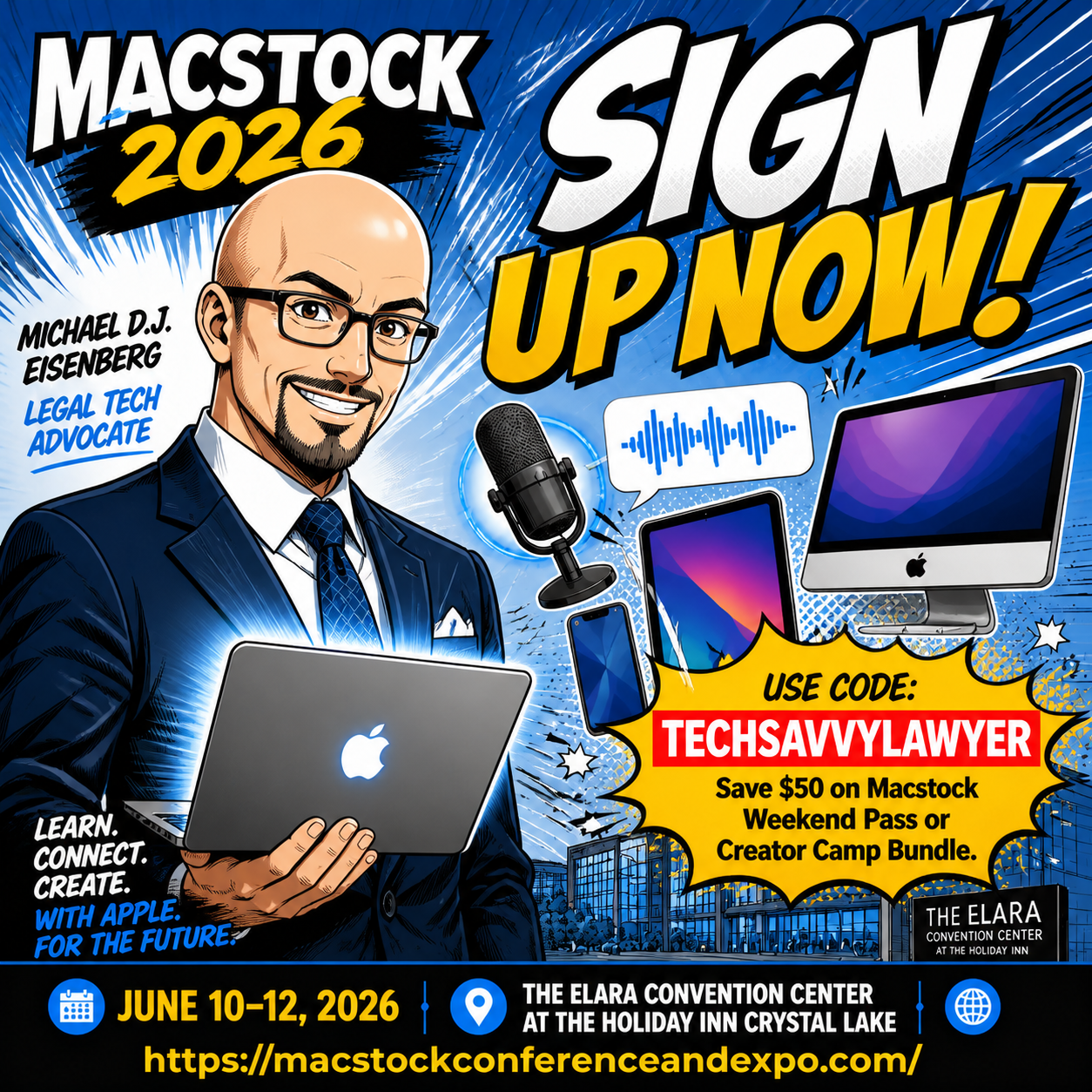
macstock 2026 will be held july 10, 11 & 12, 2026!

If you’re a solo, small-firm, or AI‑curious lawyer who lives in the Apple ecosystem, Macstock 2026 is one of the few conferences that genuinely respects both your time and your tech stack. It’s a three‑day, community‑driven, Apple‑centric event where you can sharpen your skills with your Mac, iPhone, and iPad, and walk away with workflows you can actually deploy on Monday morning.

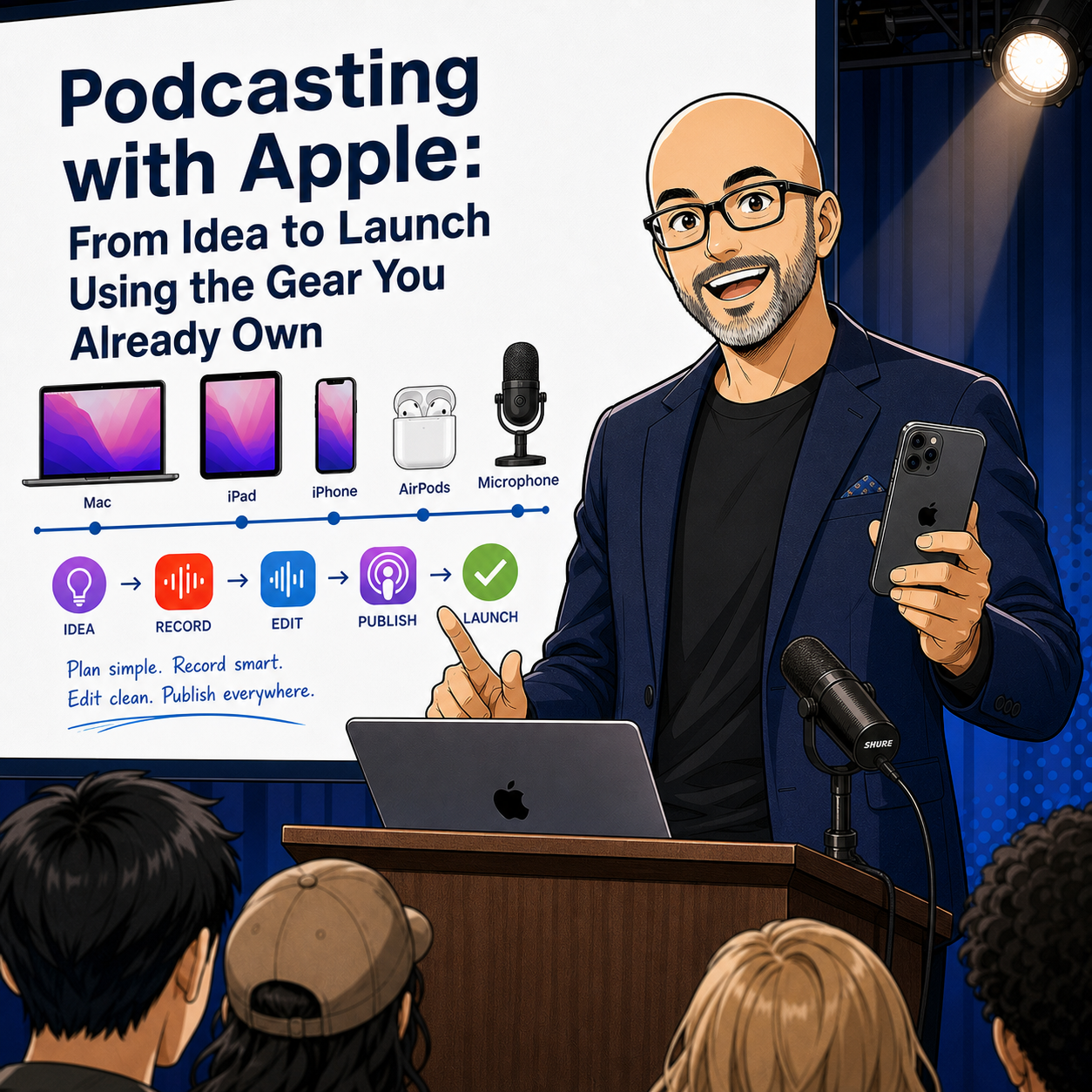
This year, I’m honored to be speaking at Macstock X on “Podcasting with Apple: From Idea to Launch Using the Gear You Already Own.” We’ll take a practical walk through planning, recording, and publishing a professional‑quality podcast using the same devices you already carry into court, client meetings, and your home office. Whether you want to build a niche show for veterans’ benefits, family law, or small‑business compliance—or simply become a more confident guest on other podcasts—this session is designed to be accessible, concrete, and repeatable. 🎙️

What Makes Macstock Different (and Why Lawyers Should Care)

Macstock isn’t a generic tech expo with a handful of Apple sessions bolted on; it’s an independent, Apple‑focused conference built for people who actually use Apple gear every day. The attendees range from first‑time Mac users to seasoned creators, but everyone shares a common goal: get more from Apple hardware and software without drowning in jargon.

For attorneys, that matters. You’re not trying to become an IT professional. You want to:

  • Capture and organize evidence more efficiently on your iPhone. 📱

  • Draft, annotate, and sign documents on your iPad when you’re away from the office.

  • Automate repetitive tasks on your Mac so you can spend more time on advocacy and less on admin.

learn how to use your mac to podcast!

Macstock’s sessions, hallway conversations, and Creator Camp tracks are all geared toward real‑world workflows—exactly the kinds of workflows I talk about on The Tech-Savvy Lawyer podcast and blog, including episodes like Ethical AI, Paperless Practice, and Smart Hardware Choices with ABA LTRC Chair Alan Klevan ⚖️🤖 and similar deep‑dives into ethical tech use.

A Time-Sensitive Deal: Save $50 and Support The Tech-Savvy Lawyer

Let’s talk about timing and value. You can use my code TECHSAVVYLAWYER at checkout to save $50 on your Macstock Weekend Pass or Creator Camp Bundle. If you’ve been thinking, “I should go to Macstock one of these years,” this is that year.

For every person who uses the code, Macstock provides me a $25 referral fee. That means:

  • You pay $50 less for a weekend of Apple‑centric, workflow‑rich content.

  • You directly support The Tech-Savvy Lawyer blog and podcast, including future episodes and tutorials.

The code TECHSAVVYLAWYER is not case‑sensitive and is valid through July 8, 2026.

How Macstock Helps You Meet Your Ethical Tech Duties

your The Tech-Savvy Lawyer.Page Blogger and podcaster will be presenting at Macstock x!

Macstock is not marketed as a legal tech conference, but it naturally supports your professional obligations under the ABA Model Rules.

  • Competence — Model Rule 1.1 (Comment 8): You have a duty to keep abreast of the benefits and risks associated with relevant technology. Learning how to securely use Apple devices for uses like document management, client communication, and evidence handling goes directly to your duty of technological competence.

  • Confidentiality — Model Rule 1.6: Many sessions at Macstock touch on system settings, backups, and secure workflows. Understanding how to configure your Apple devices to minimize unauthorized access, especially when using cloud sync and third‑party apps, strengthens your compliance with confidentiality obligations.

  • Communication — Model Rule 1.4: Clear, timely communication often depends on your ability to reach clients where they are—email, secure messaging, or even video updates. The more confidently you use your Apple tools, the more reliably you can keep clients informed.

If there is not a session directly addressing your questions, there are many enthusiastic, friendly attendees and speakers happy to try to help you and your Apple computer needs! 🤗

On The Tech-Savvy Lawyer blog and podcast, we frequently link these ethics points to real tools and scenarios—just as we did in episodes exploring AI, deepfakes, and metadata in digital evidence—and Macstock is a natural extension of that mindset.

Why Lawyers Should Care About Podcasting with Apple

Podcasting can be more than a marketing buzzword. Done right, it can be:

  • A client education channel that answers common questions before they become billable emergencies.

  • A way to build authority in a niche practice area—veterans’ benefits, immigration, special education, you name it.

  • A platform to interview judges, experts, and colleagues in a way that strengthens professional relationships.

My Macstock session, “Podcasting with Apple: From Idea to Launch Using the Gear You Already Own,” is focused on practical, lawyer‑friendly steps. We’ll talk about using your iPhone as a primary microphone, recording with your Mac, organizing episodes in iCloud, and editing in approachable tools—no audio engineering degree required. If you enjoy my conversations with guests on The Tech-Savvy Lawyer podcast, this session will show you what it takes to stand behind the mic yourself.

Community, Not Just Content

One of the things I appreciate most about Macstock is the community. People go back year after year not only because the sessions are strong, but because the hallway track, shared meals, and evening conversations provide real, candid problem‑solving time.

For lawyers—especially solos and small‑firm practitioners—this kind of peer‑to‑peer exchange is invaluable. You’ll find people who:

  • Have already solved a workflow you’re struggling with.

  • Are willing to share templates, shortcuts, and practical advice.

  • Understand the pressure of balancing client work, marketing, and a life outside the office.

If you’ve listened to episodes like my MacVoices “Road to Macstock” appearance in 2024, you’ve heard how much I value that human side of legal tech and Apple tech events.

Ready to Join Me at Macstock?

If you’re serious about making your existing Apple gear work harder for your practice—without overwhelming your staff or your budget—Macstock 2026 is worth the trip. You’ll return with actionable workflows, renewed confidence, and a clearer sense of how to align your technology use with your ethical obligations.

Just don’t wait:

  • Sign up at https://macstockconferenceandexpo.com/register/

  • Use code TECHSAVVYLAWYER (not case‑sensitive) for $50 off your Macstock Weekend Pass or Creator Camp Bundle.

  • For every use of the code, I receive a $25 referral fee that helps sustain The Tech-Savvy Lawyer content you rely on.

I look forward to seeing you at Macstock X— and hopefully hearing your voice in the podcasting space soon. 🎧⚖️

🎁 The Ultimate 2025 Tech Gift Guide for Attorneys: Expert-Curated Gadgets and Tools Every Lawyer Needs

Are you ready to the lawyers in your life a great holiday tech gift!

As we approach the holiday season, finding the perfect gift for that tech-savvy attorney in your life can feel like preparing for a complex motion hearing. Drawing from this year's episodes of The Tech-Savvy Lawyer Page Podcast and the cutting-edge discussions featured throughout 2025 on The Tech-Savvy Lawyer.Page blog, I've curated a comprehensive gift guide that spans every budget range and technology ecosystem.

The legal profession has undergone an unprecedented technological transformation this year. Artificial intelligence has moved from experimental novelty to courtroom necessity, cloud-based practice management has become the standard rather than the exception, and the ethical duties surrounding technological competence have never been more critical. This gift guide reflects these seismic shifts while maintaining focus on practical tools that enhance daily practice rather than collecting digital dust.

Whether you're shopping for a solo practitioner juggling client intake while traveling between courthouses, a BigLaw associate drowning in document review, or a tech-curious partner finally ready to embrace the digital age, this guide delivers thoughtfully selected recommendations organized by price point and technology platform. Each suggestion comes with direct purchase links and represents tools that real attorneys use to build more efficient, profitable, and balanced practices.

Important Note: All prices listed are subject to change and represent current manufacturer suggested retail pricing. The holiday shopping season typically brings significant discounts and special offers, so readers will likely find even better deals than those reflected here.

Gifts Under $25: Small Investments, Major Impact 💻⚖️

Apple & Third-Party Related

  • OWC Thunderbolt 4 USB-C Cable 0.7m ($19.99) https://eshop.macsales.com/item/OWC/CBLTB4C0.7M/
    Every iPhone and MacBook-carrying attorney needs quality connectivity cables. The OWC Thunderbolt 4 Cable delivers up to 40Gb/s data transfer speeds, supports up to 100W power delivery, and works flawlessly with all Thunderbolt 3, Thunderbolt 4, USB-C, and USB4 devices. This universal cable eliminates guesswork about compatibility.

  • AirTag Single Pack (Apple, $24) https://www.apple.com/shop/buy-airtag/airtag
    Attach this to briefcases, laptop bags, or case files to track important items. The peace of mind alone makes this essential for traveling attorneys.

  • Apple Lightning to USB Cable 1m ($19) https://www.apple.com/shop/product/MXLY2AM/A/lightning-to-usb-cable-1-m
    For attorneys still using older iPhones and iPads with Lightning ports, having reliable charging and sync cables remains essential for daily practice.

Windows & Third-Party Related

  • Logitech Pebble M350 Wireless Mouse ($19.99) https://www.logitech.com/en-us/shop/p/pebble-2-m350s-wireless-mouse.910-007022?sp=1&searchclick=Logitech
    This silent, compact mouse works seamlessly with Windows laptops and tablets. Perfect for attorneys working in quiet courtrooms or shared office spaces where traditional mouse clicks would prove disruptive.

  • Anker 341 USB-C Hub 7-in-1 Multi-Port Adapter ($19.99) https://www.anker.com/products/a8346
    Surface Pro and modern Windows laptop users need expanded connectivity. This Anker 7-in-1 hub adds HDMI 4K output, USB-A data ports, USB-C Power Delivery charging, microSD and SD card slots—all in one compact adapter perfect for courtroom presentations and document transfers.

Google/Android & Third-Party Related

  • Anker PowerCore Slim 10000 PD ($24.99) https://www.anker.com/products/a1229
    Android-using attorneys need portable power. This slim battery pack provides fast charging for Pixel phones and Galaxy devices during long court days.

  • Google Chromecast with Google TV ($20 on sale) https://store.google.com/product/chromecast_google_tv
    Transform any hotel TV into a presentation screen or entertainment center. Ideal for attorneys who travel for depositions, mediations, and conferences.

  • USB-C to HDMI Cable ($12.79) https://www.amazon.com/dp/B075V5JK36
    Essential for Android device users who need to connect phones or tablets to external displays for client presentations or courtroom exhibits.

AI-Related Tools

  • ChatGPT Plus One-Month Gift Subscription ($20) https://openai.com/chatgpt/pricing
    While not a physical gift, a month of ChatGPT Plus provides access to GPT-4 for legal research assistance, document drafting support, and productivity enhancement. Many attorneys use this for initial case assessment and client communication templates.

Accessories & Productivity Enhancers

Gifts $100 or Less: Professional-Grade Tools 💼📱

Apple & Third-Party Related

There some great tech gifts under $25 that you can get anyone whether they are in legal field or not!

Windows & Third-Party Related

Google/Android & Third-Party Related

  • Samsung Galaxy Buds FE ($99.99) https://www.samsung.com/us/mobile/audio/galaxy-buds-fe
    Android attorneys deserve quality wireless earbuds. These provide active noise cancellation, long battery life, and seamless integration with Galaxy devices.

  • Anker MagGo Wireless Charging Station (Foldable 3-in-1) (on sale for $72.99) https://www.anker.com/products/b2568
    Qi-compatible charging pads work across Android devices, AirPods, and smartwatches. This eliminates cable clutter on attorney desks while providing convenient simultaneous device charging.

AI-Related Tools

  • Grammarly Premium Annual Subscription ($96 when on sale) https://www.grammarly.com/upgrade
    AI-powered writing assistance helps attorneys improve brief quality, catch errors before filing, and maintain consistent tone across client communications. The plagiarism checker provides additional value.

Accessories & Productivity Enhancers

Find something that will enhance the lawyer-in-your life’s holiday!

Important Reminder: Prices listed are subject to change. The holiday shopping season brings exceptional deals, particularly on tech accessories and productivity tools. The AirTag 4-pack mentioned above frequently drops to $64-69 during sales events—watch for these bargains.

Gifts Over $100: Premium Technology for Serious Practitioners 🚀⚖️

Apple & Third-Party Related

  • AirPods Pro 3 ($249) https://www.apple.com/airpods-pro
    The latest AirPods Pro feature unprecedented active noise cancellation, heart rate sensing during workouts, and extended eight-hour battery life. Perfect for attorneys taking depositions, conducting virtual hearings, and maintaining focus during complex document review.

  • iPad Air (M3, $599) https://www.apple.com/ipad-air
    This represents the sweet spot for attorney tablets. Powerful enough for document review, video conferencing, and note-taking, yet more affordable than the iPad Pro. The M2 chip handles demanding legal applications effortlessly.

  • Apple Magic Keyboard for iPad Pro ($349) https://www.apple.com/shop/product/MJQJ3LL/A/magic-keyboard-for-ipad-pro-11-inch-m4-us-english-black
    Transforms iPads into laptop replacements. The floating cantilever design, backlit keys, and integrated trackpad create professional typing experiences during brief writing and client communications.

  • Apple Watch Series 11 ($399) https://www.apple.com/apple-watch-series-10
    Health monitoring, notification management, and quick communication access help attorneys maintain work-life balance. The larger display improves message readability during client emergencies.

  • MacBook Air M4 ($999) https://www.apple.com/shop/buy-mac/macbook-air
    The perfect attorney laptop balances portability, performance, and battery life. Handles document drafting, legal research, video conferencing, and case management software with ease.

CONSIDER SUPPORTING YOUR FAVORITE BLOG WITH A TSL.PP MUG: https://www.thetechsavvylawyer.page/shop/mug

🎁

CONSIDER SUPPORTING YOUR FAVORITE BLOG WITH A TSL.PP MUG: https://www.thetechsavvylawyer.page/shop/mug 🎁

Windows & Third-Party Related

Google/Android & Third-Party Related

Accessories & Productivity Enhancers

  • Herman Miller Aeron Chair ($1,351.00) https://www.hermanmiller.com/products/seating/office-chairs/aeron-chairs
    Quality seating prevents back pain during long days of document review and client meetings. Adjustable lumbar support and armrests accommodate different attorney body types with industry-leading ergonomics.

  • LG 34" Ultrawide Monitor 5K2K ($1,315.35) https://www.amazon.com/LG-34WK95U-W-34-Class-UltraWide/dp/B07FT8ZBMR
    Expanded screen real estate transforms document comparison, legal research, and multi-tasking productivity. Replaces dual monitor setups with cleaner desk aesthetics and seamless workflow.

  • Remarkable 2 Digital Notebook ($399) https://remarkable.com/store/remarkable-2
    Paper-like digital writing experience for attorneys who prefer handwritten notes. Converts handwriting to text and syncs across devices without distracting notifications.

  • Logitech C922 Pro Stream Webcam ($74.99) https://www.logitech.com/en-us/products/webcams/c922-pro-stream-webcam.960-001087.html
    Superior 1080p/30fps video quality for depositions, client consultations, and court appearances. Auto-focus and light correction ensure professional presentation during virtual proceedings.

  • Logitech Brio 4K Ultra HD Webcam ($159.99) https://www.logitech.com/en-us/products/webcams/brio-4k-hdr-webcam.html
    The premium upgrade for attorneys who demand the best video quality. The Brio delivers true 4K resolution at 30fps or 1080p at 60fps with HDR, RightLight 3 technology for challenging lighting conditions, and Windows Hello facial recognition support. Features adjustable field of view (65°/78°/90°), 5x digital zoom, and dual omnidirectional microphones with noise cancellation. Essential for attorneys conducting high-stakes virtual hearings, depositions with court reporters, and client presentations where image quality matters.

  • Samsung T7 Portable SSD 1TB ($109.99) https://www.amazon.com/dp/B0874XN4D8
    The Samsung T7 provides fast, portable storage for case files, discovery materials, and backup documents with transfer speeds up to 1,050 MB/s. Essential for attorneys handling large litigation matters and encrypted data protection.

Making the Right Choice: Strategic Gift Selection 🎯

Still can’t think of the right gift to give that lawyer in your life: Why not a The Tech-Savvy Lawyer.Page Podcast Mug?!

Selecting the perfect technology gift requires understanding the recipient's practice area, existing technology ecosystem, and daily workflow challenges. Solo practitioners benefit most from all-in-one solutions that maximize portability and minimize complexity. BigLaw associates thrive with premium productivity tools that streamline document-intensive work. Government attorneys and public defenders appreciate cost-effective solutions that deliver professional results within budget constraints.

Consider the recipient's technology platform before purchasing. Apple users invest in ecosystem integration—AirPods work seamlessly with iPhones, iPads sync notes with MacBooks, and AirTags leverage the Find My network. Windows attorneys rely on Microsoft 365 integration across Surface devices and traditional laptops. Android users appreciate Google Workspace connectivity and cross-device synchronization.

Accessories matter more than attorneys initially realize. Quality headphones transform noisy environments into focused workspaces. Ergonomic peripherals prevent repetitive stress injuries that sideline productive careers. External storage protects critical case files and discovery materials from device failures. Cable management and charging solutions reduce desktop chaos while ensuring devices remain powered during crucial client communications.

*Pricing Reminder: All prices listed throughout this guide are subject to change and represent current manufacturer suggested retail pricing or recent observed pricing. The holiday shopping season consistently delivers exceptional discounts and promotional offers across virtually every product category featured here. Savvy shoppers will find deals significantly below the prices mentioned—particularly during Black Friday, Cyber Monday, and throughout December as retailers compete for holiday sales. The AirTag 4-pack, for example, regularly drops from $99 to $64-69 during sales events, representing tremendous value. Watch for similar discounts on webcams, headphones, keyboards, mice, storage devices, and accessories that can stretch your gift-giving budget considerably further.

This holiday season, give gifts that demonstrate understanding of legal practice realities while supporting technological competence—an ethical obligation every attorney carries. Whether spending $25 on quality OWC Thunderbolt cables or $1,000 on practice-transforming AI subscriptions, thoughtful technology gifts invest in the recipient's professional success, client service excellence, and work-life balance. The attorneys in your life deserve tools that work as hard as they do while making difficult work more manageable and rewarding.

❄️❅☃️❆❄️ Have a Happy Holiday Season!❄️❅☃️❆❄️

MTC

🎙️ Ep. 108: Women Leading Legal Tech: Sonya Palmer on AI, Apple Setup And Essential Tools.

Our next guest is Sonya Palmer, COO of Rankings.io and host of the LawHer podcast.

Today, Sonya shares her expertise on women's roles in legal tech, AI-powered marketing, and optimizing workflows within the Apple ecosystem. She addresses common misconceptions about women in law and technology, offers top tech tips for using social media to grow a legal practice, and highlights frequent mistakes professionals make when adopting AI. Sonya also provides practical advice for disconnecting from work, especially for attorneys, and explores how men and women approach tech-based disconnection differently.

Join Sonya and me as we discuss the following three questions and more!

  1. It's an interesting fact that more women than men play video games. What are the top three misconceptions people have about women in technology and the practice of law?

  2. What are our guest's top three tech tips for using social media to promote a law practice?

  3. What are our guest's top three tech tips for disconnecting from work to get peace of mind while maintaining oversight of the practice? Is there a difference between how men and women better disconnect? If so, what are the top three differences and top three similarities between the two?

In our conversation, we cover the following:

[00:56] Sonya's Tech Setup

[06:15] Misconceptions About Women in Technology and Law

[08:07] Tech Tips for Social Media Promotion in Law Practice

[12:30] Common Errors in Using AI for Marketing

[16:03] Tech Tips for Disconnecting from Work

[20:54] Differences and Similarities in Disconnecting for Men and Women

[22:35] Contact Information

Resources:

Connect with Sonya:

Podcasts Mentioned in the episode:

Hardware mentioned in the conversation:

Software & Cloud Services mentioned in the conversation: