🎁 The Ultimate 2025 Tech Gift Guide for Attorneys: Expert-Curated Gadgets and Tools Every Lawyer Needs

Are you ready to the lawyers in your life a great holiday tech gift!

As we approach the holiday season, finding the perfect gift for that tech-savvy attorney in your life can feel like preparing for a complex motion hearing. Drawing from this year's episodes of The Tech-Savvy Lawyer Page Podcast and the cutting-edge discussions featured throughout 2025 on The Tech-Savvy Lawyer.Page blog, I've curated a comprehensive gift guide that spans every budget range and technology ecosystem.

The legal profession has undergone an unprecedented technological transformation this year. Artificial intelligence has moved from experimental novelty to courtroom necessity, cloud-based practice management has become the standard rather than the exception, and the ethical duties surrounding technological competence have never been more critical. This gift guide reflects these seismic shifts while maintaining focus on practical tools that enhance daily practice rather than collecting digital dust.

Whether you're shopping for a solo practitioner juggling client intake while traveling between courthouses, a BigLaw associate drowning in document review, or a tech-curious partner finally ready to embrace the digital age, this guide delivers thoughtfully selected recommendations organized by price point and technology platform. Each suggestion comes with direct purchase links and represents tools that real attorneys use to build more efficient, profitable, and balanced practices.

Important Note: All prices listed are subject to change and represent current manufacturer suggested retail pricing. The holiday shopping season typically brings significant discounts and special offers, so readers will likely find even better deals than those reflected here.

Gifts Under $25: Small Investments, Major Impact 💻⚖️

Apple & Third-Party Related

  • OWC Thunderbolt 4 USB-C Cable 0.7m ($19.99) https://eshop.macsales.com/item/OWC/CBLTB4C0.7M/
    Every iPhone and MacBook-carrying attorney needs quality connectivity cables. The OWC Thunderbolt 4 Cable delivers up to 40Gb/s data transfer speeds, supports up to 100W power delivery, and works flawlessly with all Thunderbolt 3, Thunderbolt 4, USB-C, and USB4 devices. This universal cable eliminates guesswork about compatibility.

  • AirTag Single Pack (Apple, $24) https://www.apple.com/shop/buy-airtag/airtag
    Attach this to briefcases, laptop bags, or case files to track important items. The peace of mind alone makes this essential for traveling attorneys.

  • Apple Lightning to USB Cable 1m ($19) https://www.apple.com/shop/product/MXLY2AM/A/lightning-to-usb-cable-1-m
    For attorneys still using older iPhones and iPads with Lightning ports, having reliable charging and sync cables remains essential for daily practice.

Windows & Third-Party Related

  • Logitech Pebble M350 Wireless Mouse ($19.99) https://www.logitech.com/en-us/shop/p/pebble-2-m350s-wireless-mouse.910-007022?sp=1&searchclick=Logitech
    This silent, compact mouse works seamlessly with Windows laptops and tablets. Perfect for attorneys working in quiet courtrooms or shared office spaces where traditional mouse clicks would prove disruptive.

  • Anker 341 USB-C Hub 7-in-1 Multi-Port Adapter ($19.99) https://www.anker.com/products/a8346
    Surface Pro and modern Windows laptop users need expanded connectivity. This Anker 7-in-1 hub adds HDMI 4K output, USB-A data ports, USB-C Power Delivery charging, microSD and SD card slots—all in one compact adapter perfect for courtroom presentations and document transfers.

Google/Android & Third-Party Related

  • Anker PowerCore Slim 10000 PD ($24.99) https://www.anker.com/products/a1229
    Android-using attorneys need portable power. This slim battery pack provides fast charging for Pixel phones and Galaxy devices during long court days.

  • Google Chromecast with Google TV ($20 on sale) https://store.google.com/product/chromecast_google_tv
    Transform any hotel TV into a presentation screen or entertainment center. Ideal for attorneys who travel for depositions, mediations, and conferences.

  • USB-C to HDMI Cable ($12.79) https://www.amazon.com/dp/B075V5JK36
    Essential for Android device users who need to connect phones or tablets to external displays for client presentations or courtroom exhibits.

AI-Related Tools

  • ChatGPT Plus One-Month Gift Subscription ($20) https://openai.com/chatgpt/pricing
    While not a physical gift, a month of ChatGPT Plus provides access to GPT-4 for legal research assistance, document drafting support, and productivity enhancement. Many attorneys use this for initial case assessment and client communication templates.

Accessories & Productivity Enhancers

Gifts $100 or Less: Professional-Grade Tools 💼📱

Apple & Third-Party Related

There some great tech gifts under $25 that you can get anyone whether they are in legal field or not!

Windows & Third-Party Related

Google/Android & Third-Party Related

  • Samsung Galaxy Buds FE ($99.99) https://www.samsung.com/us/mobile/audio/galaxy-buds-fe
    Android attorneys deserve quality wireless earbuds. These provide active noise cancellation, long battery life, and seamless integration with Galaxy devices.

  • Anker MagGo Wireless Charging Station (Foldable 3-in-1) (on sale for $72.99) https://www.anker.com/products/b2568
    Qi-compatible charging pads work across Android devices, AirPods, and smartwatches. This eliminates cable clutter on attorney desks while providing convenient simultaneous device charging.

AI-Related Tools

  • Grammarly Premium Annual Subscription ($96 when on sale) https://www.grammarly.com/upgrade
    AI-powered writing assistance helps attorneys improve brief quality, catch errors before filing, and maintain consistent tone across client communications. The plagiarism checker provides additional value.

Accessories & Productivity Enhancers

Find something that will enhance the lawyer-in-your life’s holiday!

Important Reminder: Prices listed are subject to change. The holiday shopping season brings exceptional deals, particularly on tech accessories and productivity tools. The AirTag 4-pack mentioned above frequently drops to $64-69 during sales events—watch for these bargains.

Gifts Over $100: Premium Technology for Serious Practitioners 🚀⚖️

Apple & Third-Party Related

  • AirPods Pro 3 ($249) https://www.apple.com/airpods-pro
    The latest AirPods Pro feature unprecedented active noise cancellation, heart rate sensing during workouts, and extended eight-hour battery life. Perfect for attorneys taking depositions, conducting virtual hearings, and maintaining focus during complex document review.

  • iPad Air (M3, $599) https://www.apple.com/ipad-air
    This represents the sweet spot for attorney tablets. Powerful enough for document review, video conferencing, and note-taking, yet more affordable than the iPad Pro. The M2 chip handles demanding legal applications effortlessly.

  • Apple Magic Keyboard for iPad Pro ($349) https://www.apple.com/shop/product/MJQJ3LL/A/magic-keyboard-for-ipad-pro-11-inch-m4-us-english-black
    Transforms iPads into laptop replacements. The floating cantilever design, backlit keys, and integrated trackpad create professional typing experiences during brief writing and client communications.

  • Apple Watch Series 11 ($399) https://www.apple.com/apple-watch-series-10
    Health monitoring, notification management, and quick communication access help attorneys maintain work-life balance. The larger display improves message readability during client emergencies.

  • MacBook Air M4 ($999) https://www.apple.com/shop/buy-mac/macbook-air
    The perfect attorney laptop balances portability, performance, and battery life. Handles document drafting, legal research, video conferencing, and case management software with ease.

CONSIDER SUPPORTING YOUR FAVORITE BLOG WITH A TSL.PP MUG: https://www.thetechsavvylawyer.page/shop/mug

🎁

CONSIDER SUPPORTING YOUR FAVORITE BLOG WITH A TSL.PP MUG: https://www.thetechsavvylawyer.page/shop/mug 🎁

Windows & Third-Party Related

Google/Android & Third-Party Related

Accessories & Productivity Enhancers

  • Herman Miller Aeron Chair ($1,351.00) https://www.hermanmiller.com/products/seating/office-chairs/aeron-chairs
    Quality seating prevents back pain during long days of document review and client meetings. Adjustable lumbar support and armrests accommodate different attorney body types with industry-leading ergonomics.

  • LG 34" Ultrawide Monitor 5K2K ($1,315.35) https://www.amazon.com/LG-34WK95U-W-34-Class-UltraWide/dp/B07FT8ZBMR
    Expanded screen real estate transforms document comparison, legal research, and multi-tasking productivity. Replaces dual monitor setups with cleaner desk aesthetics and seamless workflow.

  • Remarkable 2 Digital Notebook ($399) https://remarkable.com/store/remarkable-2
    Paper-like digital writing experience for attorneys who prefer handwritten notes. Converts handwriting to text and syncs across devices without distracting notifications.

  • Logitech C922 Pro Stream Webcam ($74.99) https://www.logitech.com/en-us/products/webcams/c922-pro-stream-webcam.960-001087.html
    Superior 1080p/30fps video quality for depositions, client consultations, and court appearances. Auto-focus and light correction ensure professional presentation during virtual proceedings.

  • Logitech Brio 4K Ultra HD Webcam ($159.99) https://www.logitech.com/en-us/products/webcams/brio-4k-hdr-webcam.html
    The premium upgrade for attorneys who demand the best video quality. The Brio delivers true 4K resolution at 30fps or 1080p at 60fps with HDR, RightLight 3 technology for challenging lighting conditions, and Windows Hello facial recognition support. Features adjustable field of view (65°/78°/90°), 5x digital zoom, and dual omnidirectional microphones with noise cancellation. Essential for attorneys conducting high-stakes virtual hearings, depositions with court reporters, and client presentations where image quality matters.

  • Samsung T7 Portable SSD 1TB ($109.99) https://www.amazon.com/dp/B0874XN4D8
    The Samsung T7 provides fast, portable storage for case files, discovery materials, and backup documents with transfer speeds up to 1,050 MB/s. Essential for attorneys handling large litigation matters and encrypted data protection.

Making the Right Choice: Strategic Gift Selection 🎯

Still can’t think of the right gift to give that lawyer in your life: Why not a The Tech-Savvy Lawyer.Page Podcast Mug?!

Selecting the perfect technology gift requires understanding the recipient's practice area, existing technology ecosystem, and daily workflow challenges. Solo practitioners benefit most from all-in-one solutions that maximize portability and minimize complexity. BigLaw associates thrive with premium productivity tools that streamline document-intensive work. Government attorneys and public defenders appreciate cost-effective solutions that deliver professional results within budget constraints.

Consider the recipient's technology platform before purchasing. Apple users invest in ecosystem integration—AirPods work seamlessly with iPhones, iPads sync notes with MacBooks, and AirTags leverage the Find My network. Windows attorneys rely on Microsoft 365 integration across Surface devices and traditional laptops. Android users appreciate Google Workspace connectivity and cross-device synchronization.

Accessories matter more than attorneys initially realize. Quality headphones transform noisy environments into focused workspaces. Ergonomic peripherals prevent repetitive stress injuries that sideline productive careers. External storage protects critical case files and discovery materials from device failures. Cable management and charging solutions reduce desktop chaos while ensuring devices remain powered during crucial client communications.

*Pricing Reminder: All prices listed throughout this guide are subject to change and represent current manufacturer suggested retail pricing or recent observed pricing. The holiday shopping season consistently delivers exceptional discounts and promotional offers across virtually every product category featured here. Savvy shoppers will find deals significantly below the prices mentioned—particularly during Black Friday, Cyber Monday, and throughout December as retailers compete for holiday sales. The AirTag 4-pack, for example, regularly drops from $99 to $64-69 during sales events, representing tremendous value. Watch for similar discounts on webcams, headphones, keyboards, mice, storage devices, and accessories that can stretch your gift-giving budget considerably further.

This holiday season, give gifts that demonstrate understanding of legal practice realities while supporting technological competence—an ethical obligation every attorney carries. Whether spending $25 on quality OWC Thunderbolt cables or $1,000 on practice-transforming AI subscriptions, thoughtful technology gifts invest in the recipient's professional success, client service excellence, and work-life balance. The attorneys in your life deserve tools that work as hard as they do while making difficult work more manageable and rewarding.

❄️❅☃️❆❄️ Have a Happy Holiday Season!❄️❅☃️❆❄️

MTC

🎙️ Ep. # 124: AI Governance Expert Nikki Mehrpoo Shares the Triple E Protocol for Implementing Responsible AI and Legal Practice While Maintaining Ethical Compliance and Protecting Client Data.

My next guest is Nikki Mehrpoo. She is a nationally recognized leader in AI governance for law practices, known for her practical, ethical, and innovation-focused strategies. Today, she details her Triple-E Protocol and shares key steps for safely leveraging AI in legal work.

Join Nikki Mehrpoo and me as we discuss the following three questions and more!

  1. Based on your pioneering work with “Govern Before You Automate,” what are the top three foundational steps every lawyer should take to implement AI responsibly, and what are the top three mistakes lawyers make with AI?

  2. What are your top three tips or tricks when using AI in your work?

  3. When assessing the next AI platform from a service provider, what are the top three questions lawyers should be asking?

In our conversation, we cover the following:

  • 00:00:00 – Welcome and guest’s background 🌟

  • 00:01:00 – Current tech setup and cloud-based workflows ☁️

  • 00:02:00 – Privacy and IP management, not client confidentiality 🔐

  • 00:03:00 – Document deduplication with Effingo 📄

  • 00:04:00 – Hardware: HP Omni Book 7 Laptop, HP monitors, iPhone 💻📱

  • 00:05:00 – Efficiency tools: Text Expander, personal workflow shortcuts ⌨️

  • 00:06:00 – Balancing technology innovation and risk management ⚖️

  • 00:07:00 – Adapting to change, ongoing legal tech education 🧑‍💻

  • 00:08:00 – Triple-E Framework: Educate, Empower, Elevate 🚀

  • 00:09:00 – Governance, supervision duties, policy setting 🛡️

  • 00:10:00 – Human verification as a standard for all legal AI output 🧑‍⚖️

  • 00:12:00 – Real-world examples: AI hallucinations, bias, and due diligence ⚠️

  • 00:13:00 – IT vs. AI expertise, communicating across teams 🛠️

  • 00:14:00 – Chief AI Governance Officer, governance in legal innovation 🏛️

  • 00:15:00 – Global compliance, EU AI Act, international standards 🌐

  • 00:16:00 – Hidden AI in legacy software, policy gaps 🔎

  • 00:17:00 – Education as continuous legal responsibility 📚

  • 00:18:00 – Better results through prompt engineering 🔤

  • 00:19:00 – Verify, verify, verify: never trust without review ✔️

  • 00:20:00 – ABA Formal Opinion 512: standards for responsible legal AI 📜

  • 00:21:00 – Nikki’s Triple-E Protocol, governance best practices 📊

  • 00:22:00 – Data origin, bias, and auditability in legal AI systems 🧩

  • 00:23:00 – Frameworks for “govern before you automate” in legal workflows 🔒

  • 00:24:00 – Importance of internal hosting and zero retention policies 🏢

  • 00:25:00 – Maintaining confidentiality with third-party AI and HIPAA compliance 🤫

  • 00:26:00 – Where to find Nikki and connect 🌐

Resources

Connect with Nikki Mehrpoo

Mentioned in the episode

Hardware mentioned in the conversation

Software & Cloud Services mentioned in the conversation

📢 ANNOUNCEMENT: Tech-Savvy Saturdays Takes a Brief Hiatus - Continuing to Empower Lawyers with Legal Tech Insights Through Blogs and Podcasts.

Hey everyone!

My goal with Tech-Savvy Saturdays (TSS) is to consistently serve as a cornerstone resource for legal professionals seeking to navigate the evolving landscape of legal technology. Due to other obligations, I need to take a pause on TSS.  But fear not, TSS will return in several months. Meanwhile, you can still stay updated on all things legal tech through the Tech-Savvy Lawyer Blog and Podcast.

Stay safe and Tech-Savvy!

Your Friend,
Michael D.J.

🎙️ Ep. 120: AI Game Changers for Law Firms - Stephen Embry on Legal Tech Adoption and Privacy Concerns 🤖⚖️

My next guest is Stephen Embry. Steve is a legal technology expert, blogger at Tech Law Crossroads, and contributor to Above the Law. A former mass tort defense litigator with 20 years of remote practice experience, Steven specializes in AI implementation for law firms and legal technology adoption challenges. With a master's degree in civil engineering and programming expertise since 1980, he brings a unique technical insight to legal practice. Steven provides data-driven analysis on how AI is revolutionizing law firms while addressing critical privacy and security concerns for legal professionals. 💻

Join Stephen Embry and me as we discuss the following three questions and more! 🎯

  1. What do you think are the top three game-changer announcements from the 2025 ILTA Conference for AI that're gonna make the most impact for solo, small, and mid-size law firms?

  2. What are the top three security and privacy concerns lawyers should address when using AI?

  3. What are your top three hacks when it comes to using AI in legal?

In our conversation, we covered the following and more! 📝

  • [00:00:00] Episode Introduction & Guest Bio

  • [00:01:00] Steve's Current Tech Setup

  • [00:02:00] Apple Devices Discussion - MacBook Air M4, AirPods Pro

  • [00:06:00] Android Phone & Remote Practice Experience

  • [00:09:00] iPad Collection & MacBook Air Purchase Story

  • [00:12:00] Travel Tech & Backup Strategies

  • [00:15:00] Q1: AI Game Changers from ILTA 2025 Conference

  • [00:24:00] Billable Hour vs AI Adoption Challenges

  • [00:26:00] Competition & Client Demands for Technology

  • [00:35:00] Q2: AI Security & Privacy Concerns for Lawyers

  • [00:37:00] Discoverability & Privilege Waiver Issues

  • [00:44:00] Q3: Top AI Hacks for Legal Professionals

  • [00:46:00] Using AI for Document Construction & Rules Compliance

  • [00:50:00] Contact Information & Resources

Resources 📚

Connect with Stephen Embry

• Email: sembry@techlawcrossroads.com
• Blog: Tech Law Crossroads - https://techlawcrossroads.com
• Above the Law Contributions: https://abovethelaw.com
• LinkedIn: [Stephen Embry LinkedIn Profile]

Mentioned in the Episode

• ILTA (International Lawyers Technology Association) Conference 2025 - https://www.iltanet.org
• Max Stock Conference - Chicago area legal technology conference
• Consumer Electronics Show (CES) - https://www.ces.tech
• Federal Rules of Civil Procedure - https://www.uscourts.gov/rules-policies/current-rules/federal-rules-civil-procedure
• Apple Event (October 9th) - Apple's product announcement events
• Gaylord Conference Center - Washington, DC area conference venue

Hardware Mentioned in the Conversation 🖥️

• MacBook Air M4 (13-inch) - https://www.apple.com/macbook-air/
• iPad Pro - https://www.apple.com/ipad-pro/
• iPad Air - https://www.apple.com/ipad-air/
• iPad Mini - https://www.apple.com/ipad-mini/
• iPhone 16 - https://www.apple.com/iphone-16/
• Apple Watch Ultra 2 - https://www.apple.com/apple-watch-ultra-2/
• AirPods Pro - https://www.apple.com/airpods-pro/
• Samsung Galaxy (Android phone) - https://www.samsung.com/us/mobile/phones/galaxy/
• Samsung Galaxy Fold 7 - https://www.samsung.com/global/galaxy/galaxy-z-fold7/

Software & Cloud Services Mentioned in the Conversation ☁️

• Apple Intelligence - https://www.apple.com/apple-intelligence/
• ChatGPT - https://chat.openai.com
• Claude (Anthropic) - https://claude.ai
• Brock AI - AI debate and argumentation tool
• Notebook AI - https://notebooklm.google.com
• Microsoft Word - https://www.microsoft.com/en-us/microsoft-365/word
• Dropbox - https://www.dropbox.com
• Backblaze - https://www.backblaze.com
• Synology - https://www.synology.com
• Whisper AI - https://openai.com/research/whisper

Don't forget to give The Tech-Savvy Lawyer.Page Podcast a Five-Star ⭐️ review on Apple Podcasts or wherever you get your podcast feeds! Your support helps us continue bringing you expert insights on legal technology.

Our next episode will be posted in about two weeks. If you have any ideas about a future episode, please contact Michael at michaeldj@techsavvylawyer.page 📧

📖 Word of the Week: RAG (Retrieval-Augmented Generation) - The Legal AI Breakthrough Eliminating Hallucinations. 📚⚖️

What is RAG?

USEd responsibly, rag can be a great tool for lawyers!

Retrieval-Augmented Generation (RAG) is a groundbreaking artificial intelligence technique that combines information retrieval with text generation. Unlike traditional AI systems that rely solely on pre-trained data, RAG dynamically retrieves relevant information from external legal databases before generating responses.

Why RAG Matters for Legal Practice

RAG addresses the most significant concern with legal AI: fabricated citations and "hallucinations." By grounding AI responses in verified legal sources, RAG systems dramatically reduce the risk of generating fictional case law. Recent studies show RAG-powered legal tools produce hallucination rates comparable to human-only work.

Key Benefits

RAG technology offers several advantages for legal professionals:

Enhanced Accuracy: RAG systems pull from authoritative legal databases, ensuring responses are based on actual statutes, cases, and regulations rather than statistical patterns.

Real-Time Updates: Unlike static AI models, RAG can access current legal information, making it valuable for rapidly evolving areas of law.

Source Attribution: RAG provides clear citations and references, enabling attorneys to verify and build upon AI-generated research.

Practical Applications

lawyers who don’t use ai technology like rag will be replaced those who do!

Law firms are implementing RAG for case law research, contract analysis, and legal memo drafting. The technology excels at tasks requiring specific legal authorities and performs best when presented with clearly defined legal issues.

Professional Responsibility Under ABA Model Rules

ABA Model Rule 1.1 (Competence): Comment 8 requires lawyers to "keep abreast of changes in the law and its practice, including the benefits and risks associated with relevant technology." This mandates understanding RAG capabilities and limitations before use.

ABA Model Rule 1.6 (Confidentiality): Lawyers must "make reasonable efforts to prevent the inadvertent or unauthorized disclosure of, or unauthorized access to, information relating to the representation of a client." When using RAG systems, attorneys must verify data security measures and understand how client information is processed and stored.

ABA Model Rule 5.3 (Supervision of Nonlawyer Assistants): ABA Formal Opinion 512 clarifies that AI tools may be considered "nonlawyer assistants" requiring supervision. Lawyers must establish clear policies for RAG usage and ensure proper training on ethical obligations.

ABA Formal Opinion 512: This 2024 guidance emphasizes that lawyers cannot abdicate professional judgment to AI systems. While RAG systems offer improved reliability over general AI tools, attorneys remain responsible for verifying outputs and maintaining competent oversight.

Final Thoughts: Implementation Considerations

lawyers must consider their ethical responsibilities when using generative ai, large language models, and rag.

While RAG significantly improves AI reliability, attorneys must still verify outputs and exercise professional judgment. The technology enhances rather than replaces legal expertise. Lawyers should understand terms of service, consult technical experts when needed, and maintain "human-in-the-loop" oversight consistent with professional responsibility requirements.

RAG represents a crucial step toward trustworthy legal AI, offering attorneys powerful research capabilities while maintaining the accuracy standards essential to legal practice and compliance with ABA Model Rules. Just make sure you use it correctly and check your work!

📢 Tech-Savvy Saturday Postponement: We're Getting It Perfect for You! 🛠️✨

I must apologize for a second postponement of our highly anticipated Tech-Savvy Saturday event, “Preparing Your Old Office Technology for Your Kids’ Back-to-School Success,” originally moved to today. The slidedeck isn’t quite ready, and you deserve engaging, practical, and properly vetted content crafted especially for our legal audience.

Thank you for your continued patience and enthusiasm. This session matters—and making sure it delivers the best possible value is my top priority. Mark your calendars for next Saturday, August 30, 2025. Expect a session packed with actionable advice, clear step-by-step instructions, and the latest insights on repurposing office tech for your family.

Stay tuned for updates and get ready for an enriched, expertly presented seminar next week. Your support means everything, and I can’t wait to see you there! 🚀

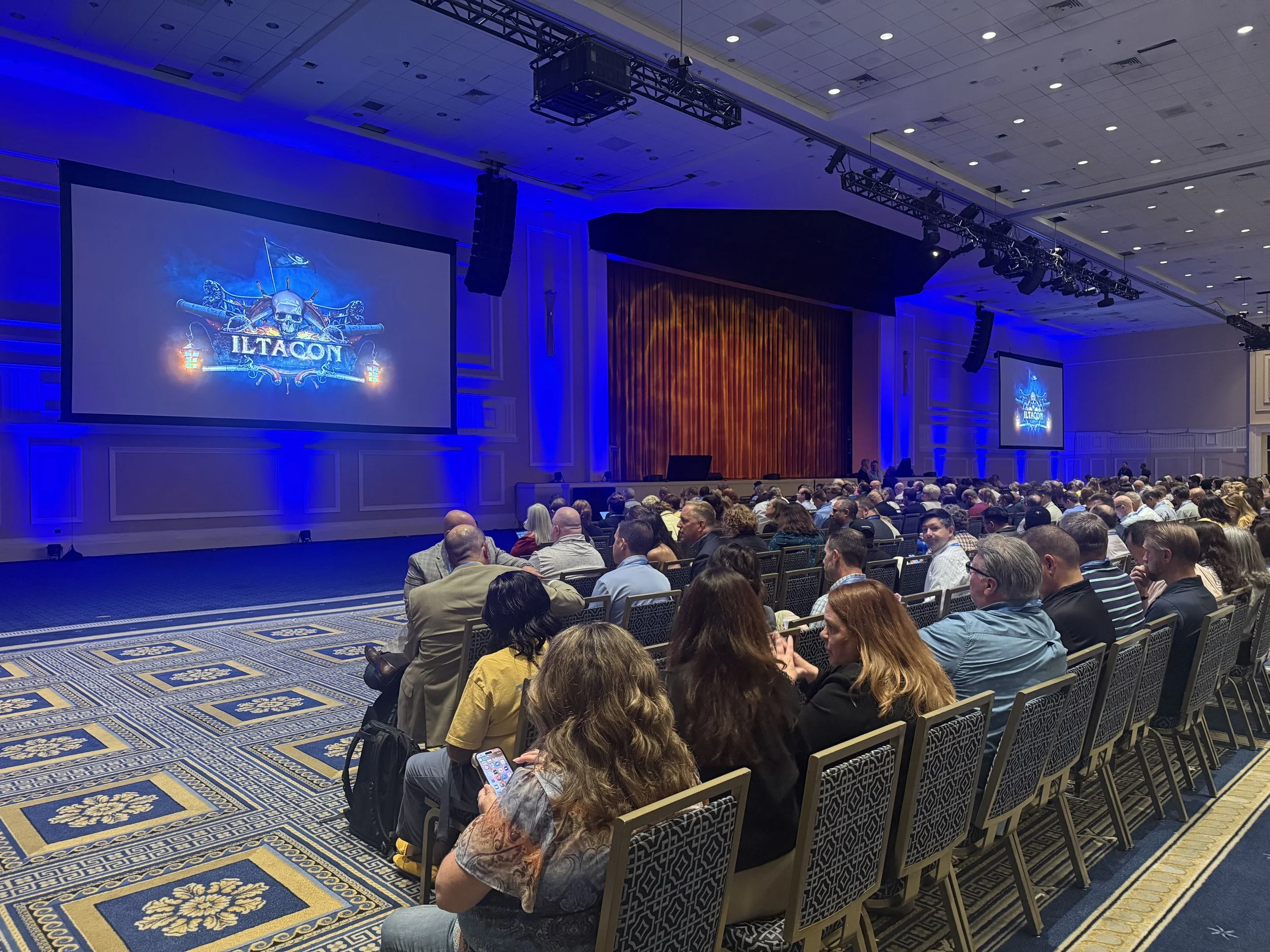
ILTACON 2025 Opening: Navigating the Legal Tech Treasure Trove ⚓

Get your legal tech plunder at #ILTACON2025

Ahoy, legal tech voyagers! ⛵ ILTACON 2025 has officially set sail at the magnificent Gaylord National Resort & Convention Center in National Harbor, Maryland, and what a spectacular opening it's been. From August 10-14, over 4,000 legal professionals interested in legal technology are charting their course through the most comprehensive bounty of legal tech innovations ever assembled.

This year's pirate theme couldn't be more fitting. Legal professionals have truly become modern-day treasure hunters, seeking out the digital gold that will transform their practices. The opening reception on Monday morning perfectly captured this spirit, with maritime merriment setting the tone for what promises to be an extraordinary week of discovery.

Among the distinguished crew of attendees, we spotted previous podcast guest Stephen Embry, the brilliant mind behind the TechLaw Crossroads blog and former chair of the American Bar Association’s Law Practice Division. His insights on artificial intelligence adoption and legal technology competency continue to guide practitioners navigating the choppy waters of digital transformation. Also making waves is Brett Burney, Vice President of NextPoint Law Group, whose expertise in bridging the chasm between legal and technology frontiers has made him a sought-after guide for firms embracing Discovery solutions.

The exhibit hall, themed as the "Pirate's Bounty," features over 225 vendors displaying their technological treasures. From AI-powered legal research tools to advanced case management systems, the bounty available to legal professionals has never been more abundant. The challenge isn't finding technology—it's selecting the right tools that will genuinely enhance practice efficiency without overwhelming existing workflows.

What makes ILTACON unique is its peer-driven approach to education. Unlike vendor-heavy conferences, ILTACON sessions are crafted by practitioners who have firsthand experience with the challenges facing legal technology professionals. This year's 80+ educational sessions span eight focus areas, ensuring every legal professional finds relevant insights to take back to their firm.

For firms with limited to moderate technology skills, ILTACON provides the perfect environment to learn from peers who have successfully navigated similar challenges. The networking opportunities alone justify the investment, as connections made here often lead to solutions for specific practice challenges.

The pirate theme extends beyond mere decoration—it represents the adventurous spirit required to succeed in today's legal technology landscape. Legal professionals must be willing to explore uncharted territories, test new solutions, and occasionally take calculated risks to discover the innovations that will give their practices a competitive edge.

#ILTACON2025

As we sail through this week of discovery, remember that the real treasure isn't the technology itself—it's the enhanced client service, improved efficiency, and competitive advantages these tools provide when properly implemented.

May fair winds fill your sails as you navigate this legal tech treasure trove! ⚓

#ILTACON2025

🎙️ Ep. 117: Legal Tech Revolution,  How Dorna Moini Built Gavel.ai to Transform the Practice of Law with AI and Automation.

Dorna Moini, CEO and Founder of Gavel, discusses how generative AI is transforming the way legal professionals work. She explains how Gavel helps lawyers automate their work, save time, and reach more clients without needing to know how to code. In the conversation, she shares the top three ways AI has improved Gavel's tools and operations. She also highlights the most significant security risks that lawyers should be aware of when using AI tools. Lastly, she provides simple tips to ensure AI-generated results are accurate and reliable, as well as how to avoid false or misleading information.

Join Dorna and me as we discuss the following three questions and more!

  1. What are the top three ways generative AI has transferred Gavel's offerings and operations?

  2. What are the top three most critical security concerns legal professionals should be aware of when using AI-integrated products like Gavel?

  3. What are the top three ways to ensure the accuracy and reliability of AI-generated results, including measures to prevent false or misleading information or hallucinations?

In our conversation, we cover the following:

[01:16] Dorna's Tech Setup and Upgrades

[03:56] Discussion on Computer and Smartphone Upgrades

[08:31] Exploring Additional Tech and Sleeping Technology

[09:32] Generative AI's Impact on Gavel's Operations

[13:13] Critical Security Concerns in AI-Integrated Products

[16:44] Playbooks and Redline Capabilities in Gavel Exec

[20:45] Contact Information

Resources

Connect with Dorna:

Websites & SaaS Products:

  • Apple Podcasts — Podcast platform (for reviews)

  • Apple Podcasts — Podcast platform (for reviews)

  • ChatGPT — AI conversational assistant by OpenAI

  • ChatGPT — AI conversational assistant by OpenAI

  • Gavel — AI-powered legal automation platform (formerly Documate)

  • Gavel Exec — AI assistant for legal document review and redlining (part of Gavel)

  • MacRumors — Apple news and product cycle information

  • MacRumors — Apple news and product cycle information

  • Notion — Workspace for notes, databases, and project management

  • Notion — Workspace for notes, databases, and project management

  • Slack — Team communication and collaboration platform 

Hardware:

Other:

How To 🛠️: Choosing the Right USB-C & Thunderbolt Cables for Legal Professionals - Understanding Speed, Power, & Professional Requirements in 2025 ⚡

lawyers need to know what cables they are using in their tech work.

In today's technology-driven legal landscape, the cables connecting your devices matter more than you might realize. The Universal Serial Bus Type-C (USB-C) standard has become the dominant connection type for modern professional equipment, but the introduction of Thunderbolt 3, 4, and 5 technologies has created a complex ecosystem of capabilities that many legal professionals don't fully understand. These distinctions can impact everything from your laptop's charging efficiency to the speed at which you transfer critical case files, making cable selection a crucial professional decision.

Why Cable Selection Matters for Legal Practice 🏛️

Modern law firms increasingly rely on portable technology to maintain productivity across multiple locations. USB-C cables and Thunderbolt connections serve as the critical link between your devices, enabling power delivery, data transfer, and video output through a single connection . The European Union's recent mandate requiring USB-C as the universal charging standard demonstrates the connector's importance in professional environments.

The legal profession's unique requirements demand reliable, high-performance connections. Depositions recorded on tablets need swift transfer to desktop workstations. Court presentations require dependable connections between laptops and projection systems. Client meetings conducted remotely depend on stable power delivery to prevent device failures during critical discussions.

Poor-quality cables may deliver inconsistent power, cause data corruption, or even present fire hazards.

🚨

Poor-quality cables may deliver inconsistent power, cause data corruption, or even present fire hazards. 🚨

Understanding USB-C and Thunderbolt Cable Categories 🔌

USB-C cables fall into several categories, each serving distinct professional needs. Standard USB-C cables provide basic connectivity with varying data transfer speeds from USB 2.0 (480 Mbps) to USB 3.2 Gen 2x2 (20 Gbps). These cables excel in basic office environments where attorneys need simple device charging and document transfer capabilities.

Thunderbolt technology represents a significant advancement over standard USB-C connections . Thunderbolt 3 and 4 cables support up to 40 Gbps data transfer speeds while maintaining backward compatibility with USB-C devices. Thunderbolt 5, the latest generation, doubles this performance to 80 Gbps bidirectional bandwidth, with Bandwidth Boost capability reaching 120 Gbps for display-intensive applications.

Full-featured Thunderbolt cables provide comprehensive functionality, supporting data transfer, video output, and power delivery simultaneously. These cables excel in modern law office environments where attorneys need to connect laptops to external monitors while simultaneously charging devices and transferring large files.

Thunderbolt Technology Evolution and Legal Applications ⚙️

Thunderbolt 4 cables are probably good enough for lawyers who deal mostly with text and one additional monitor.

Thunderbolt 4 established mandatory minimum requirements that ensure consistent performance across all certified devices. Unlike USB-C standards where many features remain optional, Thunderbolt 4 requires 40 Gbps data transfer speeds, support for two 4K displays or one 8K display, and PCIe bandwidth (data transfer capacity per lane measured in gigabytes) of 32 Gbps. This consistency proves valuable for legal professionals who need reliable performance across different office locations and court systems.

Thunderbolt 5 represents the next generation of professional connectivity, offering 80 Gbps bidirectional bandwidth with Bandwidth Boost capability up to 120 Gbps. This technology supports dual 6K displays, PCIe Gen 4 data throughput at 64 Gbps, and power delivery up to 240 watts. Legal professionals working with video evidence, virtual reality presentations, or large-scale document productions benefit significantly from these enhanced capabilities.

The Bandwidth Boost feature in Thunderbolt 5 dynamically allocates bandwidth based on demand, providing up to 120 Gbps in one direction while maintaining 40 Gbps for the return path. This asymmetric allocation proves particularly valuable for attorneys conducting video depositions or presenting multimedia evidence in court settings.

Power Delivery Standards and Legal Practice Applications

USB-C Power Delivery specifications directly impact your device's charging capabilities and overall reliability. Standard USB-C cables support up to 100 watts of power delivery, adequate for smartphones, tablets, and many ultrabooks (premium, lightweight laptop computers) used in legal practice. However, high-performance laptops commonly used for legal research and document preparation often require higher power delivery capabilities.

Thunderbolt 4 requires support for up to 100 watts of power delivery, with availability up to 140 watts for compatible devices. Thunderbolt 5 extends this capability significantly, requiring up to 140 watts with availability up to 240 watts of power delivery. This enhanced power capability proves particularly valuable for legal professionals who rely on high-performance laptops for complex tasks such as large document review, video depositions, or presentations requiring substantial processing power.

Professional legal work often involves extended periods away from traditional power source. Courts, client offices, and temporary workspaces may offer limited charging opportunities. Cables supporting higher power delivery can significantly reduce charging time, ensuring devices remain operational during critical professional activities.

Data Transfer Speed Requirements for Legal Workflows 📈

Data transfer speeds become crucial when legal professionals handle large files common in modern practice. Video depositions, high-resolution evidence photographs, and comprehensive case documentation can consume substantial storage space and require efficient transfer capabilities.

USB 2.0 speeds (480 Mbps) handle basic document transfer adequately but struggle with multimedia files. USB 3.2 Gen 2 provides 10 Gbps transfer speeds, offering noticeable improvements for larger file handling. Thunderbolt 3 and 4 deliver 40 Gbps, while Thunderbolt 5 achieves up to 80 Gbps with Bandwidth Boost reaching 120 Gbps.

Legal professionals working with video evidence, virtual reality presentations, or large-scale document productions benefit significantly from higher-speed cables. The time savings compound when transferring multiple gigabytes of case materials between devices or to external storage systems.

Thunderbolt vs USB4 v2: Understanding Professional Differences 🔄

Thunderbolt 5 cables are good for lawyers who rely on video and/or large data files.

Thunderbolt 5 and USB4 v2 share similar underlying technology but differ significantly in implementation requirements. USB4 v2 specifications make many advanced features optional, with only 20 Gbps guaranteed and 80 Gbps as an optional capability. Thunderbolt 5, conversely, mandates 80 Gbps as the minimum requirement with 140 watts power delivery required.

This distinction proves critical for legal professionals who need consistent performance across different devices and locations. Thunderbolt certification ensures that every cable and device meets strict performance standards, while USB4 v2 devices may vary significantly in actual capabilities.

The mandatory certification process for Thunderbolt products provides additional assurance for professional environments. Legal professionals investing in Thunderbolt-certified equipment can expect reliable performance regardless of manufacturer or specific implementation.

Safety and Compliance Considerations 🛡️

Professional legal practice demands attention to safety standards and equipment reliability. USB-C cables carrying more than 60 watts require Electronic Marker (E-Marker) chips to communicate power requirements safely. These chips prevent dangerous power delivery mismatches that could damage expensive professional equipment.

The USB Implementers Forum (USB-IF) and Intel provide certification programs ensuring cable compliance with safety standards. Certified cables display appropriate logos and markings, providing assurance of proper manufacturing and testing. Legal professionals should prioritize certified cables to protect valuable equipment and maintain reliable operations.

Counterfeit or substandard cables pose significant risks in professional environments. Poor-quality cables may deliver inconsistent power, cause data corruption, or even present fire hazards. The potential consequences of equipment failure during critical legal proceedings justify investing in properly certified cables.

Practical Selection Guidelines for Legal Professionals 💼

Assess your specific professional requirements before selecting cables. Attorneys primarily using tablets and smartphones for basic tasks may find standard USB-C cables with 60-watt power delivery sufficient. However, professionals relying on high-performance laptops for complex legal software should consider Thunderbolt 4 or 5 cables supporting higher power delivery and data transfer speeds.

Consider your typical work environments and usage patterns. Mobile attorneys who frequently work in various locations benefit from durable, flexible cables that withstand regular handling. Office-based professionals may prioritize longer cables for permanent desk setups or conference room installations.

Evaluate your data transfer needs based on file types and sizes commonly handled in your practice. Personal injury attorneys working with extensive medical records and accident reconstruction videos require different capabilities than corporate attorneys primarily handling text-based contracts.

Selecting cables that support current and emerging standards ensures continued compatibility as your technology needs evolve.

💡

Selecting cables that support current and emerging standards ensures continued compatibility as your technology needs evolve. 💡

Cable Length and Performance Considerations 📏

Thunderbolt 5 passive cables support full performance up to 1 meter in length, with specialized implementations available in 0.3, 0.5, 0.8, and 1-meter lengths. Beyond 1 meter, active cables with built-in electronics become necessary to maintain signal integrity over longer distances.

Thunderbolt 4 cables under 1 meter can support Thunderbolt 5 data rates, providing some forward compatibility for existing installations. This backward compatibility proves valuable for legal professionals upgrading their technology infrastructure gradually.

Professional legal environments often require longer cable runs for conference rooms or courtroom presentations. You will need Active Thunderbolt cables to maintain performance over distances up to 2 meters. This will enable flexible installation options for permanent and temporary setups.

Future-Proofing Your Cable Investment 🚀

The legal technology landscape continues evolving rapidly. Thunderbolt 5 adoption is accelerating, and 240-watt power delivery is becoming more common in professional devices. Selecting cables that support current and emerging standards ensures continued compatibility as your technology needs evolve.

Professional legal practice increasingly relies on sophisticated technology for case management, client communication, and court presentations. Investing in appropriate Thunderbolt cables from reliable and admittedly more expensive providers represents a small but crucial component of maintaining technological competency in modern legal practice.

The continued development of artificial intelligence tools and high-resolution display technologies in legal applications will demand higher bandwidth and power delivery capabilities. Legal professionals who understand these evolving standards position themselves advantageously as technology continues advancing.

📊 USB-C & Thunderbolt Cable Comparison Table

Final Roundup 📋

USB-C and Thunderbolt cable selection directly impacts professional efficiency and equipment reliability in modern legal practice. Understanding power delivery requirements, data transfer speeds, safety standards, and the distinctions between USB-C, Thunderbolt 4, and Thunderbolt 5 enables informed decisions that support your professional objectives. As legal technology continues advancing, professionals who master these fundamental concepts will maintain competitive advantages in increasingly technology-dependent practice environments.

🎙️ Ep. 112: How Judges and Lawyers Can Use AI Wisely: Judge Scott Schlegel on Best Practices, Pitfalls, and The Future of Legal Tech.

My next guest is the Honorable Judge Scott Schlegel, a nationally recognized judicial innovation and technology leader.

With extensive courtroom and technological experience, Judge Schlegel offers valuable insights into how attorneys can effectively leverage artificial intelligence and legal technology to enhance their workflows. He emphasizes the importance of avoiding common pitfalls while maintaining the highest standards of professional responsibility. Judge Schlegel also underscores the critical need to keep the human in the loop, advocating for a balanced approach that upholds efficiency and legal expertise.

Join Judge Schlegel and me as we discuss the following three questions and more!

  1. What are the top three ways lawyers should use AI for their work, and what are the top three ways lawyers do not use AI correctly today?

  2. What are the top three things lawyers still get wrong with using technology in the courtroom?

  3. AI is the current advancement in technology in the workplace. What are the top three technological advances lawyers should be keeping an eye on soon?

In our conversation, we cover the following:

[00:59] Top Three Ways Lawyers Should Use AI

[04:01] Security and Privacy Concerns with AI

[06:49] Common Mistakes Lawyers Make with AI

[11:52] What Lawyers Are Still Getting Wrong in Court

[18:30] Future Technological Advances for Lawyers

[22:18] Keeping the Human Element in AI Use

Resources:

Connect with Judge Schlegel:

Software & Cloud Services mentioned in the conversation: