ANNOUNCEMENT: The Lawyer’s Guide to Podcasting Is Here: A Practical, Ethical Launch Plan for Busy Lawyers 🎙️⚖️

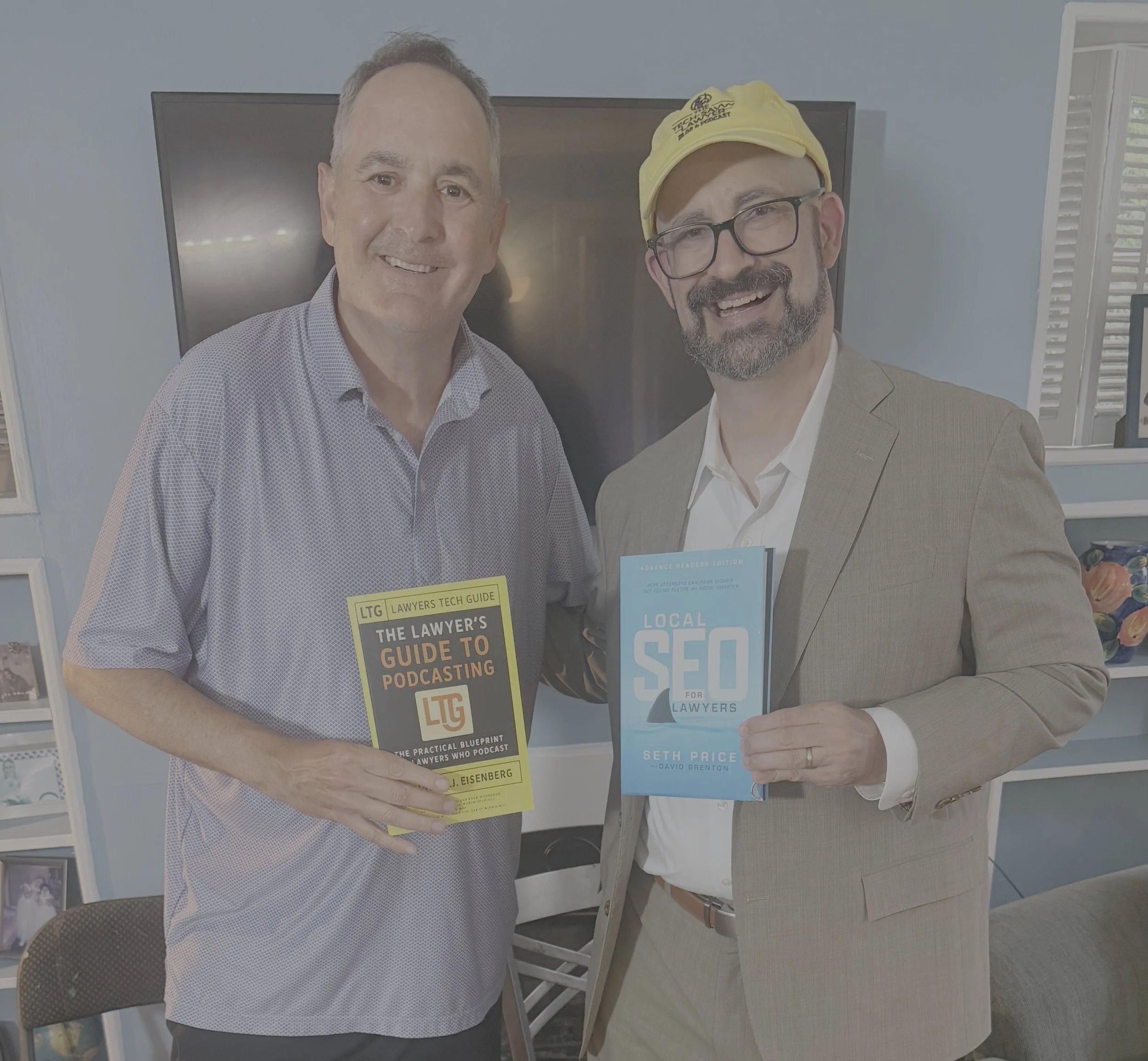
I’m excited to share! The wait is over! The Lawyer’s Guide to Podcasting is officially released. 🎉🎙️ This book is built for lawyers, paralegals, and legal professionals who want a clear, practical path to launching a podcast—without needing to be “techy” to get it right.

Podcasting has become one of the most effective ways to build trust at scale. People want more than ads. They want a real voice. They want context. They want clarity. A podcast lets you educate, connect, and show your professional judgment in a way a website cannot. It also gives prospective clients a low-pressure way to get to know you before they ever call. 📈🤝

This guide covers the full podcast lifecycle in plain language. You will learn how to pick a topic that fits your goals and schedule. You will learn the most useful show formats for legal audiences, including solo episodes, interviews, storytelling, and educational series. You will also learn what to buy (and what to skip) when building your gear setup. That includes microphones, headphones, webcams, lighting, and basic acoustic improvements that matter in real offices. 🎧🎥💡

QR Code for 📚 purchase on amazon

Software matters too. In this book, I explain beginner and pro options for recording and editing. It also covers remote recording tools and simple video workflows for YouTube and modern platforms. You will get a clear explanation of podcast hosting and distribution, including how RSS feeds deliver your episodes to directories like Apple Podcasts and Spotify. 📲🌍

A major focus of this book is professional responsibility. Lawyers must avoid accidental legal advice. Lawyers must avoid creating unintended attorney-client relationships. Lawyers must also watch multi-jurisdictional issues and advertising rules. This guide addresses those risks directly and gives practical guardrails you can use in real episodes. 🛡️📜

You will also learn how to use AI efficiently and ethically. AI can save time on transcripts, show notes, clips, and repurposed content. It can also create risk if you feed it sensitive data or publish unverified output. The book offers a workflow-first approach that protects confidentiality and supports accuracy. ✅🤖

The Lawyer’s Guide to Podcasting is part of the Lawyers Tech Guide (LTG) series from Michael D.J. Eisenberg, creator of The Tech-Savvy Lawyer.Page. The mission is simple: use technology to communicate clearly, serve people better, and reclaim time. ⏳✨

Ready to launch?
You are just one click away!

Word of the Week: "Constitutional AI" for Lawyers - What It Is, Why It Matters for ABA Rules, and How Solo & Small Firms Should Use It!

Constitutional AI’s ‘helpful, harmless, honest’ standard is a solid starting point for lawyers evaluating AI platforms.

The term “Constitutional AI” appeared this week in a Tech Savvy Lawyer post about the MTC/PornHub breach as a cybersecurity wake‑up call for lawyers 🚨. That article used it to highlight how AI systems (like those law firms now rely on) must be built and governed by clear, ethical rules — much like a constitution — to protect client data and uphold professional duties. This week’s Word of the Week unpacks what Constitutional AI really means and explains why it matters deeply for solo, small, and mid‑size law firms.

🔍 What is Constitutional AI?

Constitutional AI is a method for training large language models so they follow a written set of high‑level principles, called a “constitution” 📜. Those principles are designed to make the AI helpful, honest, and harmless in its responses.

As Claude AI from Anthropic explains:
Constitutional AI refers to a set of techniques developed by researchers at Anthropic to align AI systems like myself with human values and make us helpful, harmless, and honest. The key ideas behind Constitutional AI are aligning an AI’s behavior with a ‘constitution’ defined by human principles, using techniques like self‑supervision and adversarial training, developing constrained optimization techniques, and designing training data and model architecture to encode beneficial behaviors.” — Claude AI, Anthropic (July 7th, 2023).

In practice, Constitutional AI uses the model itself to critique and revise its own outputs against that constitution. For example, the model might be told: “Do not generate illegal, dangerous, or unethical content,” “Be honest about what you don’t know,” and “Protect user privacy.” It then evaluates its own answers against those rules before giving a final response.

Think of it like a junior associate who’s been given a firm’s internal ethics manual and told: “Before you send that memo, check it against these rules.” Constitutional AI does that same kind of self‑checking, but at machine speed.

🤝 How Constitutional AI Relates to Lawyers

For lawyers, Constitutional AI is important because it directly shapes how AI tools behave when handling legal work 📚. Many legal AI tools are built on models that use Constitutional AI techniques, so understanding this concept helps lawyers:

  • Judge whether an AI assistant is likely to hallucinate, leak sensitive info, or give ethically problematic advice.

  • Choose tools whose underlying AI is designed to be more transparent, less biased, and more aligned with professional norms.

  • Better supervise AI use in the firm, which is a core ethical duty under the ABA Model Rules.

Solo and small firms, in particular, often rely on off‑the‑shelf AI tools (like chatbots or document assistants). Knowing that a tool is built on Constitutional AI principles can give more confidence that it’s designed to avoid harmful outputs and respect confidentiality.

⚖️ Why It Matters for ABA Model Rules

For solo and small firms, asking whether an AI platform aligns with Constitutional AI’s standards is a practical first step in choosing a trustworthy tool.

The ABA’s Formal Opinion 512 on generative AI makes clear that lawyers remain responsible for all work done with AI, even if an AI tool helped draft it 📝. Constitutional AI is relevant here because it’s one way that AI developers try to build in ethical guardrails that align with lawyers' obligations.

Key connections to the Model Rules:

  • Rule 1.1 (Competence): Lawyers must understand the benefits and risks of the technology they use. Knowing that a tool uses Constitutional AI helps assess whether it’s reasonably reliable for tasks like research, drafting, or summarizing.

  • Rule 1.6 (Confidentiality): Constitutional AI models are designed to refuse to disclose sensitive information and to avoid memorizing or leaking private data. This supports the lawyer’s duty to make “reasonable efforts” to protect client confidences.

  • Rule 5.1 / 5.3 (Supervision): Managing partners and supervising attorneys must ensure that AI tools used by staff are consistent with ethical rules. A tool built on Constitutional AI principles is more likely to support, rather than undermine, those supervisory duties.

  • Rule 3.3 (Candor to the Tribunal): Constitutional AI models are trained to admit uncertainty and avoid fabricating facts or cases, which helps reduce the risk of submitting false or misleading information to a court.

In short, Constitutional AI doesn’t relieve lawyers of their ethical duties, but it can make AI tools safer and more trustworthy when used under proper supervision.

🛡️ The “Helpful, Harmless, and Honest” Principle

The three pillars of Constitutional AI — helpful, harmless, and honest — are especially relevant for lawyers:

  • Helpful: The AI should provide useful, relevant information that advances the client’s matter, without unnecessary or irrelevant content.

  • Harmless: The AI should avoid generating illegal, dangerous, or unethical content, and should respect privacy and confidentiality.

  • Honest: The AI should admit when it doesn’t know something, avoid fabricating facts or cases, and not misrepresent its capabilities.

For law firms, this “helpful, harmless, and honest” standard is a useful mental checklist when using AI:

  • Is this AI output actually helpful to the client’s case?

  • Could this output harm the client (e.g., by leaking confidential info or suggesting an unethical strategy)?

  • Is the AI being honest (e.g., not hallucinating case law or pretending to know facts it can’t know)?

If the answer to any of those questions is “no,” the AI output should not be used without significant human review and correction.

🛠️ Practical Takeaways for Law Firms

For solo, small, and mid‑size firms, here’s how to put this into practice:

Lawyers need to screen AI tools and ensure they are aligned with ABA Model Rules.

  1. Know your tools. When evaluating a legal AI product, ask whether it’s built on a Constitutional AI–style model (e.g., Claude). That tells you it’s designed with explicit ethical constraints.

  2. Treat AI as a supervised assistant. Never let AI make final decisions or file work without a lawyer’s review. Constitutional AI reduces risk, but it doesn’t eliminate the need for human judgment.

  3. Train your team. Make sure everyone in the firm understands that AI outputs must be checked for accuracy, confidentiality, and ethical compliance — especially when using third‑party tools.

  4. Update your engagement letters and policies. Disclose to clients when AI is used in their matters, and explain how the firm supervises it. This supports transparency under Rule 1.4 and Rule 1.6.

  5. Focus on “helpful, honest, harmless.” Use Constitutional AI as a mental checklist: Is this AI being helpful to the client? Is it honest about its limits? Is it harmless (no bias, no privacy leaks)? If not, don’t rely on it.

Words of the Week: “ANTHROPIC” VS. “AGENTIC”: UNDERSTANDING THE DISTINCTION IN LEGAL TECHNOLOGY 🔍

lawyers need to know the difference anthropic v. agentic

The terms "Anthropic" and "agentic" circulate frequently in legal technology discussions. They sound similar. They appear in the same articles. Yet they represent fundamentally different concepts. Understanding the distinction matters deeply for legal practitioners seeking to leverage artificial intelligence effectively.

Anthropic is a company—specifically, an AI safety-focused organization that develops large language models, most notably Claude. Think of Anthropic as a technology provider. The company pioneered "Constitutional AI," a training methodology that embeds explicit principles into AI systems to guide their behavior toward helpfulness, harmlessness, and honesty. When you use Claude for legal research or document drafting, you are using a product built by Anthropic.

Agentic describes a category of AI system architecture and capability—not a company or product. Agentic systems operate autonomously, plan multi-step tasks, make decisions dynamically, and execute workflows with minimal human intervention. An agentic system can break down complex assignments, gather information, refine outputs, and adjust its approach based on changing circumstances. It exercises judgment about which tools to deploy and when to escalate matters to human oversight.

"Constitutional AI" is an ai training methodology promoting helpfulness, harmlessness, and honesty in ai programing

The relationship between these concepts becomes clearer through a practical scenario. Imagine you task an AI system with analyzing merger agreements from a target company. A non-agentic approach requires you to provide explicit instructions for each step: search the database, extract key clauses, compare terms against templates, and prepare a summary. You guide the process throughout. An agentic approach allows you to assign a goal—Review these contracts, flag risks, and prepare a risk summary—and the AI system formulates its own research plan, prioritizes which documents to examine first, identifies gaps requiring additional information, and works through the analysis independently, pausing only when human judgment becomes necessary.

Anthropic builds AI models capable of agentic behavior. Claude, Anthropic's flagship model, can function as an agentic system when configured appropriately. However, Anthropic's models can also operate in simpler, non-agentic modes. You might use Claude to answer a direct question or draft a memo without any agentic capability coming into play. The capability exists within Anthropic's models, but agentic functionality remains optional depending on your implementation.

They work together as follows: Anthropic provides the underlying AI model and the training methodology emphasizing constitutional principles. That foundation becomes the engine powering agentic systems. The Constitutional AI approach matters specifically for agentic applications because autonomous systems require robust safeguards. As AI systems operate more independently, explicit principles embedded during training help ensure they remain aligned with human values and institutional requirements. Legal professionals cannot simply deploy an autonomous AI agent without trust in its underlying decision-making framework.

Agentic vs. Anthropic: Know the Difference. Shape the Future of Law!

For legal practitioners, the distinction carries practical implications. You evaluate Anthropic as a vendor when selecting which AI provider's tools to adopt. You evaluate agentic architecture when deciding whether your specific use case requires autonomous task execution or whether simpler, more directed AI assistance suffices. Many legal workflows benefit from direct AI support without requiring full autonomy. Others—such as high-volume contract analysis during due diligence—leverage agentic capabilities to move work forward rapidly.

Both elements represent genuine advances in legal technology. Recognizing the difference positions you to make informed decisions about tool adoption and appropriate implementation for your practice. ✅

🎙️🎁 TSL Labs Bonus: The Ultimate 2025 Tech Gift Guide for Attorneys — Expert-Curated Gadgets, AI Tools, and Must-Have Devices Every Lawyer Needs!

🎯 In this TSL Labs Bonus episode, we are experimenting with Google’s Notebook LLM to do a “Deep Dive” on our November 24th editorial on the ultimate 2025 tech gift guide for attorneys. We use this AI-powered conversation to unpack the key themes, ethical challenges, and actionable recommendations. Whether you're a solo practitioner, big law associate, or tech-curious partner, this episode delivers expert-curated insights on gadgets, AI tools, and must-have devices that support technological competence as a professional obligation.

If you're a busy legal professional seeking practical tech recommendations that enhance daily practice rather than collect digital dust, join us for this insightful conversation that explores how the right technology investments can improve your practice, safeguard your clients, and help prevent unnecessary bar complaints.

🤔 Join Google AI Deep Dive as they discuss the following three questions and more!

  1. What are the essential low-cost tech gifts under $25 that can make an immediate impact on an attorney's practice, and why do items like cables and tracking devices matter for professional competence?

  2. Which professional-grade tools under $100 deliver the best value for attorneys seeking to fulfill their ethical duty to work smarter and faster through AI integration and productivity enhancements?

  3. Why should premium technology investments over $100—including physical infrastructure like ergonomic chairs—be considered essential to an attorney's professional obligation to their clients?

In our conversation, we cover the following:

[00:00:00] — Episode introduction and TSL Labs Bonus overview

[00:01:00] — Navigating the perfect tech gift for attorneys: unique needs like security, portability, focus, and raw power

[00:02:00] — The three seismic forces driving tech choices: AI integration, cloud-based practice management, and heightened ethical duties

[00:03:00] — Target audience: solo practitioners, big law associates, and tech-curious partners who need technology that lasts

[00:04:00] — Essential low-cost gifts under $25: OWC Thunderbolt 4 USB-C cable and Apple AirTag for security and reliability

[00:05:00] — Productivity essentials: Logitech Pebble M350 silent mouse and Anker 7-in-1 USB-C Hub for presentations

[00:06:00] — AI tools for "forced competence": ChatGPT Plus one-month subscription as a low-risk nudge toward AI exploration

[00:07:00] — Professional grade tools under $100: Apple Pencil (1st Gen) for document annotation and Logitech MX Keys Mini keyboard

[00:08:00] — Focus and noise cancellation: Soundcore Space One headphones with 40+ hours battery life

[00:09:00] — Precision document navigation: Logitech MX Master 3S mouse with horizontal scrolling for wide documents

[00:10:00] — Premium mobile computing sweet spots: iPad Air with M3 chip ($599) and MacBook Air M4 ($999)

[00:11:00] — Physical infrastructure as health technology: Herman Miller Aeron chair ($1,351) for sustained high-quality work

[00:12:00] — Ultra-wide monitor benefits: LG 34" 5K 2K ($315) for seamless document comparison and reduced cognitive strain

[00:13:00] — Virtual practice essentials: Logitech Brio 4K webcam ($160) and Samsung T7 SSD ($109) for secure data management

[00:14:00] — The ultimate organizational hub: CalDigit TS3 Plus dock ($280) with 15 ports for cable clutter elimination

[00:15:00] — Strategic gift-giving advice: Understanding ecosystem (Apple, Windows, Android) and workflow considerations

📚 Resources

🖥️ Hardware Mentioned in the Conversation

Under $25:

  • OWC Thunderbolt 4 USB-C Cable (~$19.99) — Universal cable supporting 40Gb/s data, 100W power delivery, up to 8K video —(https://www.owc.com)

  • Apple AirTag (Single Pack) ($24) — Bluetooth tracking device using Find My network —(https://www.apple.com/airtag)

  • Logitech Pebble M350 Wireless Mouse (~$19.99) — Silent click, 90% noise reduction, 18-month battery — (https://www.logitech.com)

  • Anker 341 USB-C Hub (7-in-1) (~$19.99) — HDMI 4K@30Hz, USB ports, SD card slots — https://www.anker.com)

  • ORICLE 65W USB Travel Power Strip — Flat plug, 4-foot cord, 7-in-1 hub for travel —(https://oricotechs.com)

Under $100:

Premium Over $100:

  • iPad Air with M3 Chip (Starting at $599) — 8-core CPU, 9-core GPU, ideal balance of power and portability — (https://www.apple.com/ipad-air)

  • MacBook Air M4 (Starting at $999) — 10-core CPU, 10-core GPU, up to 18 hours battery life —(https://www.apple.com/macbook-air)

  • Herman Miller Aeron Chair (~$1,351) — Ergonomic office chair with PostureFit SL, three sizes for 1st-99th percentile —(https://www.hermanmiller.com)

  • LG 34" Ultrawide 5K 2K Monitor (~$315) — 3440x1440 resolution, curved display for seamless multitasking — (https://www.lg.com/us/monitors)

  • Logitech Brio 4K Ultra HD Webcam (~$160) — 4K@30fps, RightLight 3 HDR, adjustable 65°/78°/90° FOV — (https://www.logitech.com)

  • Samsung T7 Portable SSD (1TB) (~$109.99) — 1,050MB/s read speed, AES 256-bit encryption, 2m drop resistant — (https://www.samsung.com)

  • CalDigit TS3 Plus Thunderbolt 3 Dock (~$280) — 15 ports, 87W laptop charging, dual 4K display support — (https://www.caldigit.com)

💻 Software & Cloud Services Mentioned in the Conversation

  • ChatGPT Plus ($20/month) — OpenAI's premium AI assistant with GPT-4 access for research and drafting — (https://chat.openai.com)

  • Grammarly Premium (~$96/year on sale; $144/year regular) — AI-powered writing assistant with plagiarism detection —(https://www.grammarly.com)

  • Apple Find My — Location tracking app for AirTags and Apple devices — https://www.icloud.com/find

📌 Disclaimer: Prices mentioned throughout this episode and show notes are approximate and based on manufacturer suggested retail prices around the time of the publication date; actual pricing may vary depending on manufacturer availability, retailer promotions, seasonal sales, and geographic location, and we recommend verifying current pricing before making any purchase decisions.

🎙️ Ep. #125: Transforming Law Practice: Allison Johs on Legal Tech Productivity, AI Ethics & Automation Strategies.

My next guest is Allison Johs, former Chair of the ABA Legal Technology Resource Center and founder of Legal Ease Consulting. 🎯 Allison has spent nearly two decades helping law firms prevent "lawyer meltdown" by guiding them through digital transformation, boosting productivity, and providing practical tech solutions for modern legal professionals. With 15 years of practicing law and experience growing a firm from 15 to over 50 attorneys, Allison brings real-world expertise to the challenges lawyers face when balancing technology adoption with successful client service.

Join Allison Johs and me as we discuss the following three questions and more! 🤔

  1. What are the top three foundational mistakes lawyers make when implementing new legal technology, and how can solo and small firms avoid these pitfalls to ensure their technology investments actually improve their practice rather than just create additional complexity?

  2. What are your top three recommendations for lawyers who want to responsibly integrate AI into their practice while maintaining ethical compliance and ensuring client confidentiality?

  3. What are the top three technology-driven strategies lawyers can implement immediately to automate routine tasks and reclaim billable hours?

In our conversation, we cover the following: ⏱️

  • [00:00:00] – Episode introduction and guest welcome

  • [00:01:00] – Allison's current tech setup: Dell laptop, HP all-in-one desktop, Logitech Brio webcam, Microsoft 365

  • [00:02:00] – Discussion of portable monitors (INNOCN) and dual-screen productivity setups

  • [00:03:00] – Document scanning workflow with ScanSnap scanner and going paperless

  • [00:04:00] – OCR considerations for different practice areas, Adobe Acrobat for occasional OCR needs

  • [00:05:00]Mistake #1: Not considering roles of all people who will use the technology in the firm

  • [00:06:00] – Including staff input during technology selection and implementation

  • [00:07:00] – Coaching resistant employees through technology adoption

  • [00:08:00] – Addressing legitimate objections vs. fear of change; demonstrating value to staff

  • [00:09:00]Mistake #2: Not checking how new technology integrates with existing systems

  • [00:10:00] – Hidden costs of technology transitions: running parallel systems for 6-8 months

  • [00:11:00] – Budgeting for duplicate CRM/LPM subscriptions during migration

  • [00:12:00]Mistake #3: Failing to appropriately invest in ongoing training

  • [00:13:00] – Training new hires and keeping up with subscription software updates

  • [00:14:00]AI Recommendation #1: Thoroughly investigate how AI tools handle data, security, and training

  • [00:15:00]AI Recommendation #2: Setting and strictly enforcing AI usage policies; mandatory human review

  • [00:16:00] – The importance of reviewing AI outputs—lawyers should know precedents in their practice area

  • [00:17:00]AI Recommendation #3: Start with non-client-facing AI work (internal processes, marketing, financials)

  • [00:18:00] – Ethical considerations: using AI on published court decisions for legal analysis

  • [00:19:00] – Using AI to find contrary precedents and distinguishing cases

  • [00:20:00] – Duty to supervise: real-world consequences when AI use goes wrong

  • [00:21:00]Automation Strategy #1: Appointment booking tools (Calendly, Microsoft Bookings)

  • [00:22:00]Automation Strategy #2: Templates, document assembly, AI chatbots for client intake

  • [00:23:00]Automation Strategy #3: Automated time tracking and AI-powered billing review

  • [00:23:30] – Text Expander discussion: saving 2-5 hours weekly on repetitive typing

  • [00:24:00] – Allison's top automation tools: Calendly, Microsoft Power Automate, Microsoft Bookings

  • [00:25:00] – Discovering hidden features in Microsoft 365 (Ben Schorr webinar reference)

  • [00:26:00] – Using AI for travel planning: Google AI for trip itineraries, Perplexity AI for route optimization

  • [00:27:00] – Maximizing productivity during travel and conference attendance

  • [00:28:00] – Where to find Allison: websites, social media, and YouTube channel

Resources 📚

Connect with Allison Johs:

Mentioned in the Episode:

  • 📖 ABA Legal Technology Resource Centeramericanbar.org/groups/departments_offices/legal_technology_resources

  • 📖 How to Do More in Less Time (2nd Edition, 2023) – ABA Law Practice Division book co-authored by Allison Johs - https://www.amazon.com/How-More-Less-Time-Productivity/dp/1639052283

  • 📖 Make LinkedIn Work for You: A Practical Handbook for Lawyers and Other Legal Professionals – Co-authored with Dennis Kennedy - https://www.amazon.com/Make-LinkedIn-Work-You-Professionals/dp/1734076321

  • 👤 Ben Schorr – Microsoft 365 expert, now with Affinity Consulting Group - https://www.affinityconsulting.com/team/ben-m-schorr/

  • 🏛️ Universal Migrator – CRM/LPM data migration tool - https://www.universalmigrator.com/

Hardware Mentioned in the Conversation:

  • 💻 Dell Laptop - https://www.dell.com/en-us/shop/dell-laptops/scr/laptops?_gl=1*78tbrz*_up*MQ..*_gs*MQ..&gclid=EAIaIQobChMIgerxro6QkQMVdUpHAR0BUBUOEAAYASAAEgJ_R_D_BwE&gclsrc=aw.ds

  • 🖥️ HP All-in-One Desktop Computer - https://www.hp.com/us-en/shop/vwa/desktops/form=All-in-One

  • 🖥️ INNOCN Portable Monitor (1080p mobile screen) – innocn.com

  • 📷 Logitech Brio Webcam (4K with built-in microphone) – logitech.com/brio

  • 🖨️ HP Printer - https://www.hp.com/us-en/shop/vwa/printers

  • 📄 Fujitsu ScanSnap Scanner (duplex document scanner) – scansnap.com

Software & Cloud Services Mentioned in the Conversation:

🎙️ Ep. 120: AI Game Changers for Law Firms - Stephen Embry on Legal Tech Adoption and Privacy Concerns 🤖⚖️

My next guest is Stephen Embry. Steve is a legal technology expert, blogger at Tech Law Crossroads, and contributor to Above the Law. A former mass tort defense litigator with 20 years of remote practice experience, Steven specializes in AI implementation for law firms and legal technology adoption challenges. With a master's degree in civil engineering and programming expertise since 1980, he brings a unique technical insight to legal practice. Steven provides data-driven analysis on how AI is revolutionizing law firms while addressing critical privacy and security concerns for legal professionals. 💻

Join Stephen Embry and me as we discuss the following three questions and more! 🎯

  1. What do you think are the top three game-changer announcements from the 2025 ILTA Conference for AI that're gonna make the most impact for solo, small, and mid-size law firms?

  2. What are the top three security and privacy concerns lawyers should address when using AI?

  3. What are your top three hacks when it comes to using AI in legal?

In our conversation, we covered the following and more! 📝

  • [00:00:00] Episode Introduction & Guest Bio

  • [00:01:00] Steve's Current Tech Setup

  • [00:02:00] Apple Devices Discussion - MacBook Air M4, AirPods Pro

  • [00:06:00] Android Phone & Remote Practice Experience

  • [00:09:00] iPad Collection & MacBook Air Purchase Story

  • [00:12:00] Travel Tech & Backup Strategies

  • [00:15:00] Q1: AI Game Changers from ILTA 2025 Conference

  • [00:24:00] Billable Hour vs AI Adoption Challenges

  • [00:26:00] Competition & Client Demands for Technology

  • [00:35:00] Q2: AI Security & Privacy Concerns for Lawyers

  • [00:37:00] Discoverability & Privilege Waiver Issues

  • [00:44:00] Q3: Top AI Hacks for Legal Professionals

  • [00:46:00] Using AI for Document Construction & Rules Compliance

  • [00:50:00] Contact Information & Resources

Resources 📚

Connect with Stephen Embry

• Email: sembry@techlawcrossroads.com
• Blog: Tech Law Crossroads - https://techlawcrossroads.com
• Above the Law Contributions: https://abovethelaw.com
• LinkedIn: [Stephen Embry LinkedIn Profile]

Mentioned in the Episode

• ILTA (International Lawyers Technology Association) Conference 2025 - https://www.iltanet.org
• Max Stock Conference - Chicago area legal technology conference
• Consumer Electronics Show (CES) - https://www.ces.tech
• Federal Rules of Civil Procedure - https://www.uscourts.gov/rules-policies/current-rules/federal-rules-civil-procedure
• Apple Event (October 9th) - Apple's product announcement events
• Gaylord Conference Center - Washington, DC area conference venue

Hardware Mentioned in the Conversation 🖥️

• MacBook Air M4 (13-inch) - https://www.apple.com/macbook-air/
• iPad Pro - https://www.apple.com/ipad-pro/
• iPad Air - https://www.apple.com/ipad-air/
• iPad Mini - https://www.apple.com/ipad-mini/
• iPhone 16 - https://www.apple.com/iphone-16/
• Apple Watch Ultra 2 - https://www.apple.com/apple-watch-ultra-2/
• AirPods Pro - https://www.apple.com/airpods-pro/
• Samsung Galaxy (Android phone) - https://www.samsung.com/us/mobile/phones/galaxy/
• Samsung Galaxy Fold 7 - https://www.samsung.com/global/galaxy/galaxy-z-fold7/

Software & Cloud Services Mentioned in the Conversation ☁️

• Apple Intelligence - https://www.apple.com/apple-intelligence/
• ChatGPT - https://chat.openai.com
• Claude (Anthropic) - https://claude.ai
• Brock AI - AI debate and argumentation tool
• Notebook AI - https://notebooklm.google.com
• Microsoft Word - https://www.microsoft.com/en-us/microsoft-365/word
• Dropbox - https://www.dropbox.com
• Backblaze - https://www.backblaze.com
• Synology - https://www.synology.com
• Whisper AI - https://openai.com/research/whisper

Don't forget to give The Tech-Savvy Lawyer.Page Podcast a Five-Star ⭐️ review on Apple Podcasts or wherever you get your podcast feeds! Your support helps us continue bringing you expert insights on legal technology.

Our next episode will be posted in about two weeks. If you have any ideas about a future episode, please contact Michael at michaeldj@techsavvylawyer.page 📧

🎙️ Ep. 117: Legal Tech Revolution,  How Dorna Moini Built Gavel.ai to Transform the Practice of Law with AI and Automation.

Dorna Moini, CEO and Founder of Gavel, discusses how generative AI is transforming the way legal professionals work. She explains how Gavel helps lawyers automate their work, save time, and reach more clients without needing to know how to code. In the conversation, she shares the top three ways AI has improved Gavel's tools and operations. She also highlights the most significant security risks that lawyers should be aware of when using AI tools. Lastly, she provides simple tips to ensure AI-generated results are accurate and reliable, as well as how to avoid false or misleading information.

Join Dorna and me as we discuss the following three questions and more!

  1. What are the top three ways generative AI has transferred Gavel's offerings and operations?

  2. What are the top three most critical security concerns legal professionals should be aware of when using AI-integrated products like Gavel?

  3. What are the top three ways to ensure the accuracy and reliability of AI-generated results, including measures to prevent false or misleading information or hallucinations?

In our conversation, we cover the following:

[01:16] Dorna's Tech Setup and Upgrades

[03:56] Discussion on Computer and Smartphone Upgrades

[08:31] Exploring Additional Tech and Sleeping Technology

[09:32] Generative AI's Impact on Gavel's Operations

[13:13] Critical Security Concerns in AI-Integrated Products

[16:44] Playbooks and Redline Capabilities in Gavel Exec

[20:45] Contact Information

Resources

Connect with Dorna:

Websites & SaaS Products:

  • Apple Podcasts — Podcast platform (for reviews)

  • Apple Podcasts — Podcast platform (for reviews)

  • ChatGPT — AI conversational assistant by OpenAI

  • ChatGPT — AI conversational assistant by OpenAI

  • Gavel — AI-powered legal automation platform (formerly Documate)

  • Gavel Exec — AI assistant for legal document review and redlining (part of Gavel)

  • MacRumors — Apple news and product cycle information

  • MacRumors — Apple news and product cycle information

  • Notion — Workspace for notes, databases, and project management

  • Notion — Workspace for notes, databases, and project management

  • Slack — Team communication and collaboration platform 

Hardware:

Other:

TSS: Meet Our Next Tech-Savvy Saturday (July 19, 2025) Guest: Mathew Kerbis, The Subscription Attorney

Join us this Saturday, July 19, 2025, at 12 PM EST for Tech-Savvy Saturday!

Legal innovation meets technology with Matt Kerbis, founder of Subscription Attorney LLC. Matt leads the charge to end the billable hour by offering predictable, affordable legal services starting at $19.99/month. With expertise in AI tools like Paxton, NotebookLM Pro, Perplexity, and Descript, Matt empowers attorneys to embrace efficient, client-centered models. Matt hosts the Law Subscribed podcast and is celebrated by the ABA for innovation. Don’t miss this industry-changing session—unlock how to become your own “subscription attorney”!

Don’t miss this industry-changing session—unlock how to become your own “subscription attorney”!

👉 Sign up here for the free webinar!

👉 Sign up here to stay abreast of Tech-Savvy Saturdays News!

SEE YOU THIS SATURDAY!!!

🎙️

SEE YOU THIS SATURDAY!!! 🎙️

🎙️ Ep. 108: Women Leading Legal Tech: Sonya Palmer on AI, Apple Setup And Essential Tools.

Our next guest is Sonya Palmer, COO of Rankings.io and host of the LawHer podcast.

Today, Sonya shares her expertise on women's roles in legal tech, AI-powered marketing, and optimizing workflows within the Apple ecosystem. She addresses common misconceptions about women in law and technology, offers top tech tips for using social media to grow a legal practice, and highlights frequent mistakes professionals make when adopting AI. Sonya also provides practical advice for disconnecting from work, especially for attorneys, and explores how men and women approach tech-based disconnection differently.

Join Sonya and me as we discuss the following three questions and more!

  1. It's an interesting fact that more women than men play video games. What are the top three misconceptions people have about women in technology and the practice of law?

  2. What are our guest's top three tech tips for using social media to promote a law practice?

  3. What are our guest's top three tech tips for disconnecting from work to get peace of mind while maintaining oversight of the practice? Is there a difference between how men and women better disconnect? If so, what are the top three differences and top three similarities between the two?

In our conversation, we cover the following:

[00:56] Sonya's Tech Setup

[06:15] Misconceptions About Women in Technology and Law

[08:07] Tech Tips for Social Media Promotion in Law Practice

[12:30] Common Errors in Using AI for Marketing

[16:03] Tech Tips for Disconnecting from Work

[20:54] Differences and Similarities in Disconnecting for Men and Women

[22:35] Contact Information

Resources:

Connect with Sonya:

Podcasts Mentioned in the episode:

Hardware mentioned in the conversation:

Software & Cloud Services mentioned in the conversation: