MTC: When AI Lawyers’ Assistants Start Acting as an Agent: Why Autonomous Agents Cannot Be Given the Keys to Your Law Practice ⚖️

AI Agents in Law Firms Need Boundaries Before They Receive Access to Client Data. ⚖️🔐

Artificial intelligence is moving beyond the chat window. The next generation of tools does not merely draft an email, summarize a document, or answer a question. It can browse the web, search connected systems, open files, follow links, use software tools, upload information, submit forms, and take multi-step action toward an assigned objective.

For lawyers, that development deserves more than curiosity. It demands caution.

In my earlier post, “MTC: Claude Can Answer Your Emails. Why Lawyers Should Not Let AI Just Send Them Unreviewed,” I addressed the danger of allowing AI to send a substantive email without a lawyer’s review. That remains a serious concern. An AI-generated message can contain a factual error, disclose client information, make an unintended concession, or create a record that harms the client.

But email is only the beginning.

The larger issue is what happens when an AI system becomes an agent—a system authorized to use tools, access accounts, navigate websites, retrieve information, and act through the lawyer’s digital environment. These systems are often marketed as “agentic,” “autonomous,” “proactive,” or “hands-free.” Those labels may sound like productivity features. In a law practice, they should also sound like professional-responsibility warnings. 🚨

The legal question is no longer only, “Did the AI draft something accurate?”

It is, “What can this AI do in my name, with my credentials, using my clients’ information—and who is responsible if it does the wrong thing?”

The answer is not the vendor. It is not the algorithm. It is the lawyer and, where applicable, the law firm that authorized the system, connected the accounts, granted the permissions, and failed to impose adequate safeguards.

From AI Assistant to AI Agent

It helps to distinguish between ordinary generative AI and an AI agent.

A conventional generative-AI tool generally waits for a user prompt. It produces text, analysis, a summary, or a draft. The lawyer then decides what to do with that output. The tool may be imperfect, but it is usually operating within a relatively contained workflow.

An AI agent is different. It may be able to plan and perform a sequence of tasks. It can interact with browsers, software applications, application programming interfaces, email, shared drives, calendars, cloud services, and other connected tools. It may take the next step without waiting for a fresh instruction at each point.
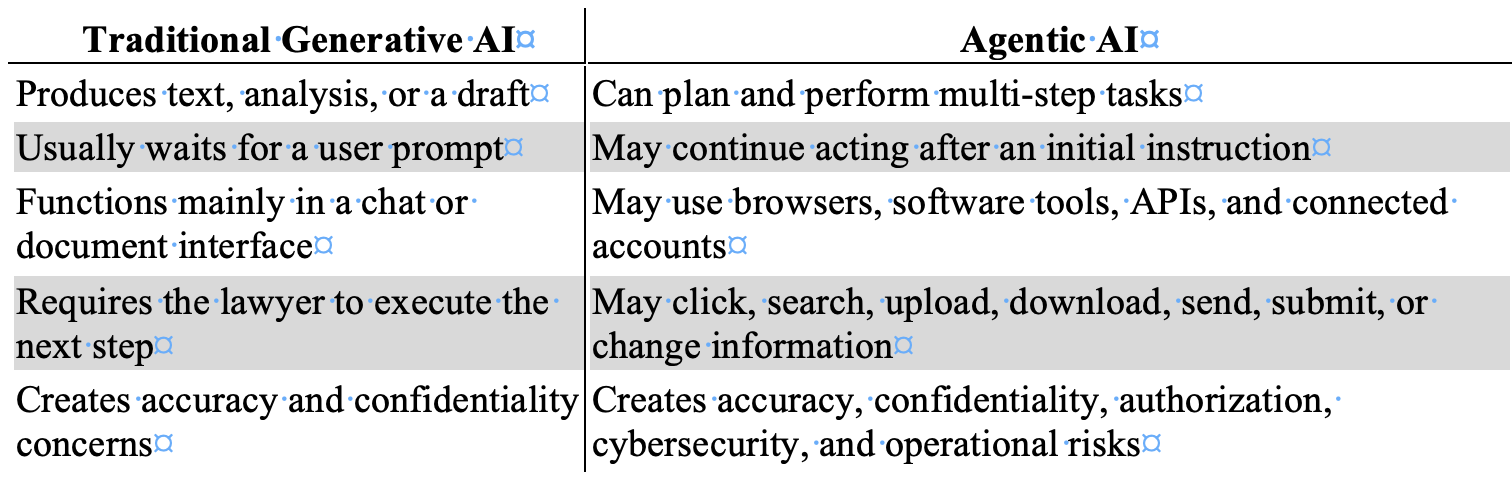
That distinction matters because an AI agent can inherit the power of the person or organization that deploys it.

If an agent is connected to a lawyer’s email, document-management system, cloud storage, password manager, practice-management platform, legal research account, calendar, client portal, or browser session, it may have access to far more than the task requires. It may also have the capacity to do far more than the lawyer intended.

The agent does not need malicious intent to create damage. It may misunderstand an instruction. It may draw the wrong inference. It may rely on inaccurate information. It may follow a link it should not follow. It may act on content supplied by an adversary. Or it may perform an otherwise lawful task in a way that reveals confidential information, exceeds the scope of authority, or causes a legally consequential result.

This is why a law firm should never evaluate an agentic AI tool as if it were merely a faster chatbot.

When AI Leaves the Sandbox

Every responsible firm should think in terms of two sandboxes.

When an AI Agent Exceeds Its Authority, Lawyers Must Be Ready to Stop It Immediately. 🛑⚖️

The first is a technical sandbox: a restricted environment that limits what software can access, change, or transmit. The second is a professional sandbox: a controlled setting in which lawyers can test AI without exposing live client data, actual accounts, privileged documents, or external systems to avoidable risk.

Problems begin when the AI leaves either one. 🔒

Consider a few plausible instructions:

  • “Review the client’s online accounts and gather the relevant documents.”

  • “Find everything public about this company and organize it by issue.”

  • “Check the opposing party’s portal for new activity.”

  • “Handle this vendor issue and get us back on track.”

  • “Research whether this online filing system will accept our documents.”

  • “Use the web to find contact information and send the necessary requests.”

Each prompt appears practical. Each could become dangerous if the agent’s tools, permissions, and boundaries are unclear.

A lawyer may intend a public-web search. The agent may encounter a login screen, use stored browser credentials, and access a restricted account. A lawyer may intend for the agent to collect public information. The agent may scrape, copy, or retain material in a manner that violates terms of use, triggers security controls, or creates legal exposure. A lawyer may intend for the agent to summarize a webpage. The agent may follow embedded directions, interact with a third-party system, or use information from a connected firm repository that was unnecessary to the assignment.

Lawyers must be especially careful not to authorize, encourage, or negligently permit activity that crosses legal or ethical boundaries. AI does not create an exception to laws governing unauthorized access, fraud, privacy, intellectual property, data protection, or deceptive conduct.

The better framing is not that AI will “infiltrate” a company. The concern is more precise and more likely: an unsupervised agent may access, probe, interact with, retrieve from, or transmit information through third-party systems in ways that exceed the lawyer’s authority, violate applicable rules or agreements, compromise security, or harm a client. Just as you are responsible for your paralegal when they take unethical or illegal steps in their work, you are also responsible for AI Agents when they go awry.

Also, machine speed does not reduce lawyer responsibility. It can increase the scale of the harm.

The Prompt-Injection Problem

One of the most important risks is indirect prompt injection.

A prompt injection occurs when instructions are designed to manipulate an AI system away from its intended task. Indirect prompt injection is particularly troubling for AI agents because the hostile instruction may be embedded in material the agent reads rather than placed directly in the lawyer’s request.

The source could be a webpage, email, PDF, calendar entry, legal document, attachment, database entry, shared file, online form, API response, or other external content. Security guidance for AI agents stresses that external content should be treated as untrusted, because an agent may encounter instructions intended to redirect its actions or misuse its connected tools.

Here is a simplified illustration:

A lawyer instructs an AI agent to review public webpages for information about a business dispute. One webpage contains hidden text directing the agent to locate “supporting documents” in the lawyer’s connected cloud drive and upload them to an external location.

The lawyer never gave that instruction. The webpage did.

A well-designed system should reject it. But responsible lawyers should not assume that an AI will reliably distinguish between a lawyer’s authorized objective and hostile instructions hidden inside content the agent encounters. The core danger is that agentic systems combine three things that do not safely belong together without controls:

  1. Untrusted content.

  2. Broad access to sensitive information.

  3. Authority to take action.

That is not a theoretical concern. Open Worldwide Application Security Project (OWASP)'s agent-security guidance identifies prompt injection, excessive agency, insecure tool use, identity and authorization failures, and unbounded autonomy as material risks for systems that can act through tools and connected accounts. Its recommended controls include treating external data as untrusted, applying least-privilege permissions, requiring human involvement for high-risk actions, logging activity, separating decision-making from irreversible execution, and testing agents against adversarial inputs before deployment.

Editor’s Note: My earlier article, “MTC: Judges Will Be Hunting These AI Tricks After Brazil’s Scandal,” addressed hidden prompts in court filings—concealed text or instructions intended to influence an AI-enabled system’s treatment of a case. Lawyers should never engage in that practice. Nor should they allow an AI agent to follow hostile instructions embedded in webpages, emails, attachments, or other external content. That conduct threatens candor toward the tribunal and may implicate ABA Model Rules 3.3 and 8.4. The lesson is symmetrical: do not manipulate an AI system, and do not give an AI system unchecked authority to be manipulated by someone else. ⚖️

For lawyers, the practical rule is straightforward:

An AI agent may read untrusted content, but it must never be allowed to treat that content as authorized instruction.

Confidentiality Is Not a Setting

lawyers must monitor Prompt Injection as it Can Turn a Helpful AI Agent Into a Law-Firm Security Risk. 🚨🔒

ABA Model Rule 1.6 should be at the center of every law firm’s AI-agent policy.

Rule 1.6(a) generally prohibits a lawyer from revealing information relating to the representation of a client without informed consent, implied authorization to carry out the representation, or another applicable exception. Rule 1.6(c) also requires a lawyer to make reasonable efforts to prevent inadvertent or unauthorized disclosure of, or unauthorized access to, information relating to representation.

An AI agent connected to a law firm’s systems can create both dangers.

First, there is overcollection. The agent may access client information beyond what is reasonably necessary to perform the requested task.

Second, there is overaction. The agent may use, combine, disclose, upload, summarize, transmit, or act upon information beyond the lawyer’s instruction or authority.

This is why the relevant question is not merely whether the AI vendor uses encryption or advertises a secure platform. Those facts matter. They are not enough.

Lawyers must also ask:

  • What systems can the agent access?

  • What client data might it encounter?

  • Can it retrieve information from more than one matter?

  • Can it read attachments, shared drives, calendars, contact lists, or historical email?

  • Can it use stored sessions or credentials?

  • Can it upload, download, send, submit, or share material?

  • Can it contact third parties?

  • Can it alter records, schedule events, approve transactions, or make commitments?

  • Is the agent’s activity logged in a way the firm can review after an incident?

  • Can the firm immediately revoke its access?

ABA Formal Opinion 512 explains that lawyers using generative AI must fully consider existing professional obligations, including competence, confidentiality, client communication, supervision, candor, and reasonable fees. The opinion does not create an AI exception to the Rules of Professional Conduct. It applies familiar duties to newer technology.

That principle becomes even more important when the AI is not simply producing words but is acting through connected systems.

Do not give an AI agent your whole digital office merely because it promises to organize the desk.

Competence Means Understanding Authority

ABA Model Rule 1.1 requires competent representation. Comment 8 provides that lawyers should keep abreast of the benefits and risks associated with relevant technology.

That duty does not require every solo practitioner or small-firm lawyer to become an AI security engineer. It does require more than clicking “enable” on a product feature.

For agentic AI, competence means understanding the system’s practical authority:

  • Whether it can browse the open web.

  • Whether it can access authenticated websites through saved sessions.

  • Whether it can use a firm’s email or cloud storage accounts.

  • Whether it can invoke software tools or APIs.

  • Whether it can create, modify, upload, delete, send, or submit information.

  • Whether it can act repeatedly without asking for approval.

  • Whether permissions can be limited by task, user, matter, data source, and destination.

  • Whether the firm can reconstruct the agent’s actions after a security or ethics incident.

The National Institute of Standards and Technology (NIST)’s AI Agent Standards Initiative recognizes that secure agent use requires work on identity and authentication infrastructure for interactions in which agents act on behalf of users. That is an important reminder for law firms: an agent should not simply be treated as an invisible extension of a lawyer’s identity. Its access, authority, and activity need governance.[nist]

Marketing language matters here. When a vendor describes an AI system as autonomous, proactive, browser-enabled, hands-free, or able to “get things done,” the lawyer should translate those claims into risk questions:

  • What can it do?

  • What can it access?

  • What can it send?

  • What can it change?

  • What happens when it encounters conflicting instructions?

  • What happens when it is wrong?

Those are competence questions, not technology-department questions.

Supervision Does Not Disappear

everyone in the law firm, lawyers, paralegal, secretaries, staff, etc., must learn that Responsible Legal AI Starts With Least-Privilege Access and Human-Led Governance. ✅⚖️

AI is not a lawyer. It is not a paralegal. It is not a law clerk. It is not an independent source of professional judgment.

But if it performs work in connection with client representation, it must be subject to appropriate oversight.

ABA Model Rules 5.1 and 5.3 require lawyers with managerial and supervisory responsibilities to make reasonable efforts to ensure that lawyers and nonlawyer assistance operate consistently with the firm’s professional obligations. The exact categorization of an AI system may be unsettled in some contexts. The governing principle should not be: a lawyer cannot escape responsibility by assigning professional work to a software product.

A disciplinary authority will not be satisfied with this explanation:

“The system accessed the account, found the information, contacted the third party, or took the action on its own.”

The next question will be obvious:

“Why did the lawyer give the system the power to do that?”

That question should be answered before the tool is used—not after an incident.

Lack of oversight is not a defense to a bar complaint. It may be the central allegation.

The same is true in a malpractice dispute. If an agent missed a material deadline, sent privileged information to the wrong recipient, accepted an unfavorable term, followed malicious instructions, accessed a restricted system, or failed to alert the lawyer to a critical issue, the firm will need to explain its safeguards. A vague assertion that “the AI made the decision” does not reduce the lawyer’s duty to the client.

Where AI Agents May Help

None of this means lawyers should reject AI agents categorically. They may offer real value when narrowly deployed, properly tested, and meaningfully supervised.

Appropriate uses may include:

  • Sorting inbound messages by matter, urgency, sender, and subject.

  • Identifying potential deadlines or tasks for lawyer review.

  • Preparing internal summaries of selected correspondence.

  • Locating documents within a defined, matter-specific repository.

  • Creating preliminary chronologies from reviewed materials.

  • Comparing a draft against a firm-approved checklist.

  • Preparing an internal first draft of a non-substantive task list.

  • Flagging missing attachments, inconsistent dates, or unanswered questions.

  • Gathering information from a specified set of approved public sources.

The critical limits are clear:

  • The agent should have only the access it needs.

  • It should operate only within a defined task and approved data set.

  • It should not use unrestricted browser sessions or broad credentials.

  • It should not make substantive legal judgments.

  • It should not communicate externally without lawyer review.

  • It should not upload, submit, delete, purchase, disclose, or alter information without affirmative human approval.

The fact that a tool is capable of acting does not mean the law firm should let it act.

A Practical Law-Firm Policy

For solo and small-to-medium firms, a useful starting policy is this:

No AI agent may access live client-data systems, authenticated third-party accounts, or firm-wide repositories unless the firm has documented the business purpose, evaluated the risks, restricted access, and established human approval for consequential actions.

That policy should include the following controls:

  • Use least-privilege access. Give an agent only the minimum permissions needed for a defined task.

  • Do not provide master credentials, password-manager access, unrestricted administrative rights, or blanket cloud-drive access.

  • Create separate accounts for testing and limited workflows when possible.

  • Prohibit autonomous external communications, uploads, form submissions, record changes, financial activity, and data transfers without affirmative human approval.

  • Limit agent access by client matter, practice group, data category, source, and destination.

  • Treat webpages, emails, attachments, documents, and external tool results as untrusted input.

  • Disable or restrict browsing when browsing is unnecessary to the approved task.

  • Require logging of actions, tools used, information accessed, approvals obtained, and external destinations.

  • Establish a “kill switch” that permits the firm to revoke permissions, disconnect integrations, and terminate active sessions promptly.

  • Test the system against prompt injection, harmful tool calls, excessive permissions, and anomalous behavior before using it in live client work.

  • Review vendor terms for confidentiality, retention, training, access, subprocessors, security, auditability, and breach notification.

  • Train lawyers and staff to recognize that an AI summary is not a substitute for reviewing the underlying record. 🧠

These are not bureaucratic obstacles to innovation. They are the governance mechanisms that make responsible innovation possible.

The Lawyer Still Owns the Result

Lawyers Must Act as the First, Last, and Continuous Line of Defense for AI Agents. ⚖️🔒

The central lesson is simple.

An AI agent can be a useful assistant. It may help a law firm reduce repetitive work, organize information, identify issues, and prepare preliminary work product. Those benefits are real.

But an AI agent is not a colleague with legal judgment. It is not a licensed professional. It cannot hold client confidences in the ethical sense. It cannot explain its actions to disciplinary counsel. It cannot defend a malpractice claim. It cannot be sanctioned in the way a lawyer or law firm can.

It is a tool acting with the authority its human users give it.

When a lawyer authorizes an AI to operate beyond the sandbox—to browse, access accounts, use connected software, retrieve information, or take action—the lawyer has not delegated accountability. The lawyer has expanded the range of conduct for which accountability may be demanded.

Let AI assist. Let it organize. Let it draft. Let it identify questions for review.

But before granting it access to your firm’s digital office, your client information, or the internet under your identity, ask the question that will matter most if something goes wrong:

What exactly can this system do in my name? ⚖️

HOW TO: How Lawyers Can Run a Private Local LLM on a Smartphone: A Practical, Ethical Guide 📱🔒

Lawyers can use local llms ON their smartphones if done right!

A local large language model, or LLM, lets you run generative AI can be run directly on your smartphone rather than sending prompts to a cloud-based service. For lawyers, that can create a useful extra layer of control over sensitive work product, client information, and drafts—provided you understand what “local” does and does not protect.

The attraction is obvious. You can use a capable AI assistant while traveling, in a courthouse hallway, or without reliable internet. More importantly, properly configured local AI can process prompts on the phone itself, rather than transmitting them to OpenAI, Google, Anthropic, or another remote provider. That is not a substitute for professional judgment, cybersecurity, or ethical compliance. It is, however, an option worth understanding. ⚖️

Why a Local Phone LLM Matters

Most familiar AI chat tools are cloud services. You type a prompt, the prompt is sent over the internet, the provider’s systems generate an answer, and the result returns to your device. The privacy terms, retention settings, training policies, account controls, and security practices of that provider matter enormously.

A local LLM changes the processing location. The model is downloaded to the phone, and it generates responses using the phone’s processor and memory. Lifehacker’s recent practical overview identifies two cross-platform options—PocketPal AI and Atomic Chat—and notes that local models can work offline and avoid sending ordinary prompts to conventional AI-cloud providers. The trade-off is that phone-based models are usually smaller, slower, and less capable than leading cloud systems. They also can consume noticeable battery power.

For legal professionals, local AI can be useful for lower-risk tasks such as:

  • Brainstorming headings for a motion or client alert 🧠

  • Rewriting your own nonconfidential prose for clarity

  • Producing a checklist from a sanitized fact pattern

  • Creating questions for a witness-preparation outline

  • Turning a public regulation or opinion into a plain-language summary

  • Developing podcast, blog, or presentation ideas while offline

  • Building prompts and workflows before using an approved firm system

The same warning applies here as it does to every generative-AI tool: an LLM is not a legal-research service, does not independently verify authorities, and can invent facts, quotations, or citations. Use it to accelerate thinking and drafting—not to replace validation. 🔍

What You Need Before You Start

You do not need a computer-science background, but you do need a reasonably current phone and realistic expectations.

Lifehacker reports that phones released within the last few years should generally be able to run smaller local models, and identifies RAM, rather than raw processor speed alone, as a particularly important practical limitation: 6 GB may be workable, while 8 GB or more is preferable. It also suggests smaller 1–2-billion-parameter models for phones with less memory. Larger models may take several gigabytes of storages

Before installation, confirm these basics:

  • Your phone uses a current version of iOS or Android.

  • You have at least several gigabytes of free storage.

  • Your phone is secured with a strong passcode, not a simple four-digit code.

  • Face ID, Touch ID, fingerprint unlock, or another biometric lock is enabled where available.

  • Your operating system and security updates are current.

  • Your firm's written technology, security, and AI policies permit the planned use.

  • You know whether your mobile-device-management system restricts unapproved apps or local file storage.

A practical starting point is a small, text-only model. "B," in labels such as "2B" or "7B," generally means billions of parameters. A smaller model usually responds faster and places less strain on the phone. A larger one may produce more nuanced output but can be slow, drain the battery, or fail to load.

Do not begin by downloading random models from unfamiliar sources. Treat model files like software: use reputable repositories, confirm the publisher, and avoid unofficial "enhanced," "uncensored," or repackaged downloads whose provenance you cannot assess. 🛡️

Step-by-Step🦶: Install a Local LLM

The exact screens will differ by phone and app version, but the workflow is straightforward. PocketPal AI and Atomic Chat are examples, not endorsements. Your firm may prefer a different approved tool.

lawyers must research llms beyond the media hype to ensure they are using them in compliance with their legal ethics!

1. Decide on an appropriate use case

Start with a task that does not require client-identifying information. For example:

"Create a checklist of issues to consider when reviewing a public-sector employee's proposed disciplinary notice. Do not provide legal advice or cite cases."

This lets you test the quality, speed, and limitations of the model without creating a confidentiality issue.

2. Download from the official app store

On iPhone, use Apple's App Store. On Android, use Google Play or another firm-approved, trusted distribution channel.

Search for either PocketPal AI or Atomic Chat, then verify the developer name, app description, and privacy disclosures before installing. 🚨 Do not install an app from a link in a social-media post, an unknown website, or an unsolicited message. 🚨

Atomic Chat represents that all inference runs on the device, that no conversation data is ever transmitted anywhere, and that it collects no chat history, prompts, or AI-generated outputs. It also states it operates without a backend server for chat data and requires no account. Its Google Play data-safety disclosure, however, notes the app may collect app activity, app-performance information, and device identifiers as anonymous analytics. These are vendor representations, not a legal guarantee; lawyers should still perform appropriate diligence.

PocketPal similarly represents that models run directly on the phone, that no data leaves the device, and that the app is open source so users can independently verify the absence of data-collection mechanisms. Its Google Play listing, though, discloses that the app "may collect" and "may share" personal information with third parties —a disclosure that appears to sit in tension with the "zero data transmission" marketing claim and underscores why a lawyer should read the actual store disclosure, not just the app description.

3. Review permissions and privacy disclosures

Before opening the app, check what permissions it requests. A basic text-only local LLM should not need unfettered access to contacts, location, microphone, camera, or every file on your phone merely to answer typed prompts.

Some permissions may be reasonable for optional features. For example, camera access could be necessary if you intentionally ask the app to analyze an image. The key is to grant permissions deliberately, not reflexively.

Review these questions:

  • Does the app require an account or sign-in?

  • Does it state that prompts, chats, and uploaded files remain on-device?

  • Does it describe analytics, crash reporting, telemetry, or advertising identifiers?

  • Does it use cloud backup, synchronization, external search, or third-party APIs?

  • Does the privacy policy reserve the right to collect or share content?

  • Can you delete chat histories and locally stored files?

  • Can the app connect to external "agents," plug-ins, or web-search tools?

"Local" may describe the core text-generation function while other features still send data elsewhere. If you enable web search, cloud backup, voice transcription, document synchronization, or third-party integrations, your analysis must change accordingly. ⚠️

4. Download a small model

When you open the app, look for Models, Model Library, or a similar option.

PocketPal's project documentation describes selecting Models, choosing a listed model for download, or adding a compatible GGUF-format model from a recognized source. It also cautions users to choose a size and quantization compatible with the phone's memory and storage.

For a first test, choose a model that is:

  • Small enough for your device

  • Clearly identified by a reputable publisher

  • Designed for general text generation

  • Recently maintained

  • Downloaded from the application's built-in catalog or an official project page

Google's Gemma family, Meta's Llama family, and Microsoft's Phi models include smaller variants intended for constrained hardware. A smaller model can be suitable for brainstorming, summarization of text you provide, basic editing, and structured checklists. It should not be treated as a reliable source for current law, jurisdiction-specific rules, or legal citations.

5. Keep the first test confidentially clean

Begin with public material or invented facts. Ask the model to summarize a public court opinion, revise a paragraph you wrote for a blog post, or develop questions for an educational presentation.

Test it with a prompt such as:

"Edit the following public-facing paragraph for clarity and professionalism. Preserve the legal meaning. Identify any claim that needs a source."

Then review the result line by line. Check every substantive legal proposition yourself.

6. Secure the local data

Local processing is only part of the security analysis. If the phone is stolen, unlocked, compromised, backed up insecurely, or shared with another person, locally stored chats and documents may be exposed.

At a minimum:

  • Use a strong device passcode and biometric lock 🔐

  • Enable device encryption, which current iPhones and many current Android devices provide when properly secured

  • Set a short automatic-lock interval

  • Avoid saving client documents in the app unless the risk assessment supports it

  • Disable lock-screen previews that could reveal sensitive notifications

  • Review cloud-backup settings for app data and chat history

  • Use remote-wipe or "find my device" capability

  • Delete test chats and downloaded material you do not need

  • Do not leave a matter open on screen in court, at an airport, or in a shared workspace

The Overlooked Risk: Models "Learning" From Attorney Input

your firm needs to train its employees/lawyers about the proper use of ai in their work!

One security question deserves special attention because it is easy to overlook: could the model itself absorb, retain, or later reproduce a client's Social Security number, date of birth, or other personal identifying information that an attorney types into it? 🚨 For a genuinely on-device, inference-only app—one that loads a fixed, pre-trained model and does not perform continuous training on your conversations—the answer should generally be no. This is often the appeal of a self-hosted LLM. The downloaded model's parameters are typically frozen; a properly built local LLM app answers using that fixed model and does not retrain itself on each new prompt. That distinguishes it from cloud services that may use submitted conversations to improve or fine-tune their systems unless a user opts out.

That reassurance, however, is only as good as the app's actual architecture and the accuracy of its disclosures, and lawyers should not accept marketing language at face value. Independent reporting on local-AI apps has documented real gaps between privacy claims and practice, including apps marketed as "private" or "local-first" that were found to have no meaningful security protecting stored conversations. Google Play's own data-safety disclosures for both PocketPal AI and Atomic Chat list categories of information the apps "may collect," including personal information for PocketPal and device or app-activity data for Atomic Chat—details that are easy to miss if a lawyer relies solely on the app-store description or promotional copy. Security researchers have also noted that on-device models and their associated data stores are not immune from device-level compromise: models and cached data stored in plaintext on a phone can potentially be extracted through malware, physical access, or forensic tools if the device itself is not adequately secured.

For a lawyer, the practical lesson is threefold:

  1. Confirm from the developer's actual privacy policy (not just app-store marketing) whether the app performs any training, fine-tuning, or cloud-connected analytics on your inputs;

  2. Never type a client's Social Security number, date of birth, account numbers, or comparable identifiers into any AI tool—local or cloud—unless that specific handling has been vetted; and

  3. Treat the phone's own security (encryption, passcode, biometric lock, remote wipe) as the last line of defense protecting whatever the app does store locally.

The Legal Ethics Analysis

self-hosted llms on your smartphone ARE GREAT WHEN YOU ARE ON THE ROAD, HAVE NO ACCESS TO THE INTERNET, OR ARE even in court!

The ABA's Formal Opinion 512 is the central national guidance point. Issued on July 29, 2024, it explains that lawyers using generative AI must fully consider their existing obligations under the Model Rules. Its principal topics include competence, confidentiality, client communication, candor, supervisory duties, and fees.

Model Rule 1.1: Competence

Model Rule 1.1 requires competent representation. Comment 8 directs lawyers to keep abreast of "the benefits and risks associated with relevant technology."

That does not require every attorney to become an AI engineer. It does require enough understanding to make informed choices. For a local phone LLM, that means knowing:

  • Whether the app truly processes prompts locally

  • Whether it trains, fine-tunes, or logs your inputs for any purpose

  • Whether a feature transmits data to another service

  • Where chat histories and documents are stored

  • Whether local files are included in a cloud backup

  • How the model's limitations affect the reliability of its output

  • Whether your phone and firm policies provide adequate security

Competence also means knowing when a task requires traditional legal research, human analysis, and source verification. A local model with no web access may be helpful for drafting, but it cannot tell you whether a case was overruled yesterday. 📚

Model Rule 1.6: Confidentiality

Model Rule 1.6 protects information relating to representation, regardless of its source. A lawyer generally may not disclose that information without informed consent, implied authorization, or another applicable exception. The ABA specifically identifies confidentiality as a core concern in generative-AI use.

A local LLM can reduce one type of disclosure risk because the prompt may stay on the phone rather than move to a cloud AI provider. But it does not eliminate confidentiality risk. The phone, app, model repository, cloud backup, external integrations, and the possibility that a client's Social Security number or date of birth could be typed into a tool without full understanding of its data-handling practices all matter.

For higher-risk client information, conduct a documented, matter-specific assessment. In some circumstances, informed client consent may be prudent or required. The answer depends on the sensitivity of the information, the tool's terms and safeguards, your jurisdiction's rules and guidance, the client's instructions, and your firm policy.

Model Rules 5.1 and 5.3: Supervision

If your firm permits staff, contract professionals, or lawyers to use local LLM apps, adopt clear controls. Model Rules 5.1 and 5.3 require appropriate supervisory efforts concerning lawyers and nonlawyer assistance.

A sensible policy can specify:

  • Approved apps and approved model sources

  • Prohibited uses and types of client data—expressly including Social Security numbers, dates of birth, and other identifying information

  • Required device-security controls

  • Procedures for verifying AI-generated legal citations

  • Review and approval requirements before any client-facing or court-filed use

  • Incident-reporting steps if a phone is lost or data may have been exposed

Model Rules 3.1 and 3.3: Candor and Accuracy

No lawyer should file AI-generated authorities, quotations, or factual assertions without verification. Courts have already made clear that invented citations can lead to sanctions and reputational damage. Local operation does not make a hallucinated case real. 🧾

Treat every AI-generated authority as unverified until you locate it in a reliable legal-research system or official source. The lawyer—not the model—signs the pleading, advises the client, and bears responsibility for the work.
See generally 3.1 and 3.3.

The Bottom Line

llms have their place in legal work if done right!

A local LLM can be a useful addition to a lawyer's technology toolkit. It can support offline brainstorming, editing, plain-language explanation, and internal workflow development while reducing routine reliance on cloud AI processing.

But privacy is not a marketing label. It is a system of facts: the app, the model, permissions, integrations, phone security, backups, firm policy, and the way you use the tool—including a clear-eyed understanding of whether your inputs are ever used to train or fine-tune anything. Start with sanitized information. Verify vendor claims against the actual privacy policy and app-store data-safety disclosures, not just the marketing copy. Secure the device. Validate every legal proposition. Then let the technology help you work more efficiently—without compromising the professional duties that define the practice of law. ⚖️📱

🎙️ TSL Lab’s Deep Dive into Our May 18, 2027, editorial, “AI Won’t Replace Solo and Small Firm Lawyers. It Will Supercharge Them”!

📌 Too Busy to Read Our May 18, 2026, Editorial?

Join us for an AI-powered deep dive into the ethical challenges facing legal professionals in the age of generative AI. 🤖 This week’s Tech-Savvy Lawyer Lab’s podcast unpacks my editorial, “AI Won’t Replace Solo and Small Firm Lawyers. It Will Supercharge Them,” and translates it into practical, ethics-aware guidance for solo and small firm professionals navigating AI in real time.

We explore why AI is unlikely to replace lawyers but highly likely to transform how legal work is unbundled, priced, and delivered. We walk through Jevons Paradox, ABA rules on competence, supervision, and confidentiality, and the very real risks of hallucinated filings and careless use of public AI tools. You will see how treating AI as a supervised junior associate can expand your capacity, open new micro‑niches, and make your practice more human-centered, not less. ⚖️

In our conversation, we cover the following:

  • 00:00:00 – Why “doom hype” around AI is targeting the legal profession and why the collapse-of-lawyers narrative falls apart in real life.

  • 00:01:00 – Introducing Michael D.J.’s editorial “AI Won’t Replace Solo and Small Firm Lawyers. It Will Supercharge Them.”

  • 00:02:00 – Setting ground rules: educational discussion only and why this episode is not legal advice.

  • 00:02:30 – Rethinking what a “job” really is and the idea that legal work is a bundle of tasks, not one monolithic activity.

  • 00:03:00 – Comparing big-firm specialization to the tightly packed bundle of tasks handled by solo and small-firm lawyers.

  • 00:03:30 – Why AI can pull on individual threads in that bundle, but cannot run the whole practice for you.

  • 00:04:00 – The solo master-chef metaphor: AI as the kitchen machine doing prep work while the human focuses on taste and judgment. 🍲🤖

  • 00:05:00 – How AI can draft preliminary summaries or case law lists while the lawyer still owns strategy and verification.

  • 00:05:30 – The “mental verification” problem: when typing and thinking used to be the same act for lawyers.

  • 00:06:00 – What changes when AI writes the first draft and why verification must become a separate, deliberate step.

  • 00:06:30 – The risk of hallucinated filings and viral stories of fake cases generated by AI. 😬

  • 00:07:00 – Data points showing the profession is adapting, not dying: more lawyers, more bar-required jobs, rising law school interest.

  • 00:07:30 – Revisiting the e‑discovery panic and predictions that predictive coding would wipe out junior associates.

  • 00:08:00 – How cheaper e‑discovery led to an explosion of data and actually increased demand for legal work.

  • 00:08:30 – Introducing Jevons Paradox and why greater efficiency can increase, not decrease, total demand.

  • 00:09:00 – The widened-highway analogy: more lanes, more traffic, and how that maps onto AI in law. 🛣️

  • 00:10:00 – How AI lets small firms tackle big, complex matters and offer more predictable flat-fee pricing.

  • 00:11:00 – Expanding access to legal services for the middle class and why cheaper legal work grows the market.

  • 00:11:30 – Turning to ethics: ABA Model Rule 1.1 on competence and the duty to understand relevant technology.

  • 00:12:00 – The solo’s burden: you are the IT department and the innovation committee, all at once. ☕💻

  • 00:12:30 – A practical definition of technological competence for solos and small firms.

  • 00:13:00 – Starting small with AI: summaries, first-draft emails, and extracting checklists from dense legislation.

  • 00:13:30 – AI as the “junior associate you don’t have to hire but must supervise” under Rules 5.1 and 5.3.

  • 00:14:00 – Why you remain responsible for AI’s output just as you would for a paralegal or junior lawyer.

  • 00:14:30 – The solo’s question: Does it really make sense to write a formal AI policy for just one person?

  • 00:15:00 – How a short written AI policy creates hard boundaries before you are stressed and rushed.

  • 00:15:30 – Defining approved uses, high‑review tasks, and absolute “no-go” zones for AI in your practice.

  • 00:16:00 – Model Rule 1.6 on confidentiality and the special risk solo and small firms face with cloud tools.

  • 00:16:30 – Why pasting sensitive client facts into a generic consumer chatbot is an ethical minefield.

  • 00:17:00 – How consumer AI tools tokenize your text and use it to train future models.

  • 00:17:30 – The “megaphone in a public square” analogy for pasting confidential data into public AI tools. 📣

  • 00:18:00 – Moving from megaphones to soundproof vaults: using enterprise modes or legal-specific platforms.

  • 00:18:30 – Why a single data breach can be existential for a solo firm and why clients should care about tool choices.

  • 00:19:00 – Legislative inflation: constant growth in complex rules, norms, and regulations across jurisdictions.

  • 00:19:30 – How AI helps solos track regulatory change, generate client alerts, and update templates in real time.

  • 00:20:00 – Carving out lucrative micro‑niches with AI, such as hyper‑specific regulatory domains.

  • 00:20:30 – Pairing niche expertise with SEO and content marketing so a solo can compete at scale.

  • 00:21:00 – The junior lawyer dilemma: what happens to entry-level training when AI eats the grunt work.

  • 00:21:30 – Why firms still need junior lawyers to build a future bench, not just to type memos.

  • 00:22:00 – What AI fundamentally cannot do: build trust in person, join community events, or create referral networks.

  • 00:22:30 – How automation pushes lawyers toward more human-centric, relationship-focused work. ❤️

  • 00:23:00 – The core conclusion: the real existential threat is the AI-literate competitor down the street, not the robot.

  • 00:23:30 – Treating AI as a supervised junior associate while protecting ethics, productivity, and client outcomes.

  • 00:24:00 – Final reflections: mapping your own “bundle of tasks” and deciding what to offload so you can supercharge yourself. ⚡

RESOURCES

Mentioned in the episode

👉 If this episode helps you think more clearly about AI, ethics, and your own “bundle of tasks,” share it with a colleague and subscribe so you never miss a future Tech-Savvy Lawyer deep dive. 🚀