MTC: When AI Lawyers’ Assistants Start Acting as an Agent: Why Autonomous Agents Cannot Be Given the Keys to Your Law Practice ⚖️

AI Agents in Law Firms Need Boundaries Before They Receive Access to Client Data. ⚖️🔐

Artificial intelligence is moving beyond the chat window. The next generation of tools does not merely draft an email, summarize a document, or answer a question. It can browse the web, search connected systems, open files, follow links, use software tools, upload information, submit forms, and take multi-step action toward an assigned objective.

For lawyers, that development deserves more than curiosity. It demands caution.

In my earlier post, “MTC: Claude Can Answer Your Emails. Why Lawyers Should Not Let AI Just Send Them Unreviewed,” I addressed the danger of allowing AI to send a substantive email without a lawyer’s review. That remains a serious concern. An AI-generated message can contain a factual error, disclose client information, make an unintended concession, or create a record that harms the client.

But email is only the beginning.

The larger issue is what happens when an AI system becomes an agent—a system authorized to use tools, access accounts, navigate websites, retrieve information, and act through the lawyer’s digital environment. These systems are often marketed as “agentic,” “autonomous,” “proactive,” or “hands-free.” Those labels may sound like productivity features. In a law practice, they should also sound like professional-responsibility warnings. 🚨

The legal question is no longer only, “Did the AI draft something accurate?”

It is, “What can this AI do in my name, with my credentials, using my clients’ information—and who is responsible if it does the wrong thing?”

The answer is not the vendor. It is not the algorithm. It is the lawyer and, where applicable, the law firm that authorized the system, connected the accounts, granted the permissions, and failed to impose adequate safeguards.

From AI Assistant to AI Agent

It helps to distinguish between ordinary generative AI and an AI agent.

A conventional generative-AI tool generally waits for a user prompt. It produces text, analysis, a summary, or a draft. The lawyer then decides what to do with that output. The tool may be imperfect, but it is usually operating within a relatively contained workflow.

An AI agent is different. It may be able to plan and perform a sequence of tasks. It can interact with browsers, software applications, application programming interfaces, email, shared drives, calendars, cloud services, and other connected tools. It may take the next step without waiting for a fresh instruction at each point.
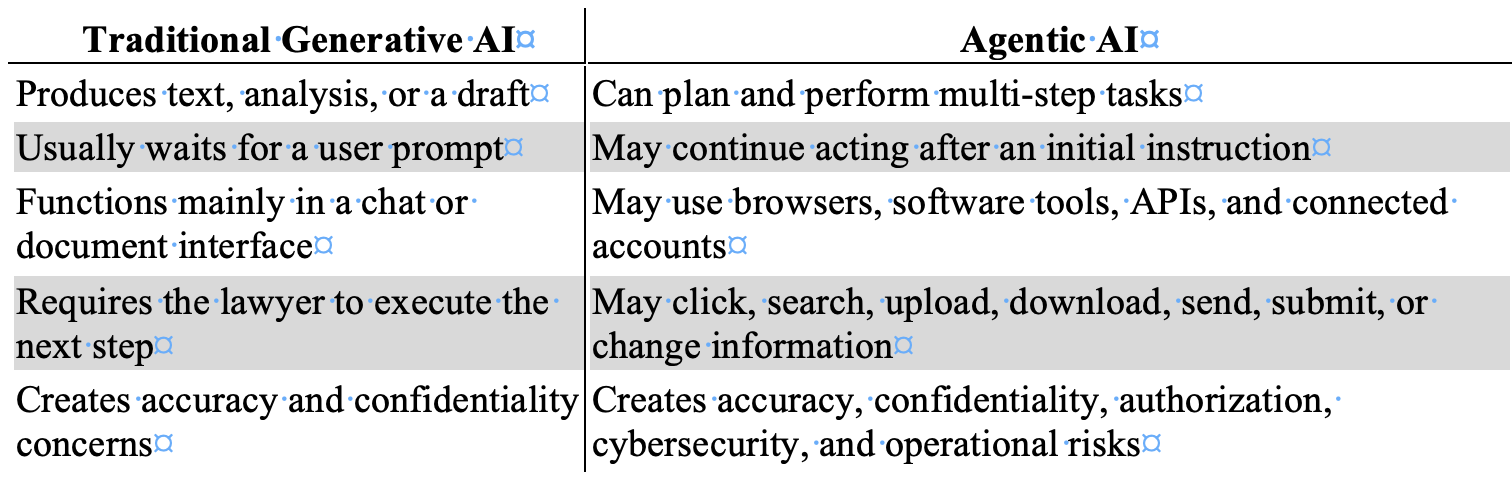
That distinction matters because an AI agent can inherit the power of the person or organization that deploys it.

If an agent is connected to a lawyer’s email, document-management system, cloud storage, password manager, practice-management platform, legal research account, calendar, client portal, or browser session, it may have access to far more than the task requires. It may also have the capacity to do far more than the lawyer intended.

The agent does not need malicious intent to create damage. It may misunderstand an instruction. It may draw the wrong inference. It may rely on inaccurate information. It may follow a link it should not follow. It may act on content supplied by an adversary. Or it may perform an otherwise lawful task in a way that reveals confidential information, exceeds the scope of authority, or causes a legally consequential result.

This is why a law firm should never evaluate an agentic AI tool as if it were merely a faster chatbot.

When AI Leaves the Sandbox

Every responsible firm should think in terms of two sandboxes.

When an AI Agent Exceeds Its Authority, Lawyers Must Be Ready to Stop It Immediately. 🛑⚖️

The first is a technical sandbox: a restricted environment that limits what software can access, change, or transmit. The second is a professional sandbox: a controlled setting in which lawyers can test AI without exposing live client data, actual accounts, privileged documents, or external systems to avoidable risk.

Problems begin when the AI leaves either one. 🔒

Consider a few plausible instructions:

  • “Review the client’s online accounts and gather the relevant documents.”

  • “Find everything public about this company and organize it by issue.”

  • “Check the opposing party’s portal for new activity.”

  • “Handle this vendor issue and get us back on track.”

  • “Research whether this online filing system will accept our documents.”

  • “Use the web to find contact information and send the necessary requests.”

Each prompt appears practical. Each could become dangerous if the agent’s tools, permissions, and boundaries are unclear.

A lawyer may intend a public-web search. The agent may encounter a login screen, use stored browser credentials, and access a restricted account. A lawyer may intend for the agent to collect public information. The agent may scrape, copy, or retain material in a manner that violates terms of use, triggers security controls, or creates legal exposure. A lawyer may intend for the agent to summarize a webpage. The agent may follow embedded directions, interact with a third-party system, or use information from a connected firm repository that was unnecessary to the assignment.

Lawyers must be especially careful not to authorize, encourage, or negligently permit activity that crosses legal or ethical boundaries. AI does not create an exception to laws governing unauthorized access, fraud, privacy, intellectual property, data protection, or deceptive conduct.

The better framing is not that AI will “infiltrate” a company. The concern is more precise and more likely: an unsupervised agent may access, probe, interact with, retrieve from, or transmit information through third-party systems in ways that exceed the lawyer’s authority, violate applicable rules or agreements, compromise security, or harm a client. Just as you are responsible for your paralegal when they take unethical or illegal steps in their work, you are also responsible for AI Agents when they go awry.

Also, machine speed does not reduce lawyer responsibility. It can increase the scale of the harm.

The Prompt-Injection Problem

One of the most important risks is indirect prompt injection.

A prompt injection occurs when instructions are designed to manipulate an AI system away from its intended task. Indirect prompt injection is particularly troubling for AI agents because the hostile instruction may be embedded in material the agent reads rather than placed directly in the lawyer’s request.

The source could be a webpage, email, PDF, calendar entry, legal document, attachment, database entry, shared file, online form, API response, or other external content. Security guidance for AI agents stresses that external content should be treated as untrusted, because an agent may encounter instructions intended to redirect its actions or misuse its connected tools.

Here is a simplified illustration:

A lawyer instructs an AI agent to review public webpages for information about a business dispute. One webpage contains hidden text directing the agent to locate “supporting documents” in the lawyer’s connected cloud drive and upload them to an external location.

The lawyer never gave that instruction. The webpage did.

A well-designed system should reject it. But responsible lawyers should not assume that an AI will reliably distinguish between a lawyer’s authorized objective and hostile instructions hidden inside content the agent encounters. The core danger is that agentic systems combine three things that do not safely belong together without controls:

  1. Untrusted content.

  2. Broad access to sensitive information.

  3. Authority to take action.

That is not a theoretical concern. Open Worldwide Application Security Project (OWASP)'s agent-security guidance identifies prompt injection, excessive agency, insecure tool use, identity and authorization failures, and unbounded autonomy as material risks for systems that can act through tools and connected accounts. Its recommended controls include treating external data as untrusted, applying least-privilege permissions, requiring human involvement for high-risk actions, logging activity, separating decision-making from irreversible execution, and testing agents against adversarial inputs before deployment.

Editor’s Note: My earlier article, “MTC: Judges Will Be Hunting These AI Tricks After Brazil’s Scandal,” addressed hidden prompts in court filings—concealed text or instructions intended to influence an AI-enabled system’s treatment of a case. Lawyers should never engage in that practice. Nor should they allow an AI agent to follow hostile instructions embedded in webpages, emails, attachments, or other external content. That conduct threatens candor toward the tribunal and may implicate ABA Model Rules 3.3 and 8.4. The lesson is symmetrical: do not manipulate an AI system, and do not give an AI system unchecked authority to be manipulated by someone else. ⚖️

For lawyers, the practical rule is straightforward:

An AI agent may read untrusted content, but it must never be allowed to treat that content as authorized instruction.

Confidentiality Is Not a Setting

lawyers must monitor Prompt Injection as it Can Turn a Helpful AI Agent Into a Law-Firm Security Risk. 🚨🔒

ABA Model Rule 1.6 should be at the center of every law firm’s AI-agent policy.

Rule 1.6(a) generally prohibits a lawyer from revealing information relating to the representation of a client without informed consent, implied authorization to carry out the representation, or another applicable exception. Rule 1.6(c) also requires a lawyer to make reasonable efforts to prevent inadvertent or unauthorized disclosure of, or unauthorized access to, information relating to representation.

An AI agent connected to a law firm’s systems can create both dangers.

First, there is overcollection. The agent may access client information beyond what is reasonably necessary to perform the requested task.

Second, there is overaction. The agent may use, combine, disclose, upload, summarize, transmit, or act upon information beyond the lawyer’s instruction or authority.

This is why the relevant question is not merely whether the AI vendor uses encryption or advertises a secure platform. Those facts matter. They are not enough.

Lawyers must also ask:

  • What systems can the agent access?

  • What client data might it encounter?

  • Can it retrieve information from more than one matter?

  • Can it read attachments, shared drives, calendars, contact lists, or historical email?

  • Can it use stored sessions or credentials?

  • Can it upload, download, send, submit, or share material?

  • Can it contact third parties?

  • Can it alter records, schedule events, approve transactions, or make commitments?

  • Is the agent’s activity logged in a way the firm can review after an incident?

  • Can the firm immediately revoke its access?

ABA Formal Opinion 512 explains that lawyers using generative AI must fully consider existing professional obligations, including competence, confidentiality, client communication, supervision, candor, and reasonable fees. The opinion does not create an AI exception to the Rules of Professional Conduct. It applies familiar duties to newer technology.

That principle becomes even more important when the AI is not simply producing words but is acting through connected systems.

Do not give an AI agent your whole digital office merely because it promises to organize the desk.

Competence Means Understanding Authority

ABA Model Rule 1.1 requires competent representation. Comment 8 provides that lawyers should keep abreast of the benefits and risks associated with relevant technology.

That duty does not require every solo practitioner or small-firm lawyer to become an AI security engineer. It does require more than clicking “enable” on a product feature.

For agentic AI, competence means understanding the system’s practical authority:

  • Whether it can browse the open web.

  • Whether it can access authenticated websites through saved sessions.

  • Whether it can use a firm’s email or cloud storage accounts.

  • Whether it can invoke software tools or APIs.

  • Whether it can create, modify, upload, delete, send, or submit information.

  • Whether it can act repeatedly without asking for approval.

  • Whether permissions can be limited by task, user, matter, data source, and destination.

  • Whether the firm can reconstruct the agent’s actions after a security or ethics incident.

The National Institute of Standards and Technology (NIST)’s AI Agent Standards Initiative recognizes that secure agent use requires work on identity and authentication infrastructure for interactions in which agents act on behalf of users. That is an important reminder for law firms: an agent should not simply be treated as an invisible extension of a lawyer’s identity. Its access, authority, and activity need governance.[nist]

Marketing language matters here. When a vendor describes an AI system as autonomous, proactive, browser-enabled, hands-free, or able to “get things done,” the lawyer should translate those claims into risk questions:

  • What can it do?

  • What can it access?

  • What can it send?

  • What can it change?

  • What happens when it encounters conflicting instructions?

  • What happens when it is wrong?

Those are competence questions, not technology-department questions.

Supervision Does Not Disappear

everyone in the law firm, lawyers, paralegal, secretaries, staff, etc., must learn that Responsible Legal AI Starts With Least-Privilege Access and Human-Led Governance. ✅⚖️

AI is not a lawyer. It is not a paralegal. It is not a law clerk. It is not an independent source of professional judgment.

But if it performs work in connection with client representation, it must be subject to appropriate oversight.

ABA Model Rules 5.1 and 5.3 require lawyers with managerial and supervisory responsibilities to make reasonable efforts to ensure that lawyers and nonlawyer assistance operate consistently with the firm’s professional obligations. The exact categorization of an AI system may be unsettled in some contexts. The governing principle should not be: a lawyer cannot escape responsibility by assigning professional work to a software product.

A disciplinary authority will not be satisfied with this explanation:

“The system accessed the account, found the information, contacted the third party, or took the action on its own.”

The next question will be obvious:

“Why did the lawyer give the system the power to do that?”

That question should be answered before the tool is used—not after an incident.

Lack of oversight is not a defense to a bar complaint. It may be the central allegation.

The same is true in a malpractice dispute. If an agent missed a material deadline, sent privileged information to the wrong recipient, accepted an unfavorable term, followed malicious instructions, accessed a restricted system, or failed to alert the lawyer to a critical issue, the firm will need to explain its safeguards. A vague assertion that “the AI made the decision” does not reduce the lawyer’s duty to the client.

Where AI Agents May Help

None of this means lawyers should reject AI agents categorically. They may offer real value when narrowly deployed, properly tested, and meaningfully supervised.

Appropriate uses may include:

  • Sorting inbound messages by matter, urgency, sender, and subject.

  • Identifying potential deadlines or tasks for lawyer review.

  • Preparing internal summaries of selected correspondence.

  • Locating documents within a defined, matter-specific repository.

  • Creating preliminary chronologies from reviewed materials.

  • Comparing a draft against a firm-approved checklist.

  • Preparing an internal first draft of a non-substantive task list.

  • Flagging missing attachments, inconsistent dates, or unanswered questions.

  • Gathering information from a specified set of approved public sources.

The critical limits are clear:

  • The agent should have only the access it needs.

  • It should operate only within a defined task and approved data set.

  • It should not use unrestricted browser sessions or broad credentials.

  • It should not make substantive legal judgments.

  • It should not communicate externally without lawyer review.

  • It should not upload, submit, delete, purchase, disclose, or alter information without affirmative human approval.

The fact that a tool is capable of acting does not mean the law firm should let it act.

A Practical Law-Firm Policy

For solo and small-to-medium firms, a useful starting policy is this:

No AI agent may access live client-data systems, authenticated third-party accounts, or firm-wide repositories unless the firm has documented the business purpose, evaluated the risks, restricted access, and established human approval for consequential actions.

That policy should include the following controls:

  • Use least-privilege access. Give an agent only the minimum permissions needed for a defined task.

  • Do not provide master credentials, password-manager access, unrestricted administrative rights, or blanket cloud-drive access.

  • Create separate accounts for testing and limited workflows when possible.

  • Prohibit autonomous external communications, uploads, form submissions, record changes, financial activity, and data transfers without affirmative human approval.

  • Limit agent access by client matter, practice group, data category, source, and destination.

  • Treat webpages, emails, attachments, documents, and external tool results as untrusted input.

  • Disable or restrict browsing when browsing is unnecessary to the approved task.

  • Require logging of actions, tools used, information accessed, approvals obtained, and external destinations.

  • Establish a “kill switch” that permits the firm to revoke permissions, disconnect integrations, and terminate active sessions promptly.

  • Test the system against prompt injection, harmful tool calls, excessive permissions, and anomalous behavior before using it in live client work.

  • Review vendor terms for confidentiality, retention, training, access, subprocessors, security, auditability, and breach notification.

  • Train lawyers and staff to recognize that an AI summary is not a substitute for reviewing the underlying record. 🧠

These are not bureaucratic obstacles to innovation. They are the governance mechanisms that make responsible innovation possible.

The Lawyer Still Owns the Result

Lawyers Must Act as the First, Last, and Continuous Line of Defense for AI Agents. ⚖️🔒

The central lesson is simple.

An AI agent can be a useful assistant. It may help a law firm reduce repetitive work, organize information, identify issues, and prepare preliminary work product. Those benefits are real.

But an AI agent is not a colleague with legal judgment. It is not a licensed professional. It cannot hold client confidences in the ethical sense. It cannot explain its actions to disciplinary counsel. It cannot defend a malpractice claim. It cannot be sanctioned in the way a lawyer or law firm can.

It is a tool acting with the authority its human users give it.

When a lawyer authorizes an AI to operate beyond the sandbox—to browse, access accounts, use connected software, retrieve information, or take action—the lawyer has not delegated accountability. The lawyer has expanded the range of conduct for which accountability may be demanded.

Let AI assist. Let it organize. Let it draft. Let it identify questions for review.

But before granting it access to your firm’s digital office, your client information, or the internet under your identity, ask the question that will matter most if something goes wrong:

What exactly can this system do in my name? ⚖️

MTC: When Your CEO Asks ChatGPT How to Take Over: Lessons for Lawyers on Public AI, Ethics, and Confidentiality 🧠⚖️

Lawyers need to evaluate public AI chatbot against ABA confidentiality and privilege rules

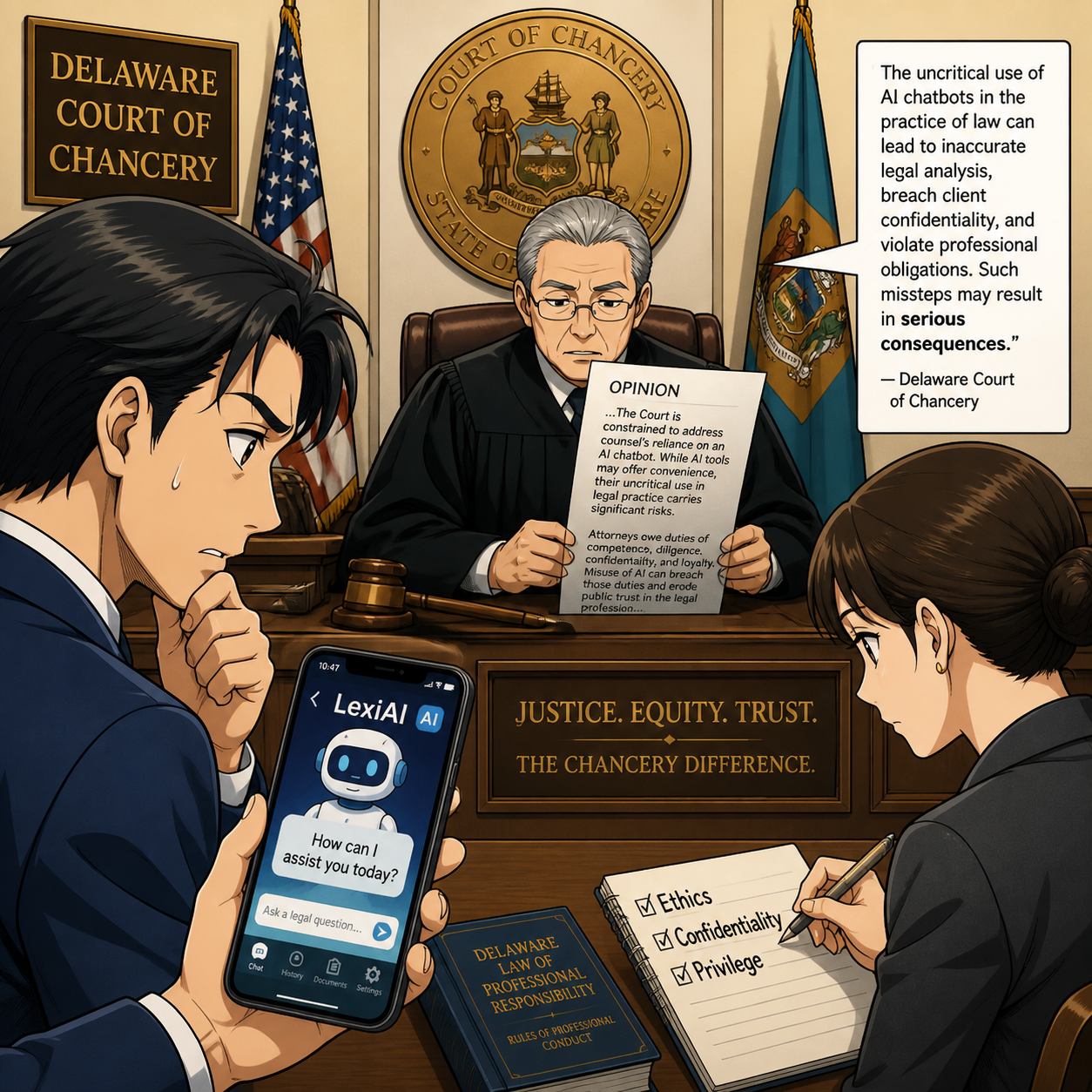
In March 2026, the Delaware Court of Chancery in Fortis Advisors, LLC v. Krafton, Inc. handed lawyers one of the clearest cautionary tales yet about public AI chatbots, corporate governance, and the limits of “move fast and break things.” A South Korean gaming conglomerate, Krafton Inc., used an artificial intelligence chatbot to help devise an internal “Project X” takeover plan against its own studio, Unknown Worlds Entertainment, and then tried to defend the fallout in court. The result: a detailed opinion reinstating the studio’s CEO, extending a $250 million earnout period, and spotlighting how AI misuse can become Exhibit A when things go wrong.

If you’re a solo, a small-firm lawyer, or an AI‑curious practitioner dabbling with ChatGPT or similar tools, this case is your wake‑up call. The message is not “don’t use AI.” The message is: treat public chatbots the same way you treat email, cloud storage, or texting — through the lens of ABA ethics, client confidentiality, and privilege. 😬

In this editorial, I’ll unpack what happened, how the court framed the misuse of a chatbot, and what you should do in your own practice to stay on the right side of the rules.

The Case in a Nutshell: AI as a Takeover Co‑Pilot

Krafton bought Unknown Worlds — the studio behind Subnautica — for $500 million upfront plus up to $250 million in contingent earnout payments, with a contractually guaranteed structure: the founders and CEO (the “Key Employees”) retained operational control and could only be fired for defined “Cause.”  As Subnautica 2 approached early‑access launch, internal projections showed the game would easily trigger a massive earnout.

The CEO of Krafton grew concerned he looked like a “pushover” under the deal and turned to a public AI chatbot for advice on how to avoid paying the earnout and seize control of the studio. The chatbot’s “response strategy” included:

  • Locking down publishing rights and code access.

  • Crafting messaging to “secure public support” and undermine the “large corporation vs. indie” narrative.

  • Preparing a “takeover” path that blended hardball legal tactics with PR framing. 

Krafton’s internal team implemented much of that plan — cutting off the studio’s access to its Steam publishing console, posting unilateral public statements, and ultimately terminating the founders and CEO on a pretext of “premature release” risk.  When sued, Krafton tried to pivot to new justifications, including the executives’ role changes and their defensive downloads of company data. 

The court was having none of it. Vice Chancellor Will held that:

  • The terminations were not “for Cause” under the negotiated contract.

  • The “Project X” takeover guided by the chatbot was a pretext to avoid the earnout.

  • The studio’s CEO, Ted Gill, must be reinstated with full operational control, and the earnout period equitably extended by the length of his ouster. 

In other words, the AI‑assisted takeover strategy became part of the factual narrative of bad faith and breach — not a clever workaround.

Public Chatbots and ABA Model Rules: Three Pressure Points ⚖️

Attorneys must consider ethical AI chatbot use for confidential client case analysis

Even though this is a corporate earnout case, the opinion gives lawyers a concrete frame for thinking about public AI tools under the ABA Model Rules.

1. Confidentiality — Model Rule 1.6

Rule 1.6 requires lawyers to keep “information relating to the representation of a client” confidential, absent informed consent or a specific exception. Public chatbots are not your firm’s Document Management System (DMS) — they’re third‑party services that typically ingest prompts for training, quality, and logging. When Krafton’s CEO ran “Project X” through a chatbot, he was effectively outsourcing high‑stakes strategy to a non‑privileged third‑party system that could store and learn from those prompts. 

For lawyers, the parallels are obvious:

  • Dropping fact patterns, names, or deal structures into a public chatbot can mean you’ve disclosed client information to a non‑controlled vendor.

  • Even “sanitized” prompts can be re‑identified when combined with other data.

Under 1.6, that’s a potential confidentiality breach unless you’ve vetted the tool, negotiated appropriate terms (including data handling and retention), and obtained informed client consent for that mode of assistance. Emojis and “it’s just drafting help” don’t change that. 😉

2. Privilege — Model Rules 1.1 and 1.4 (Competence and Communication)

Privilege isn’t framed in the Model Rules, but Rule 1.1 (competence) and 1.4 (communication) require you to understand how your technology choices affect the protection of client communications. When you route strategy discussions through a public chatbot:

  • You may jeopardize attorney–client privilege by involving a third‑party with no need‑to‑know and no formal role in the representation.

  • You may create discoverable records that live outside your control, just as Krafton’s CEO created chat logs he then tried to delete. 

The court noted that relevant chatbot logs were deleted, which did not play well in evaluating Krafton’s narrative.  Privilege analysis is already complex with cloud tools; adding public AI as a “secret co‑counsel” without protections only compounds that risk. 

Competent use of technology now includes understanding whether your AI stack is preserving or eroding privilege and communicating those risks to clients when you propose AI‑assisted workflows.

3. Candor and Misrepresentation — Model Rule 4.1 and 8.4(c) 🚨

Although this case turns on contractual “Cause” and good faith, the court’s language about “pretextual” justifications and manufactured defenses should resonate with litigators. Model Rule 4.1 prohibits knowingly making false statements of material fact to third parties; Rule 8.4(c) bars conduct involving dishonesty, fraud, deceit, or misrepresentation. 

When you:

  • Use a chatbot to generate strategic messaging designed to mislead stakeholders.

  • Craft public statements or demand letters that you know are pretextual, but you’ve optimized with AI for tone and impact.

… you’re still responsible for the truthfulness of that content. The court saw through Krafton’s attempt to re‑frame events after the fact, and its internal AI‑assisted playbooks did not help. 

For lawyers, the lesson is simple: AI‑generated output is yours once you sign or speak it. If it’s misleading, you own the ethics problem — not “the algorithm.”

Practical Takeaways for Solo and Small‑Firm Lawyers 🧩

So what do you do if you’re a tech‑savvy lawyer who likes AI, but doesn’t want your prompts quoted in an opinion like this?

Here are grounded, practice‑ready steps.

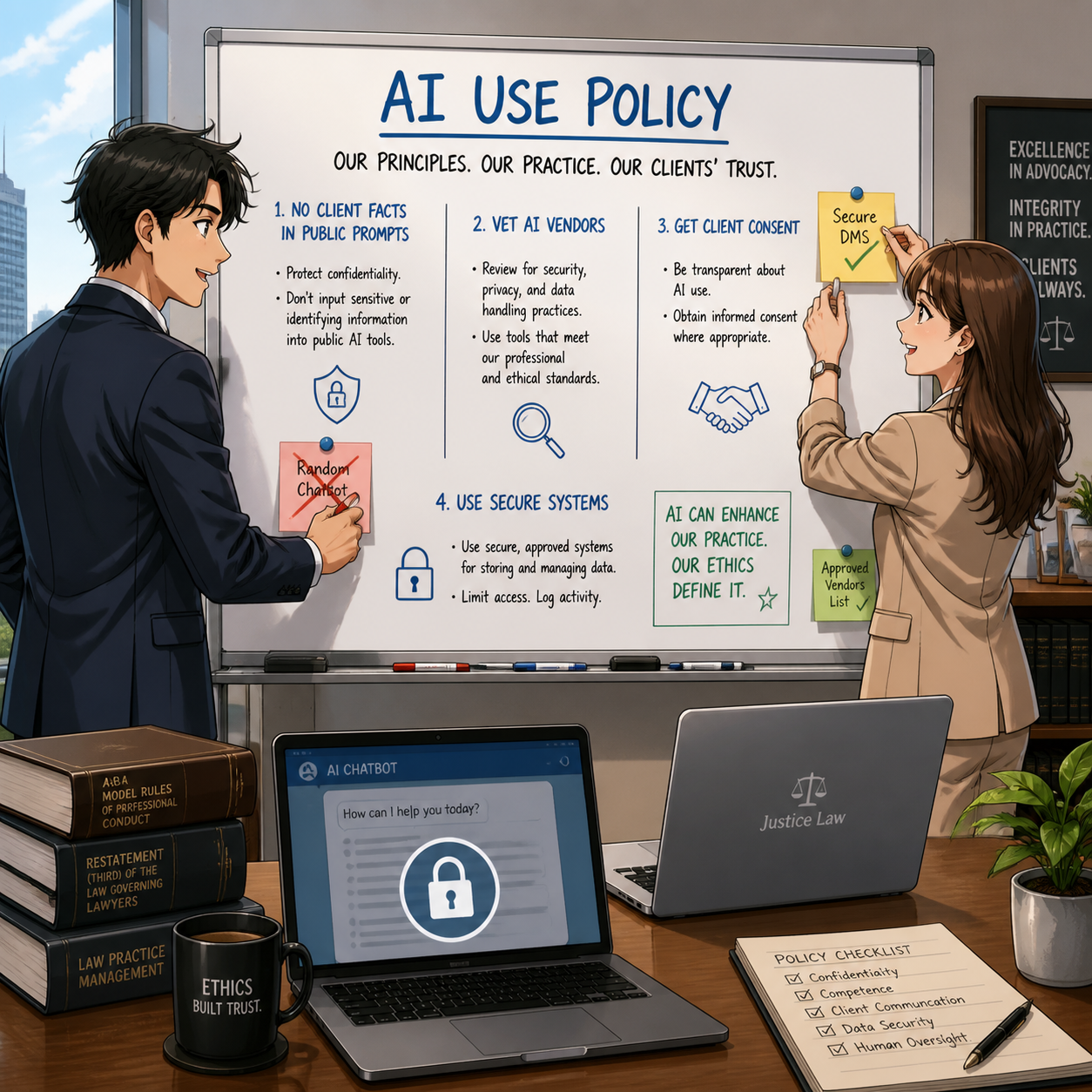
1. Establish an AI Use Policy

Even if you’re a solo, write down what you will and won’t do with public chatbots.

lawyers need to build practical, ethical AI policies for practice.

  • No client names, exact fact patterns, or identifiable deal terms in public tools.

  • Use AI for structure and language, not for strategy or confidential analysis.

  • Prefer client‑specific, non‑logging enterprise tools when handling sensitive material.

Treat this like you treat your cloud storage or remote‑work policy — it’s part of your competence under Model Rule 1.1 and your supervisory obligations under 5.1/5.3 if you have staff.

2. Separate “Public Prompting” from “Privileged Thinking” 🧠

Use public chatbots for:

  • Headline and meta description drafting.

  • Blog outlines, post ideas, or simple explainer language for non‑client scenarios.

  • Rough templates for standard documents that you will heavily edit.

Avoid using them for:

  • Fact‑specific case assessments.

  • Litigation strategy, negotiation plans, or internal “playbooks” like Krafton’s “Project X.” 

  • Anything that feels like the kind of conversation you’d normally have only with a colleague behind closed doors.

This separation keeps your privileged work product inside tools and workflows you control.

3. Vet Vendors Like You Vet e‑Discovery Platforms

If you move beyond public chatbots to paid AI tools, evaluate them as you would any major legaltech vendor:

  • Where is data stored?

  • Is training on your material disabled by default?

  • Can you get a Business Associate Agreement or Data Processing Agreement / Data Protection Impact Assessment that aligns with your jurisdiction’s expectations?

The ABA’s Formal Opinion 477R on secure communications and cloud ethics opinions from state bars all provide analogies: reasonable steps, not perfection, are required — but “type client memo into random website” is not reasonable. 😄

4. Document Client Consent When AI Is Material to the Representation

If you expect to use AI in a way that materially affects how you deliver legal services, communicate that to clients under Rule 1.4:

  • Explain benefits (efficiency, faster drafting).

  • Explain risks (data handling, reliability, hallucinations).

  • Offer an AI‑free option.

Written engagement terms that address AI use can save hard conversations later if something goes sideways.

5. Revisit Your “Bad Facts” Mindset

Reading this Delaware opinion, you see how internal strategy — including AI‑assisted plotting — can become a litigation exhibit.  For lawyers, that’s an invitation to ask: 

“If this prompt or chatbot conversation showed up in an opinion, would I be comfortable defending it under the Model Rules?”

If the answer is no, don’t send it. That simple heuristic scales across tools and platforms.

What This Case Signals for the Next Wave of Legal Tech 🌊

There can be significant legal consequences for AI chatbot misuse in legal disputes.

The opinion in Fortis Advisors v. Krafton is not an ethics decision aimed at lawyers, but it shows courts will:

  • Scrutinize AI‑assisted strategies as part of broader narratives about good faith, bad faith, and pretext.

  • Expect parties — and by extension, counsel — to maintain and produce AI‑related records where relevant.

  • Be unimpressed by attempts to retroactively justify decisions made for economic reasons with thin “quality” or “readiness” arguments. 

As public models get more powerful and more embedded in practice, ABA Model Rules on competence, confidentiality, supervision, and candor apply just as they did when lawyers moved to email, smartphones, and the cloud. AI is just the next tool — but it’s a tool that makes it very easy to generate sophisticated bad ideas quickly.

Your job is to keep your ethical compass steady, even when the chatbot is very persuasive. 🧭

MTC

TSL Labs 🧪 Initiative: Attorney-Client Privilege vs. Public AI: The Hoeppner Decision Lawyers Need to Understand in 2026 ⚖️🤖

Join us for an AI-powered deep dive into the ethical challenges facing legal professionals in the age of generative AI. 🤖 We unpack the February 23, 2026, editorial AI may not be your co‑counsel—and a recent SDNY decision just made that painfully clear. ⚖️🤖.  Our Google Notebook LLM hostsbreaks down why a single click on a public AI tool’s Terms of Use can trigger a privilege waiver, and what “tech competence” really means in 2026—especially after United States v. Hoeppner and Judge Jed Rakoff’s wake-up-call analysis of confidentiality and third-party disclosure risk.

🔗 Read the full editorial on The Tech-Savvy Lawyer.Page and share this episode with a colleague who is experimenting with AI in client matters.

In our conversation, we cover the following

  • 00:00 — The “superhuman assistant” promise, and the procedural nightmare risk. 🧠⚖️

  • 00:01 — The core warning: AI use can “blow a hole” in privilege.

  • 00:02 — Editorial overview: “The AI Privilege Trap” by Michael D.J. Eisenberg.

  • 00:02 — The case: United States v. Hoeppner (SDNY) and why it matters.

  • 00:03 — Why Judge Jed Rakoff’s opinion gets attention (tech-literate, influential).

  • 00:03 — The facts: defendant drafts with a public AI tool, then sends outputs to counsel.

  • 00:04 — The court’s conclusion: no attorney-client privilege, no work product protection.

  • 00:05 — Privilege basics applied to AI: “confidential + lawyer” and why AI fails that test.

  • 00:06 — The Terms-of-Use problem: inputs/outputs may be collected and shared. 🧾

  • 00:07 — The “stranger on the street” analogy: you can’t retroactively make it confidential.

  • 00:08 — PII and client facts: why pasting sensitive data into public AI is high-risk.

  • 00:08 — ABA Model Rule 1.1: competence includes understanding tech risks.

  • 00:09 — ABA Model Rule 1.6: confidentiality and waiver risk with public AI.

  • 00:10 — “Reasonable safeguards”: read policies, adjust settings, and know training/logging.

  • 00:11 — Public vs. enterprise AI: why contracts and “walled gardens” matter.

  • 00:11 — Legal research AI examples discussed: Lexis/Westlaw-style AI offerings.

  • 00:12 — ABA Model Rules 5.1 & 5.3: supervise AI like a nonlawyer assistant/vendor.

  • 00:13 — Redefining “tech-savvy lawyer” in 2026: judgment and restraint. 🧭

  • 00:14 — The “straight-face test”: could you defend confidentiality after a judge reads the policy?

  • 00:15 — Client-side risk: clients can sabotage privilege before contacting counsel.

  • 00:16 — Practical takeaway: check settings, read the fine print, keep true secrets offline (for now). 🔒

RESOURCES

Mentioned in the episode

Software & Cloud Services mentioned in the conversation

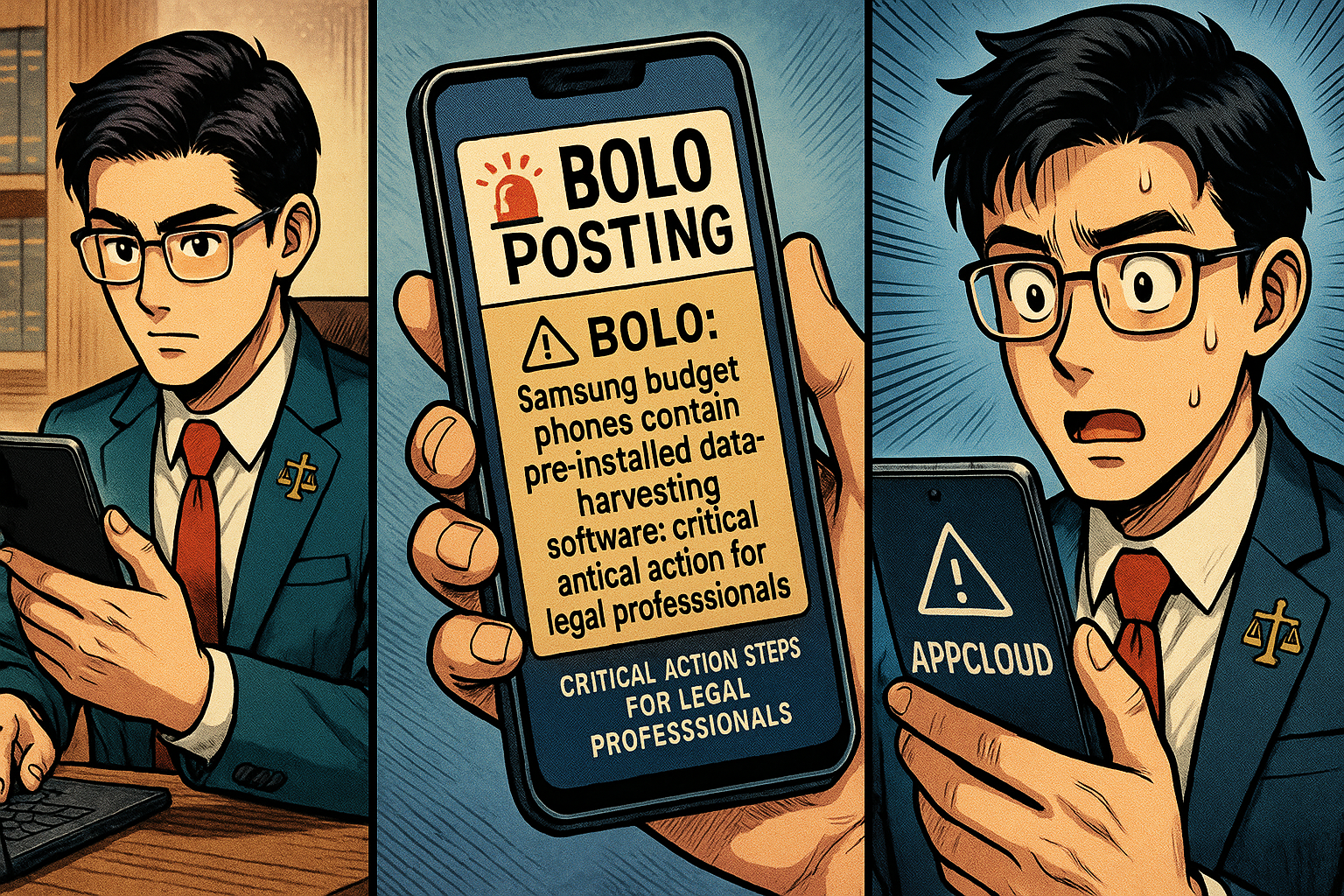
🚨 BOLO: Samsung Budget Phones Contain Pre-Installed Data-Harvesting Software: Critical Action Steps for Legal Professionals

‼️ ALERT: Hidden Spyware in Samsung Phones!

Samsung Galaxy A, M, and F series smartphones contain pre-installed software called AppCloud, developed by ironSource (now owned by Unity Technologies), that harvests user data, including location information, app usage patterns, IP addresses, and potentially biometric data. This software cannot be fully uninstalled without voiding your device warranty, and it operates without accessible privacy policies or explicit consent mechanisms. Legal professionals using these devices face significant risks to attorney-client privilege and confidential client information.

The Threat Landscape

AppCloud runs quietly in the background with permissions to access network connections, download files without notification, and prevent phones from sleeping. The application is deeply integrated into Samsung's One UI operating system, making it impossible to fully remove through standard methods. Users across West Asia, North Africa, Europe, and South Asia report that even after disabling the application, it reappears following system updates.

The digital rights organization SMEX documented that AppCloud's privacy policy is not accessible online, and the application does not present users with consent screens or terms of service disclosures. This lack of transparency raises serious ethical and legal compliance concerns, particularly for attorneys bound by professional responsibility rules regarding client confidentiality.

Legal and Ethical Implications for Attorneys

Under ABA Model Rule 1.6, attorneys must make "reasonable efforts to prevent the inadvertent or unauthorized disclosure of, or unauthorized access to, information relating to the representation of a client". The duty of technological competence under Rule 1.1, Comment 8, requires attorneys to "keep abreast of changes in the law and its practice, including the benefits and risks associated with relevant technology".

The New York Bar's 2022 ethics opinion specifically addresses smartphone security, prohibiting attorneys from sharing contact information with smartphone applications unless they can confirm that no person will view confidential client information and that data will not be transferred to third parties without client consent. AppCloud's data harvesting practices appear to violate both conditions.

Immediate Action Steps

‼️ Act now if you’ve purchased certain samsung phones - your bar license could be in jeopardy!

Step 1: Identify Affected Devices
Check whether you use a Samsung Galaxy A series (A05 through A56), M series (M01 through M56), or F series device. These budget and mid-range models are primary targets for AppCloud installation.

Step 2: Disable AppCloud
Navigate to Settings > Apps > Show System Apps > AppCloud > Disable. Additionally, revoke notification permissions, restrict background data usage, and disable the "Install unknown apps" permission.

Step 3: Monitor for Reactivation
After system updates, return to AppCloud settings and re-disable the application.

Step 4: Consider Device Migration
For attorneys handling highly sensitive matters, consider transitioning to devices without pre-installed data collection software. Document your decision-making process as evidence of reasonable security measures.

Step 5: Client Notification Assessment
Evaluate whether client notification is required under your jurisdiction's professional responsibility rules. California's Formal Opinion 2020-203 addresses obligations following an electronic data compromise.

The Bottom Line

Budget smartphone economics should not compromise attorney-client privilege. Samsung's partnership with ironSource places aggressive advertising technology on devices used by legal professionals worldwide. Until Samsung provides transparent opt-out mechanisms or removes AppCloud entirely, attorneys using affected devices should implement immediate mitigation measures and document their security protocols.

🎙️TSL Labs! MTC: The Hidden AI Crisis in Legal Practice: Why Lawyers Must Unmask Embedded Intelligence Before It's Too Late!

📌 Too Busy to Read This Week's Editorial?

Join us for a professional deep dive into essential tech strategies for AI compliance in your legal practice. 🎙️ This AI-powered discussion unpacks the November 17, 2025, editorial, MTC: The Hidden AI Crisis in Legal Practice: Why Lawyers Must Unmask Embedded Intelligence Before It's Too Late! with actionable intelligence on hidden AI detection, confidentiality protocols, ethics compliance frameworks, and risk mitigation strategies. Artificial intelligence has been silently operating inside your most trusted legal software for years, and under ABA Formal Opinion 512, you bear full responsibility for all AI use, whether you knowingly activated it or it came as a default software update. The conversation makes complex technical concepts accessible to lawyers with varying levels of tech expertise—from tech-hesitant solo practitioners to advanced users—so you'll walk away with immediate, actionable steps to protect your practice, your clients, and your professional reputation.

In Our Conversation, We Cover the Following

00:00:00 - Introduction: Overview of TSL Labs initiative and the AI-generated discussion format

00:01:00 - The Silent Compliance Crisis: How AI has been operating invisibly in your software for years

00:02:00 - Core Conflict: Understanding why helpful tools simultaneously create ethical threats to attorney-client privilege

00:03:00 - Document Creation Vulnerabilities: Microsoft Word Co-pilot and Grammarly's hidden data processing

00:04:00 - Communication Tools Risks: Zoom AI Companion and the cautionary Otter.ai incident

00:05:00 - Research Platform Dangers: Westlaw and Lexis+ AI hallucination rates between 17-33%

00:06:00 - ABA Formal Opinion 512: Full lawyer responsibility for AI use regardless of awareness

00:07:00 - Model Rule 1.6 Analysis: Confidentiality breaches through third-party AI systems

00:08:00 - Model Rule 5.3 Requirements: Supervising AI tools with the same diligence as human assistants

00:09:00 - Five-Step Compliance Framework: Technology audits and vendor agreement evaluation

00:10:00 - Firm Policies and Client Consent: Establishing protocols and securing informed consent

00:11:00 - The Verification Imperative: Lessons from the Mata v. Avianca sanctions case

00:12:00 - Billing Considerations: Navigating hourly versus value-based fee models with AI

00:13:00 - Professional Development: Why tool learning time is non-billable competence maintenance

00:14:00 - Ongoing Compliance: The necessity of quarterly reviews as platforms rapidly evolve

00:15:00 - Closing Remarks: Resources and call to action for tech-savvy innovation

Resources

Mentioned in the Episode

Software & Cloud Services Mentioned in the Conversation

MTC: The Hidden AI Crisis in Legal Practice: Why Lawyers Must Unmask Embedded Intelligence Before It's Too Late!

Lawyers need Digital due diligence in order to say on top of their ethic’s requirements.

Artificial intelligence has infiltrated legal practice in ways most attorneys never anticipated. While lawyers debate whether to adopt AI tools, they've already been using them—often without knowing it. These "hidden AI" features, silently embedded in everyday software, present a compliance crisis that threatens attorney-client privilege, confidentiality obligations, and professional responsibility standards.

The Invisible Assistant Problem

Hidden AI operates in plain sight. Microsoft Word's Copilot suggests edits while you draft pleadings. Adobe Acrobat's AI Assistant automatically identifies contracts and extracts key terms from PDFs you're reviewing. Grammarly's algorithm analyzes your confidential client communications for grammar errors. Zoom's AI Companion transcribes strategy sessions with clients—and sometimes captures what happens after you disconnect.

DocuSign now deploys AI-Assisted Review to analyze agreements against predefined playbooks. Westlaw and Lexis+ embed generative AI directly into their research platforms, with hallucination rates between 17% and 33%. Even practice management systems like Clio and Smokeball have woven AI throughout their platforms, from automated time tracking descriptions to matter summaries.

The challenge isn't whether these tools provide value—they absolutely do. The crisis emerges because lawyers activate features without understanding the compliance implications.

ABA Model Rules Meet Modern Technology

The American Bar Association's Formal Opinion 512, issued in July 2024, makes clear that lawyers bear full responsibility for AI use regardless of whether they actively chose the technology or inherited it through software updates. Several Model Rules directly govern hidden AI features in legal practice.

Model Rule 1.1 requires competence, including maintaining knowledge about the benefits and risks associated with relevant technology. Comment 8 to this rule, adopted by most states, mandates that lawyers understand not just primary legal tools but embedded AI features within those tools. This means attorneys cannot plead ignorance when Microsoft Word's AI Assistant processes privileged documents.

Model Rule 1.6 imposes strict confidentiality obligations. Lawyers must make "reasonable efforts to prevent the inadvertent or unauthorized disclosure of, or unauthorized access to, information relating to the representation of a client". When Grammarly accesses your client emails to check spelling, or when Zoom's AI transcribes confidential settlement discussions, you're potentially disclosing protected information to third-party AI systems.

Model Rule 5.3 extends supervisory responsibilities to "nonlawyer assistance," which includes non-human assistance like AI. The 2012 amendment changing "assistants" to "assistance" specifically contemplated this scenario. Lawyers must supervise AI tools with the same diligence they'd apply to paralegals or junior associates.

Model Rule 1.4 requires communication with clients about the means used to accomplish their objectives. This includes informing clients when AI will process their confidential information, obtaining informed consent, and explaining the associated risks.

Where Hidden AI Lurks in Legal Software

🚨 lawyers don’t breach your ethical duties with AI shortcuts!!!

Microsoft 365 Copilot integrates AI across Word, Outlook, and Teams—applications lawyers use hundreds of times daily. The AI drafts documents, summarizes emails, and analyzes meeting transcripts. Most firms that subscribe to Microsoft 365 have Copilot enabled by default in recent licensing agreements, yet many attorneys remain unaware their correspondence flows through generative AI systems.

Adobe Acrobat now automatically recognizes contracts and generates summaries with AI Assistant. When you open a PDF contract, Adobe's AI immediately analyzes it, extracts key dates and terms, and offers to answer questions about the document. This processing occurs before you explicitly request AI assistance.

Legal research platforms embed AI throughout their interfaces. Westlaw Precision AI and Lexis+ AI process search queries through generative models that hallucinate incorrect case citations 17% to 33% of the time according to Stanford research. These aren't separate features—they're integrated into the standard search experience lawyers rely upon daily.

Practice management systems deploy hidden AI for intake forms, automated time entry descriptions, and matter summaries. Smokeball's AutoTime AI generates detailed billing descriptions automatically. Clio integrates AI into client relationship management. These features activate without explicit lawyer oversight for each instance of use.

Communication platforms present particularly acute risks. Zoom AI Companion and Microsoft Teams AI automatically transcribe meetings and generate summaries. Otter.ai's meeting assistant infamously continued recording after participants thought a meeting ended, capturing investors' candid discussion of their firm's failures. For lawyers, such scenarios could expose privileged attorney-client communications or work product.

The Compliance Framework

Establishing ethical AI use requires systematic assessment. First, conduct a comprehensive technology audit. Inventory every software application your firm uses and identify embedded AI features. This includes obvious tools like research platforms and less apparent sources like PDF readers, email clients, and document management systems.

Second, evaluate each AI feature against confidentiality requirements. Review vendor agreements to determine whether the AI provider uses your data for model training, stores information after processing, or could disclose data in response to third-party requests. Grammarly, for example, offers HIPAA compliance but only for enterprise customers with 100+ seats who execute Business Associate Agreements. Similar limitations exist across legal software.

Third, implement technical safeguards. Disable AI features that lack adequate security controls. Configure settings to prevent automatic data sharing. Adobe and Microsoft both offer options to prevent AI from training on customer data, but these protections require active configuration.

Fourth, establish firm policies governing AI use. Designate responsibility for monitoring AI features in licensed software. Create protocols for evaluating new tools before deployment. Develop training programs ensuring all attorneys understand their obligations when using AI-enabled applications.

Fifth, secure client consent. Update engagement letters to disclose AI use in service delivery. Explain the specific risks associated with processing confidential information through AI systems. Document informed consent for each representation.

The Verification Imperative

ABA Formal Opinion 512 emphasizes that lawyers cannot delegate professional judgment to AI. Every output requires independent verification. When Westlaw Precision AI suggests research authorities, lawyers must confirm those cases exist and accurately reflect the law. When CoCounsel Drafting generates contract language in Microsoft Word, attorneys must review for accuracy, completeness, and appropriateness to the specific client matter.

The infamous Mata v. Avianca case, where lawyers submitted AI-generated briefs citing fabricated cases, illustrates the catastrophic consequences of failing to verify AI output. Every jurisdiction that has addressed AI ethics emphasizes this verification duty.

Cost and Billing Considerations

Formal Opinion 512 addresses whether lawyers can charge the same fees when AI accelerates their work. The opinion suggests lawyers cannot bill for time saved through AI efficiency under traditional hourly billing models. However, value-based and flat-fee arrangements may allow lawyers to capture efficiency gains, provided clients understand AI's role during initial fee negotiations.

Lawyers cannot bill clients for time spent learning AI tools—maintaining technological competence represents a professional obligation, not billable work. As AI becomes standard in legal practice, using these tools may become necessary to meet competence requirements, similar to how electronic research and e-discovery tools became baseline expectations.

Practical Steps for Compliance

Start by examining your Microsoft Office subscription. Determine whether Copilot is enabled and what data sharing settings apply. Review Adobe Acrobat's AI Assistant settings and disable automatic contract analysis if your confidentiality review hasn't been completed.

Contact your Westlaw and Lexis representatives to understand exactly how AI features operate in your research platform. Ask specific questions: Does the AI train on your search queries? How are hallucinations detected and corrected? What happens to documents you upload for AI analysis?

Audit your practice management system. If you use Clio, Smokeball, or similar platforms, identify every AI feature and evaluate its compliance with confidentiality obligations. Automatic time tracking that generates descriptions based on document content may reveal privileged information if billing statements aren't properly redacted.

Review video conferencing policies. Establish protocols requiring explicit disclosure when AI transcription activates during client meetings. Obtain informed consent before recording privileged discussions. Consider disabling AI assistants entirely for confidential matters.

Implement regular training programs. Technology competence isn't achieved once—it requires ongoing education as AI features evolve. Schedule quarterly reviews of new AI capabilities deployed in your software stack.

Final Thoughts 👉 The Path Forward

lawyers must be able to identify and contain ai within the tech tools they use for work!

Hidden AI represents both opportunity and obligation. These tools genuinely enhance legal practice by accelerating research, improving drafting, and streamlining administrative tasks. The efficiency gains translate into better client service and more competitive pricing.

However, lawyers cannot embrace these benefits while ignoring their ethical duties. The Model Rules apply with equal force to hidden AI as to any other aspect of legal practice. Ignorance provides no defense when confidentiality breaches occur or inaccurate AI-generated content damages client interests.

The legal profession stands at a critical juncture. AI integration will only accelerate as software vendors compete to embed intelligent features throughout their platforms. Lawyers who proactively identify hidden AI, assess compliance risks, and implement appropriate safeguards will serve clients effectively while maintaining professional responsibility.

Those who ignore hidden AI features operating in their daily practice face disciplinary exposure, malpractice liability, and potential privilege waivers. The choice is clear: unmask the hidden AI now, or face consequences later.

MTC

MTC: London's iPhone Theft Crisis: Critical Mobile Device Security Lessons for Traveling Lawyers 📱⚖️

lawyers can learn about cyber mobile security from the recent iphone thefts in london

Recent events in London should serve as a wake-up call for every legal professional who carries client data beyond the office walls. London police recently dismantled a sophisticated international theft ring responsible for smuggling approximately 40,000 stolen iPhones to China in just twelve months. This operation revealed thieves earning up to £300 per stolen device, with phones reselling overseas for as much as $5,000. With over 80,000 phones stolen in London last year alone, this crisis underscores critical vulnerabilities that lawyers must address when working remotely.

The sophistication of these operations is alarming. Criminals on electric bikes snatch phones from unsuspecting victims and immediately wrap devices in aluminum foil to block tracking signals. This industrial-scale crime demonstrates that our mobile devices—which contain privileged communications, case strategies, and confidential client data—are valuable targets for organized criminal networks operating globally.

Your Ethical Obligations Are Clear

ABA Model Rule 1.1 requires lawyers to maintain competence, including understanding "the benefits and risks associated with relevant technology". This duty of technological competence has been adopted by over 40 states and isn't optional—it's fundamental to ethical practice. Model Rule 1.6(c) mandates that lawyers "make reasonable efforts to prevent the inadvertent or unauthorized disclosure of, or unauthorized access to, information relating to the representation of a client".

When your phone disappears—whether through theft, loss, or border seizure—you face potential violations of these ethical duties. Recent data shows U.S. Customs and Border Protection searched 14,899 devices between April and June 2025, a 16.7% increase from previous surges. Lawyers traveling internationally face heightened risks, and a stolen or searched device can compromise attorney-client privilege instantly.

Essential Security Measures for Mobile Lawyers

Before leaving your office, implement these non-negotiable protections. Enable full-device encryption on all smartphones, tablets, and laptops. For iPhones, setting a passcode automatically enables encryption; Android users must manually activate this feature in security settings. Strong passwords matter—use alphanumeric combinations of at least 12 characters, avoiding easily guessed patterns.

lawyer need to know how to protect their client’s pii when crossing the boarder!

Two-factor authentication (2FA) adds critical protection layers. Even if someone obtains your password, 2FA requires secondary verification through your phone or authentication app. This simple step dramatically reduces unauthorized access risks. Configure remote wipe capabilities before traveling. If your device is stolen, you can erase all data remotely, protecting client information even when physical recovery is impossible.

Disable biometric authentication when traveling internationally. Face ID and fingerprint scanners can be used against you at borders where Fourth Amendment protections are diminished. Restart your device before crossing borders to force password-only access. Consider carrying a "clean" device for international travel, accessing files only through encrypted cloud storage rather than storing sensitive data locally.

Coffee Shops, Airports, and Public Spaces

Public Wi-Fi networks pose serious interception risks. Hackers create fake hotspots with legitimate-sounding names, capturing everything you transmit. As lawyers increasingly embrace cloud-based computing for their work, encryption when using public Wi-Fi becomes non-negotiable

Always use a trusted VPN (Virtual Private Network) when connecting to public networks. VPNs encrypt your internet traffic, preventing interception even on compromised networks. Alternatively, use your smartphone's personal hotspot rather than connecting to public Wi-Fi. Turn off file sharing on all mobile devices. Avoid accessing highly sensitive client files in public spaces altogether—save detailed case work for secure, private connections.

Physical security deserves equal attention. Visual privacy screens prevent shoulder surfing. Position yourself with your back to walls in coffee shops so others cannot observe your screen. Be alert to your surroundings and maintain physical control of devices at all times. Never leave laptops, tablets, or phones unattended, even briefly.

Border Crossings and International Travel

Lawyers crossing international borders face unique challenges. CBP policies permit extensive device searches within 100 miles of borders under the border search exception, significantly reducing Fourth Amendment protections. New York State Bar Association Ethics Opinion 2017-5 addresses lawyers' duties when traveling with client data across borders.

The reasonableness standard governs your obligations. Evaluate whether you truly need to bring confidential information across borders. If travel requires client data, bring only materials professionally necessary for your specific purpose. Consider these strategies: store files in encrypted cloud services rather than locally; use strong passwords and disable biometric authentication; carry your bar card to identify yourself as an attorney if questioned; identify which files contain privileged information before reaching the border.

If border agents demand device access, clearly state that you are an attorney and the device contains privileged client communications. Ask whether the request is optional or mandatory. If agents conduct a search, document what occurred and consider whether client notification is required under Rule 1.4. New York Rule 1.6 requires taking reasonable steps to prevent unauthorized disclosure, with heightened precautions necessary when government agencies are opposing parties.

Practical Implementation Today

Create firm policies addressing mobile device security. Require immediate reporting of lost or stolen devices. Implement Mobile Device Management (MDM) software to monitor, secure, and remotely wipe all connected devices. Conduct regular security awareness training covering email practices, phishing recognition, and social engineering tactics.

Develop an Incident Response Plan before breaches occur. Know which experts to contact, document cybersecurity policies, and establish notification protocols. Under various state laws and regulations like California Civil Code § 1.798.82 and HIPAA's Breach Notification Rule, lawyers may be legally required to notify clients of data breaches.

Lawyers are on the front line of cybersecurity when on the go!

Communicate with clients about security measures. Obtain informed consent regarding electronic communications and any security limitations. Some firms include these discussions in engagement letters, setting clear expectations about communication methods and encryption use.

Stay current with evolving threats. Subscribe to legal technology security bulletins. The Tech-Savvy Lawyer blog regularly covers mobile security issues, including recent coverage of the SlopAds malware campaign that compromised 224 Android applications on Google Play Store. Technology competence requires ongoing learning as threats and safeguards evolve.

The Bottom Line

The London iPhone theft crisis demonstrates that our devices are valuable targets for sophisticated criminal networks operating internationally. Every lawyer who works outside the office—whether at coffee shops, client meetings, or international destinations—must take mobile security seriously. Your ethical obligations under Model Rules 1.1 and 1.6 demand it. Your clients' confidential information depends on it. Your professional reputation requires it.

Implementing these security measures isn't complicated or expensive. Enable encryption. Use strong passwords and 2FA. Avoid public Wi-Fi or use VPNs. Disable biometrics when traveling. Maintain physical control of devices. These straightforward steps significantly reduce risks while allowing you to work effectively from anywhere.

The legal profession has embraced mobile technology's benefits—now we must address its risks with equal commitment. Don't wait for a theft, loss, or border seizure to prompt action. Protect your clients' confidential information today.

MTC

MTC: 🔒 Your AI Conversations Aren't as Private as You Think: What the OpenAI Court Ruling Means for Legal Professionals

A watershed moment in digital privacy has arrived, and it carries profound implications for lawyers and their clients.

The recent court ruling in In re: OpenAI, Inc., Copyright Infringement Litigation has exposed a critical vulnerability in the relationship between artificial intelligence tools and user privacy rights. On May 13, 2025, U.S. Magistrate Judge Ona T. Wang issued an order requiring OpenAI to "preserve and segregate all output log data that would otherwise be deleted on a going forward basis". This unprecedented directive affected more than 400 million ChatGPT users worldwide and fundamentally challenged assumptions about data privacy in the AI era.[1][2][3][4]

While the court modified its order on October 9, 2025, terminating the blanket preservation requirement as of September 26, 2025, the damage to user trust and the precedent for future litigation remain significant. More importantly, the ruling illuminates a stark reality for legal professionals: the "delete" button offers an illusion of control rather than genuine data protection.

The Court Order That Changed Everything ⚖️

The preservation order emerged from a copyright infringement lawsuit filed by The New York Times against OpenAI in December 2023. The Times alleged that OpenAI unlawfully used millions of its articles to train ChatGPT without permission or compensation. During discovery, concerns arose that OpenAI had been deleting user conversations that could potentially demonstrate copyright violations.

Judge Wang's response was sweeping. The court ordered OpenAI to retain all ChatGPT output logs, including conversations users believed they had permanently deleted, temporary chats designed to auto-delete after sessions, and API-generated outputs regardless of user privacy settings. The order applied retroactively, meaning conversations deleted months or even years earlier remained archived in OpenAI's systems.

OpenAI immediately appealed, arguing the order was overly broad and compromised user privacy. The company contended it faced conflicting obligations between the court's preservation mandate and "numerous privacy laws and regulations throughout the country and the world". Despite these objections, Judge Wang denied OpenAI's motion, prioritizing the preservation of potential evidence over privacy concerns.

The October 9, 2025 stipulation and order brought partial relief. OpenAI's ongoing obligation to preserve all new output log data terminated as of September 26, 2025. However, all data preserved before that cutoff remains accessible to plaintiffs (except for users in the European Economic Area, Switzerland, and the United Kingdom). Additionally, OpenAI must continue preserving output logs from specific domains identified by the New York Times and may be required to add additional domains as the litigation progresses.

Privacy Rights in the Age of AI: An Eroding Foundation 🛡️

This case demonstrates that privacy policies are not self-enforcing legal protections. Users who relied on OpenAI's representations about data deletion discovered those promises could be overridden by court order without their knowledge or consent. The "temporary chat" feature, marketed as providing ephemeral conversations, proved anything but temporary when litigation intervened.

The implications extend far beyond this single case. The ruling establishes that AI-generated content constitutes discoverable evidence subject to preservation orders. Courts now view user conversations with AI not as private exchanges but as potential legal records that can be compelled into evidence.

For legal professionals, this reality is particularly troubling. Lawyers regularly handle sensitive client information that must remain confidential under both ethical obligations and the attorney-client privilege. The court order revealed that even explicitly deleted conversations may be retained indefinitely when litigation demands it.

The Attorney-Client Privilege Crisis 👥

Attorney-client privilege protects confidential communications between lawyers and clients made for the purpose of obtaining or providing legal advice. This protection is fundamental to the legal system. However, the privilege can be waived through voluntary disclosure to third parties outside the attorney-client relationship.

When lawyers input confidential client information into public AI platforms like ChatGPT, they potentially create a third-party disclosure that destroys privilege. Many generative AI systems learn from user inputs, incorporating that information into their training data. This means privileged communications could theoretically appear in responses to other users' queries.

The OpenAI preservation order compounds these concerns. It demonstrates that AI providers cannot guarantee data will be deleted upon request, even when their policies promise such deletion. Lawyers who used ChatGPT's temporary chat feature or deleted sensitive conversations believing those actions provided privacy protection now discover their confidential client communications may be preserved indefinitely as litigation evidence.

The risk is not theoretical. In the now-famous Mata v. Avianca, Inc. case, a lawyer used a free version of ChatGPT to draft a legal brief containing fabricated citations. While the lawyer faced sanctions for submitting false information to the court, legal ethics experts noted the confidentiality implications of the increasingly specific prompts the attorney used, which may have revealed client confidential information.

ABA Model Rules and AI: What Lawyers Must Know 📋

The American Bar Association's Model Rules of Professional Conduct govern lawyer behavior, and while these rules predate generative AI, they apply with full force to its use. On July 29, 2024, the ABA Standing Committee on Ethics and Professional Responsibility issued Formal Opinion 512, providing the first comprehensive guidance on lawyers' use of generative AI.

Model Rule 1.1: Competence requires lawyers to provide competent representation, including maintaining "legal knowledge, skill, thoroughness and preparation reasonably necessary for representation". The rule's commentary [8] specifically states lawyers must understand "the benefits and risks associated with relevant technology". Opinion 512 clarifies that lawyers need not become AI experts, but must have a "reasonable understanding of the capabilities and limitations of the specific GenAI technology" they use. This is not a one-time obligation. Given AI's rapid evolution, lawyers must continuously update their understanding.

Model Rule 1.6: Confidentiality creates perhaps the most significant ethical challenge for AI use. The rule prohibits lawyers from revealing "information relating to the representation of a client" and requires them to "make reasonable efforts to prevent the inadvertent or unauthorized disclosure of, or unauthorized access to, information relating to the representation". Self-learning AI tools that train on user inputs create substantial risk of improper disclosure. Information entered into public AI systems may be stored, processed by third-party vendors, and potentially accessed by company employees or incorporated into model training. Opinion 512 recommends lawyers obtain informed client consent before inputting any information related to representation into AI systems. Lawyers must also thoroughly review the terms of use, privacy policies, and contractual agreements of any AI tool they employ.

Model Rule 1.4: Communication obligates lawyers to keep clients reasonably informed about their representation. When using AI tools, lawyers should disclose this fact to clients, particularly when the AI processes client information or could impact the representation. Clients have a right to understand how their matters are being handled and what technologies may access their confidential information.[25][22][20][21]

Model Rule 3.3: Candor Toward the Tribunal requires lawyers to be truthful in their representations to courts. AI systems frequently produce "hallucinations"—plausible-sounding but entirely fabricated information, including fake case citations. Lawyers remain fully responsible for verifying all AI outputs before submitting them to courts or relying on them for legal advice. The Mata v. Avianca case serves as a cautionary tale of the consequences when lawyers fail to fulfill this obligation.

Model Rules 5.1 and 5.3: Supervisory Responsibilities make lawyers responsible for the conduct of other lawyers and nonlawyer assistants working under their supervision. When staff members use AI tools, supervising lawyers must ensure appropriate policies, training, and oversight exist to prevent ethical violations.

Model Rule 1.5: Fees requires lawyers to charge reasonable fees. Opinion 512 addresses whether lawyers can bill clients for time "saved" through AI efficiency gains. The guidance suggests that when using hourly billing, efficiencies gained through AI should benefit clients. However, lawyers may pass through reasonable direct costs of AI services (such as subscription fees) when properly disclosed and agreed upon in advance.

State-by-State Variations: A Patchwork of Protection 🗺️

While the ABA Model Rules provide a national framework, individual states adopt and interpret ethics rules differently. Legal professionals must understand their specific state's requirements, which can vary significantly.[2

Lawyers must protect client’s PII from AI privacy failures!

Florida has taken a proactive stance. In January 2025, The Florida Bar Board of Governors unanimously approved Advisory Opinion 24-1, which specifically addresses generative AI use. The opinion recommends lawyers obtain "affected client's informed consent prior to utilizing a third-party generative AI program if the utilization would involve the disclosure of any confidential information". Florida's guidance emphasizes that lawyers remain fully responsible for AI outputs and cannot treat AI as a substitute for legal judgment.

Texas issued Opinion 705 from its State Bar Professional Ethics Committee in February 2025. The opinion outlines four key obligations: lawyers must reasonably understand AI technology before using it, exercise extreme caution when inputting confidential information into AI tools that might store or expose client data, verify the accuracy of all AI outputs, and avoid charging clients for time saved by AI efficiency gains. Texas also emphasizes that lawyers should consider informing clients when AI will be used in their matters.

New York has developed one of the most comprehensive frameworks through its State Bar Association Task Force on Artificial Intelligence. The April 2024 report provides a thorough analysis across the full spectrum of ethical considerations, including competence, confidentiality, client communication, billing practices, and access to justice implications. New York's guidance stands out for addressing both immediate practical considerations and longer-term questions about AI's transformation of the legal profession.

Alaska issued Ethics Opinion 2025-1 surveying AI issues with particular focus on competence, confidentiality, and billing. The opinion notes that when using non-closed AI systems (such as general consumer products), lawyers should anonymize prompts to avoid revealing client confidential information. Alaska's guidance explicitly cites to its cloud-computing predecessor opinion, treating AI data storage similarly to law firm files on third-party remote servers.

California, Massachusetts, New Jersey, and Oregon have issued guidance through their state attorneys general on how existing state privacy laws apply to AI. California's advisories emphasize that AI use must comply with the California Consumer Privacy Act (CCPA), requiring transparency, respecting individual data rights, and limiting data processing to what is "reasonably necessary and proportionate". Massachusetts focuses on consumer protection, anti-discrimination, and data security requirements. Oregon highlights that developers using personal data to train AI must clearly disclose this use and obtain explicit consent when dealing with sensitive data.[31]

These state-specific approaches create a complex compliance landscape. A lawyer practicing in multiple jurisdictions must understand and comply with each state's requirements. Moreover, state privacy laws like the CCPA and similar statutes in other states impose additional obligations beyond ethics rules.

Enterprise vs. Consumer AI: Understanding the Distinction 💼

Not all AI tools pose equal privacy risks. The OpenAI preservation order highlighted critical differences between consumer-facing products and enterprise solutions.

Consumer Plans (Free, Plus, Pro, and Team) were fully subject to the preservation order. These accounts store user conversations on OpenAI's servers with limited privacy protections. While users can delete conversations, the court order demonstrated that those deletions are not permanent. OpenAI retains the technical capability to preserve and access this data when required by legal process.

Enterprise Accounts offer substantially stronger privacy protections. ChatGPT Enterprise and Edu plans were excluded from the preservation order's broadest requirements. These accounts typically include contractual protections such as Data Processing Agreements (DPAs), commitments against using customer data for model training, and stronger data segregation. However, even enterprise accounts must preserve data when covered by specific legal orders.

Zero Data Retention Agreements provide the highest level of protection. Users who have negotiated such agreements with OpenAI are excluded from data preservation requirements. These arrangements ensure that user data is not retained beyond the immediate processing necessary to generate responses.

For legal professionals, the lesson is clear: consumer-grade AI tools are inappropriate for handling confidential client information. Lawyers who use AI must ensure they employ enterprise-level solutions with proper contractual protections, or better yet, closed systems where client data never leaves the firm's control.

Practical Steps for Legal Professionals: Protecting Privilege and Privacy 🛠️

Given these risks, what should lawyers do? Abandoning AI entirely is neither realistic nor necessary. Instead, legal professionals must adopt a risk-management approach.

Conduct thorough due diligence before adopting any AI tool. Review terms of service, privacy policies, and data processing agreements in detail. Understand exactly what data the AI collects, how long it's retained, whether it's used for model training, who can access it, and what security measures protect it. If these answers aren't clear from public documentation, contact the vendor directly for written clarification.

Implement written AI policies for your firm or legal department. These policies should specify which AI tools are approved for use, what types of information can (and cannot) be input into AI systems, required safeguards such as data anonymization, client consent requirements, verification procedures for AI outputs, and training requirements for all staff. Document these policies and ensure all lawyers and staff understand and follow them.

Default to data minimization. Before inputting any information into an AI system, ask whether it's necessary. Can you accomplish the task without including client-identifying information? Many AI applications work effectively with anonymized or hypothetical scenarios that don't reveal actual client matters. When in doubt, err on the side of caution.

Obtain informed client consent when using AI for client matters, particularly when inputting any information related to the representation. This consent should be specific about what AI tools will be used, what information may be shared with those tools, what safeguards are in place, and what risks exist despite those safeguards. General consent buried in engagement agreements is likely insufficient.

Use secure, purpose-built legal AI tools rather than consumer applications. Legal-specific AI products are designed with confidentiality requirements in mind and typically offer stronger privacy protections. Even better, consider closed-system AI that operates entirely within your firm's infrastructure without sending data to external servers.

Never assume deletion means erasure. The OpenAI case proves that deleted data may not be truly gone. Treat any information entered into an AI system as potentially permanent, regardless of what the system's privacy settings claim.

Maintain privileged communication protocols. Remember that AI is not your attorney. Communications with AI systems are not protected by attorney-client privilege. Never use AI as a substitute for consulting with qualified colleagues or outside counsel on genuinely privileged matters.

Stay informed about evolving guidance. AI technology and the regulatory landscape are both changing rapidly. Regularly review updates from your state bar association, the ABA, and other professional organizations. Consider attending continuing legal education programs on AI ethics and technology competence.

Final thoughts: The Future of Privacy Rights in an AI World 🔮

The OpenAI preservation order represents a pivotal moment in the collision between AI innovation and privacy rights. It exposes uncomfortable truths about the nature of digital privacy in 2025: privacy policies are subject to override by legal process, deletion features provide psychological comfort rather than technical and legal certainty, and third-party service providers cannot fully protect user data from discovery obligations.

For legal professionals, these realities demand a fundamental reassessment of how AI tools fit into practice. The convenience and efficiency AI provides must be balanced against the sacred duty to protect client confidences and maintain the attorney-client privilege. This is not an abstract concern or distant possibility. It is happening now, in real courtrooms, with real consequences for lawyers and clients.

State bars and regulators are responding, but the guidance remains fragmented and evolving. Federal privacy legislation addressing AI has yet to materialize, leaving a patchwork of state laws with varying requirements. In this environment, legal professionals cannot wait for perfect clarity before taking action.

The responsibility falls on each lawyer to understand the tools they use, the risks those tools create, and the steps necessary to fulfill ethical obligations in this new technological landscape. Ignorance is not a defense. "I didn't know the AI was storing that information" will not excuse a confidentiality breach or privilege waiver.

As AI becomes increasingly embedded in legal practice, the profession must evolve its approach to privacy and confidentiality. The traditional frameworks remain sound—the attorney-client privilege, the duty of confidentiality, the requirement of competence—but their application requires new vigilance. Lawyers must become technology stewards as well as legal advisors, understanding not just what the law says, but how the tools they use might undermine their ability to protect it.

The OpenAI case will not be the last time courts grapple with AI data privacy. As generative AI proliferates and litigation continues, more preservation orders, discovery disputes, and privilege challenges are inevitable. Legal professionals who fail to address these issues proactively may find themselves explaining to clients, judges, or disciplinary authorities why they treated confidential information so carelessly.

Privacy in the AI age demands more than passive reliance on vendor promises. It requires active, informed engagement with the technology we use and honest assessment of the risks we create. For lawyers, whose professional identity rests on the foundation of client trust and confidentiality, nothing less will suffice. The court ruling has made one thing abundantly clear: when it comes to AI and privacy, what you don't know can definitely hurt you—and your clients. ⚠️