📖 WORD OF THE WEEK (WoW): Zero Trust Architecture ⚖️🔐

Zero Trust Architecture and ABA Model Rules Compliance 🛡️
Lawyers need to "never trust, always verify" their network activity!

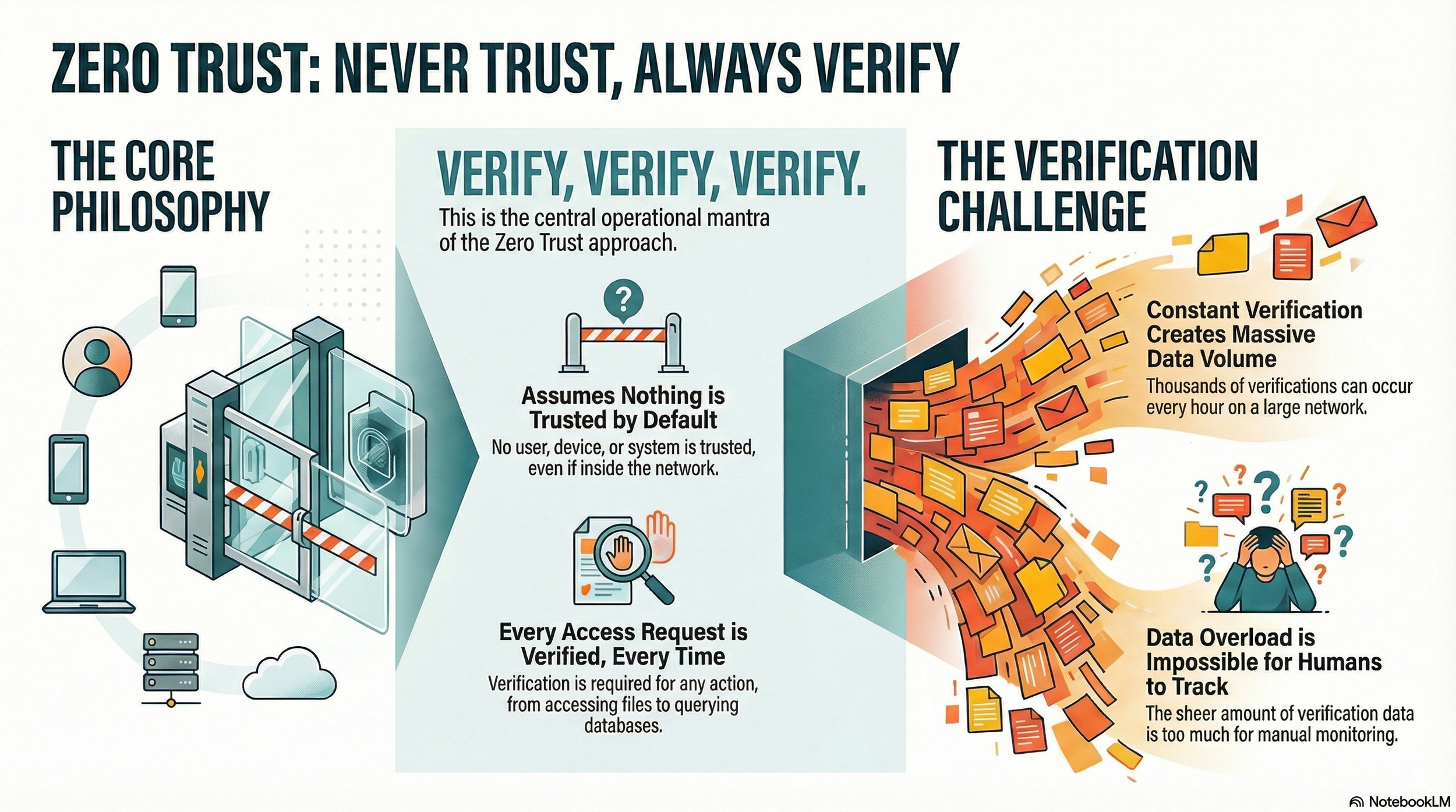
Zero Trust Architecture represents a fundamental shift in how law firms approach cybersecurity and fulfill ethical obligations. Rather than assuming that users and devices within a firm's network are trustworthy by default, this security model operates on the principle of "never trust, always verify." For legal professionals managing sensitive client information, implementing this framework has become essential to protecting confidentiality while maintaining compliance with ABA Model Rules.

The traditional security approach created a protective perimeter around a firm's network, trusting anyone inside that boundary. This model no longer reflects modern legal practice. Remote work, cloud-based case management systems, and mobile device usage mean that your firm's data exists across multiple locations and devices. Zero Trust abandons the perimeter-based approach entirely.

ABA Model Rule 1.6(c) requires lawyers to "make reasonable efforts to prevent the inadvertent or unauthorized disclosure of, or unauthorized access to, information relating to the representation of a client." Zero Trust Architecture directly fulfills this mandate by requiring continuous verification of every user and device accessing firm resources, regardless of location. This approach ensures compliance with the confidentiality duty that forms the foundation of legal practice.

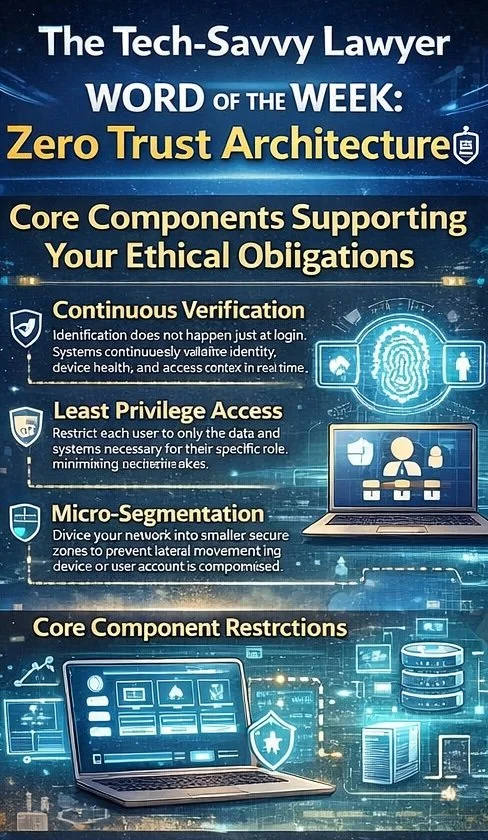
Core Components Supporting Your Ethical Obligations

Zero Trust Architecture operates through three interconnected principles aligned with ABA requirements.
legal professionals do you know the core components of modern cyber security?

  • Continuous verification means that authentication does not happen once at login. Instead, systems continuously validate user identity, device health, and access context in real time.

  • Least privilege access restricts each user to only the data and systems necessary for their specific role. An associate working on discovery does not need access to billing systems, and a paralegal in real estate does not need access to litigation files.

  • Micro-segmentation divides your network into smaller, secure zones. This prevents lateral movement, which means that if a bad actor compromises one device or user account, they cannot automatically access all firm systems.

ABA Model Rule 1.1, Comment 8 requires that lawyers maintain competence, including competence in "the benefits and risks associated with relevant technology." Understanding Zero Trust Architecture demonstrates that your firm maintains technological competence in cybersecurity matters. Additional critical components include multi-factor authentication, which requires users to verify their identity through multiple methods before accessing systems. Device authentication ensures that only approved and properly configured devices can connect to firm resources. End-to-end encryption protects data both at rest and in transit.

ABA Model Rule 1.4 requires lawyers to keep clients "reasonably informed about significant developments relating to the representation." Zero Trust Architecture supports this duty by protecting client information and enabling prompt client notification if security incidents occur.

ABA Model Rules 5.1 and 5.3 require supervisory lawyers and managers to ensure that subordinate lawyers and non-lawyer staff comply with professional obligations. Implementing Zero Trust creates the framework for effective supervision of cybersecurity practices across your entire firm.

Addressing Safekeeping Obligations

ABA Model Rule 1.15 requires lawyers to "appropriately safeguard" property of clients, including electronic information. Zero Trust Architecture provides the security infrastructure necessary to meet this safekeeping obligation. This rule mandates maintaining complete records of client property and preserving those records. Zero Trust's encryption and access controls ensure that stored records remain protected from unauthorized access.

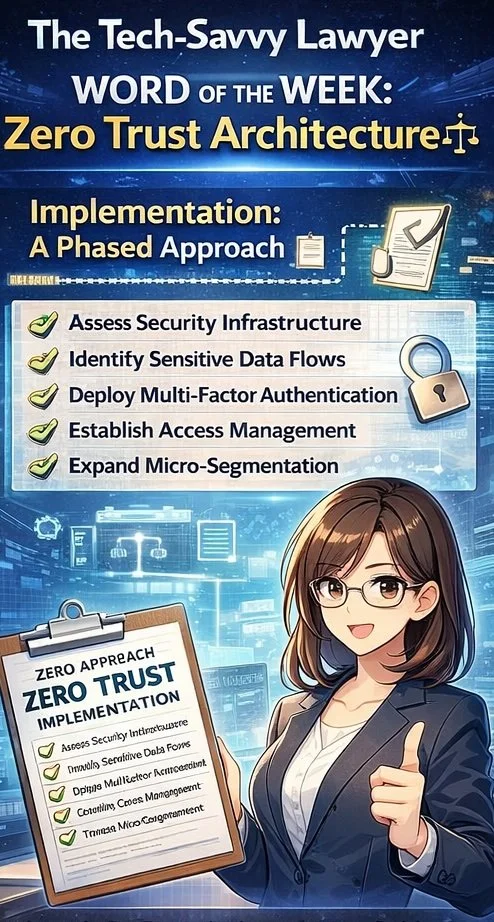
Implementation: A Phased Approach 📋

Implementing Zero Trust need not happen all at once. Begin by assessing your current security infrastructure and identifying sensitive data flows. Establish identity and access management systems to control who accesses what. Deploy multi-factor authentication across all applications. Then gradually expand micro-segmentation and monitoring capabilities as your systems mature. Document your efforts to demonstrate compliance with ABA Model Rule 1.6(c)'s requirement for "reasonable efforts."

Final Thoughts
Zero Trust Architecture transforms your firm's security posture from reactive protection to proactive verification while ensuring compliance with essential ABA Model Rules. For legal practices handling confidential client information, this security framework is not optional. It protects your clients, your firm's reputation, and your ability to practice law with integrity.

📖 Word ("Phrase") of the Week: Mobile Device Management: Essential Security for Today's Law Practice 📱🔒

Mobile Device Management is an essential concept for lawyers.

Mobile Device Management (MDM) has become essential for law firms navigating today's mobile-first legal landscape. As attorneys increasingly access confidential client information from smartphones, tablets, and laptops outside traditional office settings, MDM technology provides the security framework necessary to protect sensitive data while enabling productive remote work.

Understanding MDM in Legal Practice

MDM refers to software that allows IT teams to remotely manage, secure, and support mobile devices used across an organization. For law firms, this technology provides centralized control to enforce password requirements, encrypt data, install security updates, locate devices, and remotely lock or wipe lost or stolen devices. These capabilities directly address the ethical obligations attorneys face under the ABA Model Rules of Professional Conduct.

Ethical Obligations Drive MDM Adoption

The legal profession faces unique ethical requirements regarding technology use. ABA Model Rule 1.1 requires lawyers to maintain technological competence, including understanding "the benefits and risks associated with relevant technology". Rule 1.6 mandates that lawyers "make reasonable efforts to prevent the inadvertent or unauthorized disclosure of, or unauthorized access to, information relating to the representation of a client".

ABA Formal Opinion 498 specifically addresses virtual practice considerations. The opinion cautions that lawyers should disable listening capabilities of smart speakers and virtual assistants while discussing client matters unless the technology assists the law practice. This guidance underscores the importance of thoughtful technology implementation in legal practice.

Core MDM Features for Law Firms

Device encryption forms the foundation of MDM security. All client data should be encrypted both in transit and at rest, with granular permissions determining who accesses specific information. Remote wipe capabilities allow immediate data deletion when devices are lost or stolen, preventing unauthorized access to sensitive case information.

Application management enables IT teams to control which applications can access firm resources. Maintaining an approved application list and regularly scanning for vulnerable or unauthorized applications reduces security risks. Containerization separates personal and professional data, ensuring client information remains isolated and secure even if the device is compromised.

Compliance and Monitoring Benefits

lawyers, do you know where your mobile devices are?

MDM solutions help law firms maintain compliance with ABA guidelines, state bar requirements, and privacy laws. The systems generate detailed logs and reports on device activity, which prove vital during audits or internal investigations. Continuous compliance monitoring ensures devices meet security standards while automated checks flag devices falling below required security levels.

Implementation Best Practices

Successful MDM implementation requires establishing clear policies outlining device eligibility, security requirements, and user responsibilities. Firms should enforce device enrollment and compliance, requiring all users to register devices before accessing sensitive systems. Multi-factor authentication enhances security for sensitive data access.

Regular training ensures staff understand security expectations and compliance requirements. Automated software updates and security patches keep devices protected against evolving threats. Role-based access controls prevent unauthorized access to corporate resources by assigning permissions based on job functions.

MDM technology has evolved from optional convenience to ethical necessity. Law firms that implement comprehensive MDM strategies protect client confidentiality, meet professional obligations, and maintain competitive advantage in an increasingly mobile legal marketplace.

Keep Your Practice Safe - Stay Tech Savvy!!!

MTC: London's iPhone Theft Crisis: Critical Mobile Device Security Lessons for Traveling Lawyers 📱⚖️

lawyers can learn about cyber mobile security from the recent iphone thefts in london

Recent events in London should serve as a wake-up call for every legal professional who carries client data beyond the office walls. London police recently dismantled a sophisticated international theft ring responsible for smuggling approximately 40,000 stolen iPhones to China in just twelve months. This operation revealed thieves earning up to £300 per stolen device, with phones reselling overseas for as much as $5,000. With over 80,000 phones stolen in London last year alone, this crisis underscores critical vulnerabilities that lawyers must address when working remotely.

The sophistication of these operations is alarming. Criminals on electric bikes snatch phones from unsuspecting victims and immediately wrap devices in aluminum foil to block tracking signals. This industrial-scale crime demonstrates that our mobile devices—which contain privileged communications, case strategies, and confidential client data—are valuable targets for organized criminal networks operating globally.

Your Ethical Obligations Are Clear

ABA Model Rule 1.1 requires lawyers to maintain competence, including understanding "the benefits and risks associated with relevant technology". This duty of technological competence has been adopted by over 40 states and isn't optional—it's fundamental to ethical practice. Model Rule 1.6(c) mandates that lawyers "make reasonable efforts to prevent the inadvertent or unauthorized disclosure of, or unauthorized access to, information relating to the representation of a client".

When your phone disappears—whether through theft, loss, or border seizure—you face potential violations of these ethical duties. Recent data shows U.S. Customs and Border Protection searched 14,899 devices between April and June 2025, a 16.7% increase from previous surges. Lawyers traveling internationally face heightened risks, and a stolen or searched device can compromise attorney-client privilege instantly.

Essential Security Measures for Mobile Lawyers

Before leaving your office, implement these non-negotiable protections. Enable full-device encryption on all smartphones, tablets, and laptops. For iPhones, setting a passcode automatically enables encryption; Android users must manually activate this feature in security settings. Strong passwords matter—use alphanumeric combinations of at least 12 characters, avoiding easily guessed patterns.

lawyer need to know how to protect their client’s pii when crossing the boarder!

Two-factor authentication (2FA) adds critical protection layers. Even if someone obtains your password, 2FA requires secondary verification through your phone or authentication app. This simple step dramatically reduces unauthorized access risks. Configure remote wipe capabilities before traveling. If your device is stolen, you can erase all data remotely, protecting client information even when physical recovery is impossible.

Disable biometric authentication when traveling internationally. Face ID and fingerprint scanners can be used against you at borders where Fourth Amendment protections are diminished. Restart your device before crossing borders to force password-only access. Consider carrying a "clean" device for international travel, accessing files only through encrypted cloud storage rather than storing sensitive data locally.

Coffee Shops, Airports, and Public Spaces

Public Wi-Fi networks pose serious interception risks. Hackers create fake hotspots with legitimate-sounding names, capturing everything you transmit. As lawyers increasingly embrace cloud-based computing for their work, encryption when using public Wi-Fi becomes non-negotiable

Always use a trusted VPN (Virtual Private Network) when connecting to public networks. VPNs encrypt your internet traffic, preventing interception even on compromised networks. Alternatively, use your smartphone's personal hotspot rather than connecting to public Wi-Fi. Turn off file sharing on all mobile devices. Avoid accessing highly sensitive client files in public spaces altogether—save detailed case work for secure, private connections.

Physical security deserves equal attention. Visual privacy screens prevent shoulder surfing. Position yourself with your back to walls in coffee shops so others cannot observe your screen. Be alert to your surroundings and maintain physical control of devices at all times. Never leave laptops, tablets, or phones unattended, even briefly.

Border Crossings and International Travel

Lawyers crossing international borders face unique challenges. CBP policies permit extensive device searches within 100 miles of borders under the border search exception, significantly reducing Fourth Amendment protections. New York State Bar Association Ethics Opinion 2017-5 addresses lawyers' duties when traveling with client data across borders.

The reasonableness standard governs your obligations. Evaluate whether you truly need to bring confidential information across borders. If travel requires client data, bring only materials professionally necessary for your specific purpose. Consider these strategies: store files in encrypted cloud services rather than locally; use strong passwords and disable biometric authentication; carry your bar card to identify yourself as an attorney if questioned; identify which files contain privileged information before reaching the border.

If border agents demand device access, clearly state that you are an attorney and the device contains privileged client communications. Ask whether the request is optional or mandatory. If agents conduct a search, document what occurred and consider whether client notification is required under Rule 1.4. New York Rule 1.6 requires taking reasonable steps to prevent unauthorized disclosure, with heightened precautions necessary when government agencies are opposing parties.

Practical Implementation Today

Create firm policies addressing mobile device security. Require immediate reporting of lost or stolen devices. Implement Mobile Device Management (MDM) software to monitor, secure, and remotely wipe all connected devices. Conduct regular security awareness training covering email practices, phishing recognition, and social engineering tactics.

Develop an Incident Response Plan before breaches occur. Know which experts to contact, document cybersecurity policies, and establish notification protocols. Under various state laws and regulations like California Civil Code § 1.798.82 and HIPAA's Breach Notification Rule, lawyers may be legally required to notify clients of data breaches.

Lawyers are on the front line of cybersecurity when on the go!

Communicate with clients about security measures. Obtain informed consent regarding electronic communications and any security limitations. Some firms include these discussions in engagement letters, setting clear expectations about communication methods and encryption use.

Stay current with evolving threats. Subscribe to legal technology security bulletins. The Tech-Savvy Lawyer blog regularly covers mobile security issues, including recent coverage of the SlopAds malware campaign that compromised 224 Android applications on Google Play Store. Technology competence requires ongoing learning as threats and safeguards evolve.

The Bottom Line

The London iPhone theft crisis demonstrates that our devices are valuable targets for sophisticated criminal networks operating internationally. Every lawyer who works outside the office—whether at coffee shops, client meetings, or international destinations—must take mobile security seriously. Your ethical obligations under Model Rules 1.1 and 1.6 demand it. Your clients' confidential information depends on it. Your professional reputation requires it.

Implementing these security measures isn't complicated or expensive. Enable encryption. Use strong passwords and 2FA. Avoid public Wi-Fi or use VPNs. Disable biometrics when traveling. Maintain physical control of devices. These straightforward steps significantly reduce risks while allowing you to work effectively from anywhere.

The legal profession has embraced mobile technology's benefits—now we must address its risks with equal commitment. Don't wait for a theft, loss, or border seizure to prompt action. Protect your clients' confidential information today.

MTC