🚨 BOLO: Widespread Internet Disruption from Cloudflare Infrastructure Failure

⚠️ legal professionals need to know how to adjust when the internet’s infrastructure goes down!

On November 18, 2025, at 11:20 UTC, Cloudflare experienced a significant network outage that disrupted critical internet services relied upon by millions globally, including legal professionals and their practice management tools. The incident lasted approximately six hours before full resolution at 17:06 UTC.

The outage originated from a latent bug within Cloudflare's Bot Management configuration file. During a routine configuration update, the file size exceeded anticipated parameters, causing the bot detection module to fail and triggering cascading HTTP 500 errors across the network. The root cause was neither a cyberattack nor malicious activity, but rather a software defect in the core proxy system that processes all traffic transiting Cloudflare's infrastructure.

Impact on Legal Professionals: Law firms utilizing cloud-based practice management systems, document automation platforms, and client communication portals may have experienced access disruptions. Websites hosting legal resources, contract repositories, and time-tracking applications served through Cloudflare may have been unavailable. Authentication systems, including Cloudflare Access—commonly deployed for secure remote work environments—failed broadly during the incident.

Critical Irony: Downdetector, the primary outage-monitoring platform relied upon by IT professionals to confirm infrastructure problems, was itself offline during the incident due to Cloudflare dependency.

Operational Lessons: This event underscores the concentration risk inherent in modern internet infrastructure. Legal practices should evaluate redundancy protocols, maintain documented failover procedures, and ensure business continuity plans account for third-party provider dependencies that exist outside their direct control.

👨‍⚖️ Ethical Obligations: Under ABA Model Rules 1.1 (technological competence), 1.6 (confidentiality), and 5.3 (third-party vendor supervision), lawyers must document both incidents' impact on client matters and reassess business continuity protocols.

Action Items: Review your practice's infrastructure vendor relationships and assess SLA terms for meaningful uptime guarantees and compensation mechanisms.

🚨BOLO: Critical Samsung Zero-Day Alert: CVE-2025-21042 Enables Device Takeover via Malicious Images

Federal government warns of spyware aimed at some samsung galaxy devices - update your software now!!!

Samsung Galaxy devices face critical exploitation through CVE-2025-21042, a zero-day vulnerability enabling complete device takeover. CISA added this flaw to its Known Exploited Vulnerabilities catalog on November 10, 2025. Threat actors deployed LANDFALL spyware via malicious DNG image files sent through WhatsApp, requiring zero user interaction. This out-of-bounds write vulnerability in Samsung's image processing library allows remote code execution, data theft, and surveillance. Affected models include Galaxy S22, S23, S24 series, Z Fold4, and Z Flip4. Samsung patched this April 2025, but exploitation occurred for months prior. Federal agencies must remediate by December 1, 2025.

‼️Action Required‼️: Update devices immediately and scrutinize unsolicited image files!

MTC: The Hidden AI Crisis in Legal Practice: Why Lawyers Must Unmask Embedded Intelligence Before It's Too Late!

Lawyers need Digital due diligence in order to say on top of their ethic’s requirements.

Artificial intelligence has infiltrated legal practice in ways most attorneys never anticipated. While lawyers debate whether to adopt AI tools, they've already been using them—often without knowing it. These "hidden AI" features, silently embedded in everyday software, present a compliance crisis that threatens attorney-client privilege, confidentiality obligations, and professional responsibility standards.

The Invisible Assistant Problem

Hidden AI operates in plain sight. Microsoft Word's Copilot suggests edits while you draft pleadings. Adobe Acrobat's AI Assistant automatically identifies contracts and extracts key terms from PDFs you're reviewing. Grammarly's algorithm analyzes your confidential client communications for grammar errors. Zoom's AI Companion transcribes strategy sessions with clients—and sometimes captures what happens after you disconnect.

DocuSign now deploys AI-Assisted Review to analyze agreements against predefined playbooks. Westlaw and Lexis+ embed generative AI directly into their research platforms, with hallucination rates between 17% and 33%. Even practice management systems like Clio and Smokeball have woven AI throughout their platforms, from automated time tracking descriptions to matter summaries.

The challenge isn't whether these tools provide value—they absolutely do. The crisis emerges because lawyers activate features without understanding the compliance implications.

ABA Model Rules Meet Modern Technology

The American Bar Association's Formal Opinion 512, issued in July 2024, makes clear that lawyers bear full responsibility for AI use regardless of whether they actively chose the technology or inherited it through software updates. Several Model Rules directly govern hidden AI features in legal practice.

Model Rule 1.1 requires competence, including maintaining knowledge about the benefits and risks associated with relevant technology. Comment 8 to this rule, adopted by most states, mandates that lawyers understand not just primary legal tools but embedded AI features within those tools. This means attorneys cannot plead ignorance when Microsoft Word's AI Assistant processes privileged documents.

Model Rule 1.6 imposes strict confidentiality obligations. Lawyers must make "reasonable efforts to prevent the inadvertent or unauthorized disclosure of, or unauthorized access to, information relating to the representation of a client". When Grammarly accesses your client emails to check spelling, or when Zoom's AI transcribes confidential settlement discussions, you're potentially disclosing protected information to third-party AI systems.

Model Rule 5.3 extends supervisory responsibilities to "nonlawyer assistance," which includes non-human assistance like AI. The 2012 amendment changing "assistants" to "assistance" specifically contemplated this scenario. Lawyers must supervise AI tools with the same diligence they'd apply to paralegals or junior associates.

Model Rule 1.4 requires communication with clients about the means used to accomplish their objectives. This includes informing clients when AI will process their confidential information, obtaining informed consent, and explaining the associated risks.

Where Hidden AI Lurks in Legal Software

🚨 lawyers don’t breach your ethical duties with AI shortcuts!!!

Microsoft 365 Copilot integrates AI across Word, Outlook, and Teams—applications lawyers use hundreds of times daily. The AI drafts documents, summarizes emails, and analyzes meeting transcripts. Most firms that subscribe to Microsoft 365 have Copilot enabled by default in recent licensing agreements, yet many attorneys remain unaware their correspondence flows through generative AI systems.

Adobe Acrobat now automatically recognizes contracts and generates summaries with AI Assistant. When you open a PDF contract, Adobe's AI immediately analyzes it, extracts key dates and terms, and offers to answer questions about the document. This processing occurs before you explicitly request AI assistance.

Legal research platforms embed AI throughout their interfaces. Westlaw Precision AI and Lexis+ AI process search queries through generative models that hallucinate incorrect case citations 17% to 33% of the time according to Stanford research. These aren't separate features—they're integrated into the standard search experience lawyers rely upon daily.

Practice management systems deploy hidden AI for intake forms, automated time entry descriptions, and matter summaries. Smokeball's AutoTime AI generates detailed billing descriptions automatically. Clio integrates AI into client relationship management. These features activate without explicit lawyer oversight for each instance of use.

Communication platforms present particularly acute risks. Zoom AI Companion and Microsoft Teams AI automatically transcribe meetings and generate summaries. Otter.ai's meeting assistant infamously continued recording after participants thought a meeting ended, capturing investors' candid discussion of their firm's failures. For lawyers, such scenarios could expose privileged attorney-client communications or work product.

The Compliance Framework

Establishing ethical AI use requires systematic assessment. First, conduct a comprehensive technology audit. Inventory every software application your firm uses and identify embedded AI features. This includes obvious tools like research platforms and less apparent sources like PDF readers, email clients, and document management systems.

Second, evaluate each AI feature against confidentiality requirements. Review vendor agreements to determine whether the AI provider uses your data for model training, stores information after processing, or could disclose data in response to third-party requests. Grammarly, for example, offers HIPAA compliance but only for enterprise customers with 100+ seats who execute Business Associate Agreements. Similar limitations exist across legal software.

Third, implement technical safeguards. Disable AI features that lack adequate security controls. Configure settings to prevent automatic data sharing. Adobe and Microsoft both offer options to prevent AI from training on customer data, but these protections require active configuration.

Fourth, establish firm policies governing AI use. Designate responsibility for monitoring AI features in licensed software. Create protocols for evaluating new tools before deployment. Develop training programs ensuring all attorneys understand their obligations when using AI-enabled applications.

Fifth, secure client consent. Update engagement letters to disclose AI use in service delivery. Explain the specific risks associated with processing confidential information through AI systems. Document informed consent for each representation.

The Verification Imperative

ABA Formal Opinion 512 emphasizes that lawyers cannot delegate professional judgment to AI. Every output requires independent verification. When Westlaw Precision AI suggests research authorities, lawyers must confirm those cases exist and accurately reflect the law. When CoCounsel Drafting generates contract language in Microsoft Word, attorneys must review for accuracy, completeness, and appropriateness to the specific client matter.

The infamous Mata v. Avianca case, where lawyers submitted AI-generated briefs citing fabricated cases, illustrates the catastrophic consequences of failing to verify AI output. Every jurisdiction that has addressed AI ethics emphasizes this verification duty.

Cost and Billing Considerations

Formal Opinion 512 addresses whether lawyers can charge the same fees when AI accelerates their work. The opinion suggests lawyers cannot bill for time saved through AI efficiency under traditional hourly billing models. However, value-based and flat-fee arrangements may allow lawyers to capture efficiency gains, provided clients understand AI's role during initial fee negotiations.

Lawyers cannot bill clients for time spent learning AI tools—maintaining technological competence represents a professional obligation, not billable work. As AI becomes standard in legal practice, using these tools may become necessary to meet competence requirements, similar to how electronic research and e-discovery tools became baseline expectations.

Practical Steps for Compliance

Start by examining your Microsoft Office subscription. Determine whether Copilot is enabled and what data sharing settings apply. Review Adobe Acrobat's AI Assistant settings and disable automatic contract analysis if your confidentiality review hasn't been completed.

Contact your Westlaw and Lexis representatives to understand exactly how AI features operate in your research platform. Ask specific questions: Does the AI train on your search queries? How are hallucinations detected and corrected? What happens to documents you upload for AI analysis?

Audit your practice management system. If you use Clio, Smokeball, or similar platforms, identify every AI feature and evaluate its compliance with confidentiality obligations. Automatic time tracking that generates descriptions based on document content may reveal privileged information if billing statements aren't properly redacted.

Review video conferencing policies. Establish protocols requiring explicit disclosure when AI transcription activates during client meetings. Obtain informed consent before recording privileged discussions. Consider disabling AI assistants entirely for confidential matters.

Implement regular training programs. Technology competence isn't achieved once—it requires ongoing education as AI features evolve. Schedule quarterly reviews of new AI capabilities deployed in your software stack.

Final Thoughts 👉 The Path Forward

lawyers must be able to identify and contain ai within the tech tools they use for work!

Hidden AI represents both opportunity and obligation. These tools genuinely enhance legal practice by accelerating research, improving drafting, and streamlining administrative tasks. The efficiency gains translate into better client service and more competitive pricing.

However, lawyers cannot embrace these benefits while ignoring their ethical duties. The Model Rules apply with equal force to hidden AI as to any other aspect of legal practice. Ignorance provides no defense when confidentiality breaches occur or inaccurate AI-generated content damages client interests.

The legal profession stands at a critical juncture. AI integration will only accelerate as software vendors compete to embed intelligent features throughout their platforms. Lawyers who proactively identify hidden AI, assess compliance risks, and implement appropriate safeguards will serve clients effectively while maintaining professional responsibility.

Those who ignore hidden AI features operating in their daily practice face disciplinary exposure, malpractice liability, and potential privilege waivers. The choice is clear: unmask the hidden AI now, or face consequences later.

MTC

🎙️ TSL Labs! Google AI Discussion of MTC: 🚨‼️ Emergency BOLO! 🚨‼️ Lawyers on the Go: Essential Tech Strategies for Air Travel During the Government Shutdown ✈️

📌 Too Busy to Read This Week's Editorial?

Join us for an emergency professional deep dive into essential tech strategies for air travel during government shutdowns and travel disruptions. 🛫 This AI-powered roundtable unpacks Michael D.J. Eisenberg's critical editorial with actionable intelligence on real-time flight tracking, data security protocols, connectivity redundancy, and power management. Whether you're a legal professional navigating travel chaos or anyone managing disruptions during system-wide stress, discover how to transform from reactive scrambling to proactive control—turning travel crises into manageable projects you command. Learn the five professional-grade rules that separate those who navigate disruptions from those who get derailed.

In our conversation, we cover the following:

  • 00:00:00 – Introduction: Welcome to Tech Savvy Lawyer Labs Emergency BOLO

  • 00:01:00 – Travel Chaos as the New Normal: System Volatility & Professional Vulnerability

  • 00:02:00 – Flight Schedule Control: The Illusion & Reality of Travel Disruptions

  • 00:02:00 – Extreme Volatility in Air Travel: Cascading Flight Cancellations & Customer Service Chaos

  • 00:02:00 – Real-Time Flight Tracking Strategy: Flightradar24 & FlightAware Intelligence Systems

  • 00:02:00 – Backup Flight Monitoring: Multi-Carrier Surveillance Strategy (Delta, United, American)

  • 00:03:00 – Proactive Intelligence vs. Reactive Response: One-Hour Lead Time Advantage

  • 00:03:00 – Early Rebooking Strategy: First and Second Choice Flight Selection

  • 00:03:00 – Trusted Traveler Programs: TSA PreCheck & Time Investment ROI

  • 00:03:00 – TSA PreCheck Value: $78 for Five Years & Security Line Efficiency

  • 00:03:00 – Global Entry: $100 for Five Years with International Customs Acceleration

  • 00:04:00 – Trusted Traveler Planning: Background Checks, Interviews & Months-Ahead Application

  • 00:04:00 – Public WiFi Malpractice Alert: Data Security & Vulnerability Assessment

  • 00:04:00 – Personal Mobile Hotspot: Cellular Encryption Over Public Networks

  • 00:05:00 – Dual Carrier Coverage: eSIM Technology & Connectivity Insurance

  • 00:05:00 – Dual SIM Implementation: T-Mobile & Verizon Redundancy Strategy Without Two Phones

  • 00:05:00 – eSIM Digital Technology: Two Active Lines on One Device

  • 00:05:00 – Prepaid Data Plan Strategy: Coffee-Price Monthly Cost for Connectivity Backup

  • 00:06:00 – VPN Non-Negotiables: Encrypted Tunnel & Automatic Connection Protocol

  • 00:06:00 – VPN Automatic Startup: Device Initialization & All-Device Coverage (Phone, Tablet, Laptop)

  • 00:06:00 – International Travel Security: VPN Encryption & Surveillance Protection

  • 00:07:00 – TSA-Approved Power Banks: 100 Watt-Hour Specifications & 27,000 mAh Ceiling

  • 00:07:00 – Laptop Charging: 100-Watt USB-C Power Bank Requirements (MacBook Pro)

  • 00:07:00 – Multi-Device Charging: Simultaneous Laptop, Phone & Tablet Power Delivery

  • 00:07:00 – Smart Power Display: Charging Speed Monitoring & Juice Rationing

  • 00:07:00 – Surge Protector Safety: Airport Outlet Protection & Device Insurance

  • 00:08:00 – Airport Lounges: Priority Pass Access & Productivity Sanctuaries (1,300+ Worldwide)

  • 00:08:00 – Travel Credit Card Benefits: Complimentary Lounge Visits Strategy

  • 00:08:00 – Conference Call Chaos: Professional Communication Environment Solutions

  • 00:08:00 – Noise-Canceling Headphones: Sony XM5 & Bose QuietComfort Professional Focus

  • 00:08:00 – Battery Life Requirements: 30-40 Hour Endurance for Extended Delays

  • 00:09:00 – Offline Access Mandate: Pre-Departure Critical File Downloads

  • 00:09:00 – Six-Hour Offline Capability: Zero-Connectivity Work Strategy

  • 00:09:00 – Adobe Scan App: OCR Technology & Mobile Document Management

  • 00:10:00 – Adobe Ecosystem Syncing: Cross-Device Workflow & E-Signature Integration

  • 00:10:00 – Apple Ecosystem Continuity: iPhone, iPad & MacBook Seamless Integration

  • 00:10:00 – FileVault Encryption & Face ID: Built-In Security Non-Negotiables

  • 00:11:00 – Five Professional-Grade Rules: Pre-Travel Checklist & Crisis Preparation

  • 00:11:00 – Rule One: Full Device Charge Before Departure

  • 00:11:00 – Rule Two: Offline Maps & Critical Files Downloaded Locally

  • 00:11:00 – Rule Three: Screenshot Everything (Boarding Passes, Hotel, Car Rental)

  • 00:11:00 – Rule Four: Distributed Charger Storage Across Multiple Bags for Backup Power

  • 00:11:00 – Rule Five: Share Itinerary with Emergency Contact

  • 00:11:00 – Post-Crisis Integration: Permanent Daily Workflow Implementation

  • 00:11:00 – The Bigger Question: Crisis Tools as Permanent Professional Standards

  • 00:12:00 – Transition to AI Ethics Discussion: Hidden AI Crisis in Legal Practice Teaser

  • 00:14:00 – Conclusion: Tech Savvy Lawyer Labs Roundtable Summary & Resources

Resources 📚

Mentioned in the episode:

Hardware mentioned in the conversation:

Software & Cloud Services mentioned in the conversation:

🎙️ Ep. # 124: AI Governance Expert Nikki Mehrpoo Shares the Triple E Protocol for Implementing Responsible AI and Legal Practice While Maintaining Ethical Compliance and Protecting Client Data.

My next guest is Nikki Mehrpoo. She is a nationally recognized leader in AI governance for law practices, known for her practical, ethical, and innovation-focused strategies. Today, she details her Triple-E Protocol and shares key steps for safely leveraging AI in legal work.

Join Nikki Mehrpoo and me as we discuss the following three questions and more!

  1. Based on your pioneering work with “Govern Before You Automate,” what are the top three foundational steps every lawyer should take to implement AI responsibly, and what are the top three mistakes lawyers make with AI?

  2. What are your top three tips or tricks when using AI in your work?

  3. When assessing the next AI platform from a service provider, what are the top three questions lawyers should be asking?

In our conversation, we cover the following:

  • 00:00:00 – Welcome and guest’s background 🌟

  • 00:01:00 – Current tech setup and cloud-based workflows ☁️

  • 00:02:00 – Privacy and IP management, not client confidentiality 🔐

  • 00:03:00 – Document deduplication with Effingo 📄

  • 00:04:00 – Hardware: HP Omni Book 7 Laptop, HP monitors, iPhone 💻📱

  • 00:05:00 – Efficiency tools: Text Expander, personal workflow shortcuts ⌨️

  • 00:06:00 – Balancing technology innovation and risk management ⚖️

  • 00:07:00 – Adapting to change, ongoing legal tech education 🧑‍💻

  • 00:08:00 – Triple-E Framework: Educate, Empower, Elevate 🚀

  • 00:09:00 – Governance, supervision duties, policy setting 🛡️

  • 00:10:00 – Human verification as a standard for all legal AI output 🧑‍⚖️

  • 00:12:00 – Real-world examples: AI hallucinations, bias, and due diligence ⚠️

  • 00:13:00 – IT vs. AI expertise, communicating across teams 🛠️

  • 00:14:00 – Chief AI Governance Officer, governance in legal innovation 🏛️

  • 00:15:00 – Global compliance, EU AI Act, international standards 🌐

  • 00:16:00 – Hidden AI in legacy software, policy gaps 🔎

  • 00:17:00 – Education as continuous legal responsibility 📚

  • 00:18:00 – Better results through prompt engineering 🔤

  • 00:19:00 – Verify, verify, verify: never trust without review ✔️

  • 00:20:00 – ABA Formal Opinion 512: standards for responsible legal AI 📜

  • 00:21:00 – Nikki’s Triple-E Protocol, governance best practices 📊

  • 00:22:00 – Data origin, bias, and auditability in legal AI systems 🧩

  • 00:23:00 – Frameworks for “govern before you automate” in legal workflows 🔒

  • 00:24:00 – Importance of internal hosting and zero retention policies 🏢

  • 00:25:00 – Maintaining confidentiality with third-party AI and HIPAA compliance 🤫

  • 00:26:00 – Where to find Nikki and connect 🌐

Resources

Connect with Nikki Mehrpoo

Mentioned in the episode

Hardware mentioned in the conversation

Software & Cloud Services mentioned in the conversation

🚨‼️ Emergency BOLO! 🚨‼️ Lawyers on the Go: Essential Tech Strategies for Air Travel During the Government Shutdown ✈️

Be the lawyer savant while dealing with air travel hassle!

The ongoing government shutdown has created unprecedented challenges for air travelers. With over 1,500 flights canceled daily, furloughed FAA and TSA workers, and a mandated 10% reduction in operations at 40 major airports by Friday, lawyers who travel for depositions, court appearances, and client meetings face serious disruptions. The right technology can transform these chaotic conditions from career obstacles into manageable inconveniences.

Track Flights Like Your Case Depends on It

Real-time flight intelligence separates prepared lawyers from stranded ones. Services like FlightAware and Flightradar24 provide push notifications for gate changes, delays, and cancellations before airport displays update. These apps offer predictive reports using historical data, allowing you to rebook proactively rather than reactively. During this shutdown, airlines are canceling flights with minimal notice—sometimes just hours before departure. Set up alerts for your flight and at least two backup options on different carriers.

Mobile Hotspots: Your Smart Device Connection Strategy

Public airport Wi-Fi poses serious ethical risks for lawyers handling confidential client data. (See TSL Blog Post - Malpractice Alert! If you are using a mobile device for your work and not using a VPN, you are exposing yourself to trouble.) Rather than depending solely on hotel and airport networks, transform your smart device—iPhone, iPad, or Android device—into a secure mobile hotspot. Most cellular carriers offer hotspot functionality built directly into your device settings, providing cellular encryption significantly stronger than public Wi-Fi networks. This approach eliminates the need for separate hardware while leveraging existing data plans.

Consider the power of dual carrier coverage by maintaining active plans with two different carriers—for example, AT&T and Verizon. If one network experiences outages or if you have a poor signal during the shutdown's staffing crisis, your second carrier ensures continuous connectivity. iPhones support Dual SIM through eSIM technology, allowing simultaneous carrier activation on a single device. Tablets with cellular capabilities similarly support multiple carriers, offering redundancy that protects against carrier-specific network failures during this period of infrastructure stress.

VPN Protection is Non-Negotiable

When you must access public networks, Virtual Private Networks (See TSL Blog Post - 📰 How to Ensure a Public Wi-Fi Network Is Legitimate (and Why Legal Professionals Must Always Use a VPN)!) encrypt your connection and mask your IP address. VPNs prevent hackers from intercepting privileged communications—a critical safeguard when working from airport lounges during extended delays. Configure your VPN to connect automatically at startup. Every device accessing firm networks or client files requires VPN protection, particularly when traveling internationally where surveillance risks increase. Enable VPN across all your devices simultaneously—iPhone, iPad, and laptop—ensuring consistent protection regardless of which device you're using.

Airport Lounge Access: Productivity Sanctuaries

Extended delays during the shutdown make lounge access invaluable. Priority Pass provides membership to over 1,300 lounges with quiet workspaces, reliable Wi-Fi, and complimentary amenities. For occasional travelers, many pay-per-use platforms offer access without annual fees. Many mid-tier travel credit cards include Priority Pass memberships with several free annual visits.

Power Banks: Anker Delivers Portable Professional Power

A tsa approved backup battery can be a career saver!!!

TSA permits power banks up to 100Wh (approximately 27,000mAh) in carry-on luggage. Anker Prime Power Bank* (26K, 300W) offers exceptional capacity at 26,250mAh, providing powerful performance for simultaneous device charging while meeting TSA requirements. The smart display provides real-time insights into charging speed and battery levels, with dual USB-C ports delivering 140W maximum output per port. This enables charging a MacBook Pro while simultaneously powering an iPhone and iPad—essential during multi-hour delays where multiple devices require constant connectivity.

For lighter travel, the Anker 747 Power Bank (PowerCore 26K) delivers 25,600mAh capacity with 87W rapid charging in a more compact profile. Budget-conscious travelers find the Anker MagGo* series offers excellent value as the best travel-specific Anker option. All Anker models feature multiple charging ports, allowing lawyers to charge phones, tablets, and laptops simultaneously—critical when airport charging stations become competition zones during this crisis.

Note:  If you are going to plug into an available outlet, don’t forget to use a serge protector. A sudden change in current could wipe out your device and leave you in a pickle.

Document Scanning: Adobe Technology on Your Apple Devices

Adobe Document Cloud transforms smartphones and tablets into powerful document management systems. The Adobe Scan app on iPhone and iPad uses optical character recognition to convert printed documents into searchable, editable PDFs. The app automatically detects document edges, straightens images, and enhances text clarity—perfect for scanning contracts, pleadings, or client intake forms from any location.

Adobe Acrobat Reader on iPhone, iPad, and Mac provides seamless document access across your entire Apple ecosystem. Documents opened on your MacBook sync instantly to your iPad or iPhone, allowing you to continue working on depositions notes from your phone during airport delays. The integrated fill-and-sign functionality enables you to execute agreements while in transit, with e-signatures recognized across all Adobe Document Cloud platforms. Importantly, Adobe products maintain cloud synchronization—if you lose cellular connection, previously downloaded documents remain accessible, ensuring you can work offline during flights or in coverage dead zones.youtube 

Practice Management: Download Before You Depart

Cloud-based platforms like Clio enable remote access to case files, time tracking, and client communications from any device. The critical step traveling lawyers often overlook: download all necessary files to your device BEFORE leaving the office. Modern practice management apps allow offline access to downloaded content, ensuring you maintain full productivity even if cellular or Wi-Fi connectivity fails. Flight time, extended airport delays, and coverage-restricted locations won't interrupt your work if essential files are already stored locally. Enable offline mode in your practice management app before traveling, treating it as a mandatory pre-departure checklist item alongside your boarding pass.

Noise-Cancelling Headphones for Focus

Sony WH-1000XM5 and Bose QuietComfort Ultra headphones provide 30-40 hour battery life and industry-leading active noise cancellation. I personally am a fan of Apple AirPods Max* (for flights) and Apple AirPods* (for on the go). These tools enable concentration during flights and allow productive conference calls from crowded gate areas. Budget options like Soundcore Life Q30 deliver comparable performance at reduced cost.

The Apple Ecosystem Advantage for Traveling Lawyers

Seamless integration across iPhone, iPad, and MacBook enables efficiency that standalone devices cannot match. Lawyers leveraging the Apple ecosystem can start a document review on their MacBook, switch to an iPad for annotation during client meetings, and finalize on an iPhone while traveling between appointments. This continuity proves invaluable during travel disruptions when flexibility matters most. Security features including Touch ID, Face ID, and FileVault encryption protect client confidentiality. The closed ecosystem provides transparency and security that appeals to legal professionals handling sensitive information.

TSA PreCheck and Global Entry

While not technology per se, these trusted traveler programs dramatically reduce security wait times—increasingly critical as TSA operates with reduced staffing. PreCheck costs $78 for five years; Global Entry includes PreCheck benefits plus expedited customs for $100 per five years. Applications require background checks and in-person interviews, so apply well before travel needs arise.

Prepare Before You Depart

TSA PRECHECk and Global Entry can add a little piece of mind during stressful air travel times!

Download offline maps, save important case files and documents locally, and fully charge all devices before reaching the airport. Download practice management files, case materials, and Adobe documents ensuring offline access. Screenshot confirmations, boarding passes, and hotel reservations in case connectivity fails. Configure your personal hotspot and dual carriers before travel begins. Store backup chargers in different bags to prevent total power loss. Share itineraries with colleagues who can handle emergencies if you become stranded.

The government shutdown has made air travel unpredictable and frustrating and even when the government “reopens” travel will not return to normal instantly. Lawyers cannot avoid travel obligations, but strategic technology adoption mitigates disruptions. These tools maintain productivity, protect client confidentiality, and preserve professional reputation when flights disappear and airports descend into chaos. Technology transforms crisis management from reactive scrambling into proactive preparation—exactly what clients expect from their counsel.

Be Safe and Happy Lawyering!

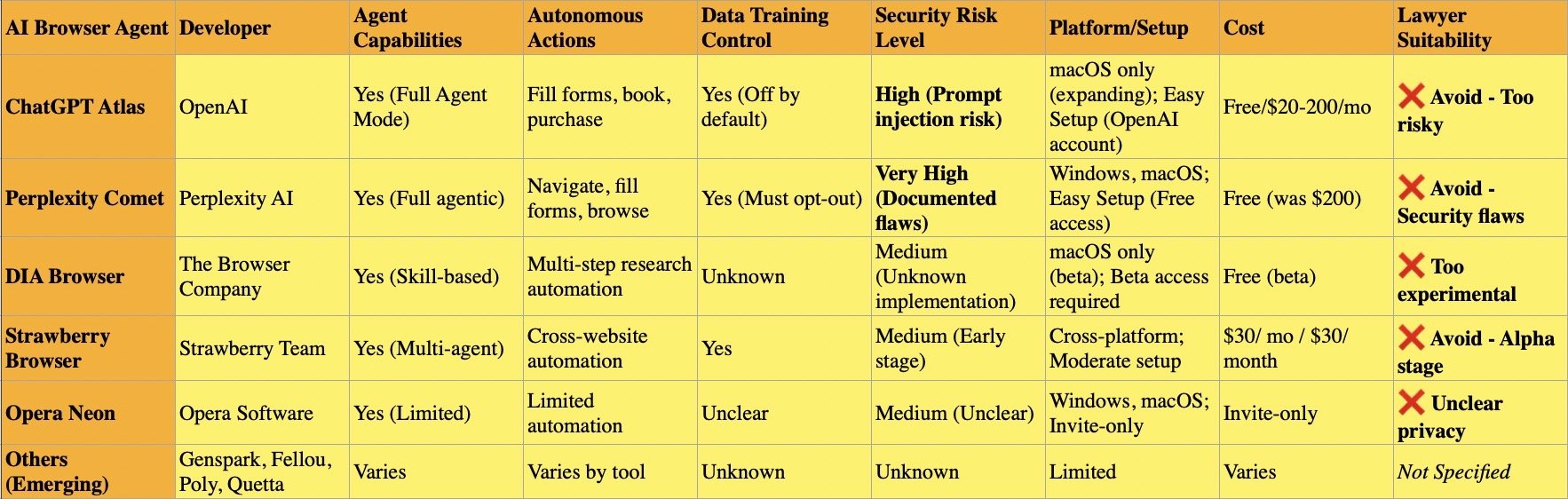
"How To": Lawyers Choosing the Right “AI Browsers” While Protecting Client Data: Complete Guide 2025 🔒⚖️

The question is whether lawyers should be using “AI Browsers” right now?

AI browsers represent a fundamental shift from traditional web browsing. Unlike Chrome or Firefox with AI features bolted on, dedicated AI browsers like ChatGPT Atlas, Perplexity Comet, DIA Browser, and Strawberry Browser were built from the ground up around artificial intelligence. These tools don't just help you browse—they browse for you, making autonomous decisions, filling forms, booking reservations, and completing multi-step tasks through "agentic" capabilities that require extensive access to your data.

For lawyers, this autonomy creates unacceptable confidentiality risks. Security researchers discovered that AI browsers suffer from critical "prompt injection" vulnerabilities where malicious code hidden on websites tricks the AI into stealing emails, accessing calendars, and exfiltrating confidential files. When you ask an AI browser to "summarize this page," it processes both visible content and invisible malicious instructions without distinguishing between them.

The AI Training Threat

Most AI browsers automatically train on your browsing data unless you manually opt out. This means privileged attorney-client communications, case research, and client information could become embedded in AI training datasets permanently. Once data trains an AI model, removing it becomes impossible—it persists indefinitely in the neural network's learned patterns.

ChatGPT Atlas defaults to excluding browsing content from training, but users must verify this setting remains disabled in Data Controls. Perplexity Comet automatically opts users into AI training on browsing data and search queries unless you manually disable the Data Retention toggle in Account Settings. Strawberry Browser and DIA Browser have unclear or unknown training policies, making them inappropriate for client work. Samsung banned ChatGPT after employees accidentally exposed proprietary code this way.

The Leading Dedicated AI Browsers

Perplexity Comet positions itself as a research-focused "answer engine" with citation-first design. However, security researchers at Brave documented severe vulnerabilities including screenshot attacks where nearly invisible text tricks the AI into executing unauthorized commands. Comet's autonomous agent can navigate websites, fill shopping carts, and cancel subscriptions independently—impressive for productivity but catastrophic for confidentiality when exploited.

ChatGPT Atlas integrates OpenAI's models into a Chromium-based browser with Agent Mode for automating tasks. Currently macOS-only with other platforms coming soon, Atlas provides contextual memory across browsing sessions and can access connected services like email and calendars. While OpenAI implements some safeguards, security experts emphasize no AI agent browser has adequate protections for confidential information.

Strawberry Browser, developed by a Swedish team, focuses on multi-agent automation with "AI Companions" that learn your patterns and work across multiple websites simultaneously. Still in alpha/beta stage at $30/month, Strawberry demonstrates extensive autonomous capabilities but remains too experimental for legal practice.

DIA Browser from The Browser Company redesigns browsing around AI-powered tab organization and workflow memory. In limited beta, DIA uses AI to remember research habits and enable conversational interaction with open tabs. The experimental nature and unclear privacy policies make it inappropriate for client work.

Opera Neon and emerging alternatives (Genspark, Fellou, Poly, Quetta) remain in early stages with insufficient track records or unclear privacy practices for legal professional evaluation.

Critical Recommendations for Lawyers

Avoid all AI agent browsers for client-related work. PCMag's extensive testing concluded: "Given their dubious value, poor performance, and privacy concerns, I don't think AI web browsers are worth using" over traditional alternatives.

If you experiment with AI browsers personally, do so only for non-confidential tasks. Disable all training features immediately. Use separate devices that never access client files, emails, or practice management systems. Understand that prompt injection attacks remain threats regardless of privacy settings.

Traditional browsers (Firefox, Brave, Safari) with proper privacy configurations remain your only safe option. Your Rule 1.6 obligations require recognizing when new technology poses unacceptable confidentiality risks.

Lawyers should know what risks come with using AI Browsers!

📖 Word ("Phrase") of the Week: Mobile Device Management: Essential Security for Today's Law Practice 📱🔒

Mobile Device Management is an essential concept for lawyers.

Mobile Device Management (MDM) has become essential for law firms navigating today's mobile-first legal landscape. As attorneys increasingly access confidential client information from smartphones, tablets, and laptops outside traditional office settings, MDM technology provides the security framework necessary to protect sensitive data while enabling productive remote work.

Understanding MDM in Legal Practice

MDM refers to software that allows IT teams to remotely manage, secure, and support mobile devices used across an organization. For law firms, this technology provides centralized control to enforce password requirements, encrypt data, install security updates, locate devices, and remotely lock or wipe lost or stolen devices. These capabilities directly address the ethical obligations attorneys face under the ABA Model Rules of Professional Conduct.

Ethical Obligations Drive MDM Adoption

The legal profession faces unique ethical requirements regarding technology use. ABA Model Rule 1.1 requires lawyers to maintain technological competence, including understanding "the benefits and risks associated with relevant technology". Rule 1.6 mandates that lawyers "make reasonable efforts to prevent the inadvertent or unauthorized disclosure of, or unauthorized access to, information relating to the representation of a client".

ABA Formal Opinion 498 specifically addresses virtual practice considerations. The opinion cautions that lawyers should disable listening capabilities of smart speakers and virtual assistants while discussing client matters unless the technology assists the law practice. This guidance underscores the importance of thoughtful technology implementation in legal practice.

Core MDM Features for Law Firms

Device encryption forms the foundation of MDM security. All client data should be encrypted both in transit and at rest, with granular permissions determining who accesses specific information. Remote wipe capabilities allow immediate data deletion when devices are lost or stolen, preventing unauthorized access to sensitive case information.

Application management enables IT teams to control which applications can access firm resources. Maintaining an approved application list and regularly scanning for vulnerable or unauthorized applications reduces security risks. Containerization separates personal and professional data, ensuring client information remains isolated and secure even if the device is compromised.

Compliance and Monitoring Benefits

lawyers, do you know where your mobile devices are?

MDM solutions help law firms maintain compliance with ABA guidelines, state bar requirements, and privacy laws. The systems generate detailed logs and reports on device activity, which prove vital during audits or internal investigations. Continuous compliance monitoring ensures devices meet security standards while automated checks flag devices falling below required security levels.

Implementation Best Practices

Successful MDM implementation requires establishing clear policies outlining device eligibility, security requirements, and user responsibilities. Firms should enforce device enrollment and compliance, requiring all users to register devices before accessing sensitive systems. Multi-factor authentication enhances security for sensitive data access.

Regular training ensures staff understand security expectations and compliance requirements. Automated software updates and security patches keep devices protected against evolving threats. Role-based access controls prevent unauthorized access to corporate resources by assigning permissions based on job functions.

MDM technology has evolved from optional convenience to ethical necessity. Law firms that implement comprehensive MDM strategies protect client confidentiality, meet professional obligations, and maintain competitive advantage in an increasingly mobile legal marketplace.

Keep Your Practice Safe - Stay Tech Savvy!!!

MTC: London's iPhone Theft Crisis: Critical Mobile Device Security Lessons for Traveling Lawyers 📱⚖️

lawyers can learn about cyber mobile security from the recent iphone thefts in london

Recent events in London should serve as a wake-up call for every legal professional who carries client data beyond the office walls. London police recently dismantled a sophisticated international theft ring responsible for smuggling approximately 40,000 stolen iPhones to China in just twelve months. This operation revealed thieves earning up to £300 per stolen device, with phones reselling overseas for as much as $5,000. With over 80,000 phones stolen in London last year alone, this crisis underscores critical vulnerabilities that lawyers must address when working remotely.

The sophistication of these operations is alarming. Criminals on electric bikes snatch phones from unsuspecting victims and immediately wrap devices in aluminum foil to block tracking signals. This industrial-scale crime demonstrates that our mobile devices—which contain privileged communications, case strategies, and confidential client data—are valuable targets for organized criminal networks operating globally.

Your Ethical Obligations Are Clear

ABA Model Rule 1.1 requires lawyers to maintain competence, including understanding "the benefits and risks associated with relevant technology". This duty of technological competence has been adopted by over 40 states and isn't optional—it's fundamental to ethical practice. Model Rule 1.6(c) mandates that lawyers "make reasonable efforts to prevent the inadvertent or unauthorized disclosure of, or unauthorized access to, information relating to the representation of a client".

When your phone disappears—whether through theft, loss, or border seizure—you face potential violations of these ethical duties. Recent data shows U.S. Customs and Border Protection searched 14,899 devices between April and June 2025, a 16.7% increase from previous surges. Lawyers traveling internationally face heightened risks, and a stolen or searched device can compromise attorney-client privilege instantly.

Essential Security Measures for Mobile Lawyers

Before leaving your office, implement these non-negotiable protections. Enable full-device encryption on all smartphones, tablets, and laptops. For iPhones, setting a passcode automatically enables encryption; Android users must manually activate this feature in security settings. Strong passwords matter—use alphanumeric combinations of at least 12 characters, avoiding easily guessed patterns.

lawyer need to know how to protect their client’s pii when crossing the boarder!

Two-factor authentication (2FA) adds critical protection layers. Even if someone obtains your password, 2FA requires secondary verification through your phone or authentication app. This simple step dramatically reduces unauthorized access risks. Configure remote wipe capabilities before traveling. If your device is stolen, you can erase all data remotely, protecting client information even when physical recovery is impossible.

Disable biometric authentication when traveling internationally. Face ID and fingerprint scanners can be used against you at borders where Fourth Amendment protections are diminished. Restart your device before crossing borders to force password-only access. Consider carrying a "clean" device for international travel, accessing files only through encrypted cloud storage rather than storing sensitive data locally.

Coffee Shops, Airports, and Public Spaces

Public Wi-Fi networks pose serious interception risks. Hackers create fake hotspots with legitimate-sounding names, capturing everything you transmit. As lawyers increasingly embrace cloud-based computing for their work, encryption when using public Wi-Fi becomes non-negotiable

Always use a trusted VPN (Virtual Private Network) when connecting to public networks. VPNs encrypt your internet traffic, preventing interception even on compromised networks. Alternatively, use your smartphone's personal hotspot rather than connecting to public Wi-Fi. Turn off file sharing on all mobile devices. Avoid accessing highly sensitive client files in public spaces altogether—save detailed case work for secure, private connections.

Physical security deserves equal attention. Visual privacy screens prevent shoulder surfing. Position yourself with your back to walls in coffee shops so others cannot observe your screen. Be alert to your surroundings and maintain physical control of devices at all times. Never leave laptops, tablets, or phones unattended, even briefly.

Border Crossings and International Travel

Lawyers crossing international borders face unique challenges. CBP policies permit extensive device searches within 100 miles of borders under the border search exception, significantly reducing Fourth Amendment protections. New York State Bar Association Ethics Opinion 2017-5 addresses lawyers' duties when traveling with client data across borders.

The reasonableness standard governs your obligations. Evaluate whether you truly need to bring confidential information across borders. If travel requires client data, bring only materials professionally necessary for your specific purpose. Consider these strategies: store files in encrypted cloud services rather than locally; use strong passwords and disable biometric authentication; carry your bar card to identify yourself as an attorney if questioned; identify which files contain privileged information before reaching the border.

If border agents demand device access, clearly state that you are an attorney and the device contains privileged client communications. Ask whether the request is optional or mandatory. If agents conduct a search, document what occurred and consider whether client notification is required under Rule 1.4. New York Rule 1.6 requires taking reasonable steps to prevent unauthorized disclosure, with heightened precautions necessary when government agencies are opposing parties.

Practical Implementation Today

Create firm policies addressing mobile device security. Require immediate reporting of lost or stolen devices. Implement Mobile Device Management (MDM) software to monitor, secure, and remotely wipe all connected devices. Conduct regular security awareness training covering email practices, phishing recognition, and social engineering tactics.

Develop an Incident Response Plan before breaches occur. Know which experts to contact, document cybersecurity policies, and establish notification protocols. Under various state laws and regulations like California Civil Code § 1.798.82 and HIPAA's Breach Notification Rule, lawyers may be legally required to notify clients of data breaches.

Lawyers are on the front line of cybersecurity when on the go!

Communicate with clients about security measures. Obtain informed consent regarding electronic communications and any security limitations. Some firms include these discussions in engagement letters, setting clear expectations about communication methods and encryption use.

Stay current with evolving threats. Subscribe to legal technology security bulletins. The Tech-Savvy Lawyer blog regularly covers mobile security issues, including recent coverage of the SlopAds malware campaign that compromised 224 Android applications on Google Play Store. Technology competence requires ongoing learning as threats and safeguards evolve.

The Bottom Line

The London iPhone theft crisis demonstrates that our devices are valuable targets for sophisticated criminal networks operating internationally. Every lawyer who works outside the office—whether at coffee shops, client meetings, or international destinations—must take mobile security seriously. Your ethical obligations under Model Rules 1.1 and 1.6 demand it. Your clients' confidential information depends on it. Your professional reputation requires it.

Implementing these security measures isn't complicated or expensive. Enable encryption. Use strong passwords and 2FA. Avoid public Wi-Fi or use VPNs. Disable biometrics when traveling. Maintain physical control of devices. These straightforward steps significantly reduce risks while allowing you to work effectively from anywhere.

The legal profession has embraced mobile technology's benefits—now we must address its risks with equal commitment. Don't wait for a theft, loss, or border seizure to prompt action. Protect your clients' confidential information today.

MTC

🎙️ TSL Labs! Google AI Discussion of MTC: Deepfakes, Deception, and Professional Duty - What the North Bethesda AI Incident Teaches Lawyers About Ethics in the Digital Age 🧠⚖️

📌 To Busy to Read This Week’s Editorial?

Join us for an AI-powered deep dive into the ethical challenges facing legal professionals in the age of generative AI. 🤖 This episode explores the real-world story that sparked critical questions about professional responsibility: a North Bethesda prank that went wrong and became a legal cautionary tale. We unpack the implications of AI-generated deepfakes for evidence authentication, client confidentiality, and the fundamental duty lawyers owe to the court. Whether you're navigating emerging tech in your practice or learning how to protect yourself from costly bar complaints, this conversation provides actionable insights into ABA Model Rules 1.1, 3.3, and 8.4. 📋

What You'll Learn:
✅ The technology competence imperative for modern attorneys
✅ How deepfake detection connects to ethical obligations
✅ The clash between client confidentiality (Rule 1.6) and candor to the tribunal (Rule 3.3)
✅ Five practical safeguards to implement immediately
✅ Why the "liar's dividend" threatens judicial integrity

⏱️ In Our Conversation, We Cover the Following:

  • [00:00:00 – 00:01:00] Welcome & episode overview—exploring generative AI and legal responsibility in the digital age 📱

  • [00:01:00 – 00:03:00] The North Bethesda deepfake incident—a 27-year-old woman's prank turns into criminal charges when her AI-generated photo triggers an emergency response 🚨

  • [00:03:00 – 00:04:00] The technology competence imperative—ABA Model Rule 1.1 and the 2012 amendment requiring lawyers to understand AI risks 📚

  • [00:04:00 – 00:05:00] The extent of adoption—31+ states have adopted or adapted tech competence language; it's no longer optional 📍

  • [00:05:00 – 00:06:00] Three core competencies lawyers need: How AI content is made, detection methods, and proper authentication practices 🔍

  • [00:06:00 – 00:07:00] Rule 3.3 in the AI era—candor toward the tribunal when evidence authenticity is questioned 🏛️

  • [00:07:00 – 00:08:00] The liar's dividend phenomenon—how deepfakes undermine trust in all evidence, even genuine materials 🎭

  • [00:08:00 – 00:09:00] Defending authentic evidence—proactive authentication, metadata, and chain of custody documentation 📊

  • [00:09:00 – 00:10:00] Rule 8.4 and the ethical precipice—the line between negligence and fraud when submitting unverified digital evidence ⚠️

  • [00:10:00 – 00:11:00] The Rule 1.6 vs. Rule 3.3 conflict—when client confidentiality must yield to candor with the court 🤝

  • [00:11:00 – 00:12:00] Disclosure obligations—lawyers must reveal false evidence, even if provided by their own client 📢

  • [00:12:00 – 00:13:00] Safeguard #1: Invest in education—CLE courses, Florida's three-hour tech requirement, and continuous learning 🎓

  • [00:12:00 – 00:13:00] Safeguard #2: Establish verification protocols—documentation, metadata demands, and forensic expert consultation 🔐

  • [00:13:00 – 00:14:00] Safeguard #3: Disclose limitations transparently—admitting gaps in expertise and using Rule 1.1 to bring in qualified co-counsel 👥

  • [00:14:00 – 00:15:00] Safeguards #4 & #5: Update client agreements and stay alert to evolving guidance from bar associations 📝

  • [00:14:00 – 00:15:00] The bigger question—what's the long-term cost to justice when digital evidence authenticity is perpetually questioned? 🔮

📚 Resources

Connect with Michael D.J. Eisenberg

🌐 Website: https://www.thetechsavvylawyer.com
📧 Email: MichaelDJ@TheTechSavvyLawyer.Page
💼 LinkedIn: https://www.linkedin.com/in/michaeldjeisenberg/ 
📱 Podcast: https://www.thetechsavvylawyer.page/podcast 

Mentioned in the Episode

🔹 ABA Model Rule 1.1 – Competence requirement (amended 2012)
🔹 ABA Model Rule 3.3 – Candor toward the tribunal
🔹 ABA Model Rule 8.4 – Misconduct (dishonesty, fraud, deceit, misrepresentation)
🔹 ABA Model Rule 1.6 – Confidentiality of information
🔹 North Bethesda, Maryland Deepfake Incident – October 2025 case study
🔹 Florida CLE Mandate – Three hours of technology-focused continuing legal education every three years
🔹 40 States, D.C. & P.R. – Jurisdictions that have adopted ABA Model Rule 1.1 technology competence language