
🎙️ Ep. #127: Mastering Legal Storytelling and AI Automation with Joshua Altman 🎙️⚖️

In Episode 127, I sit down with Joshua Altman, Managing Director of Beltway.Media, to decode the intersection of legal expertise and narrative strategy. 🏛️ We dive deep into the tech stack that powers a modern communications firm and explore how lawyers can leverage AI without losing their unique professional voice. Joshua shares actionable insights on using tools like Gumloop and Abacus.AI to automate workflows, the critical mistakes to avoid during high-stakes crisis management, and the real metrics you need to track to prove marketing ROI. 📊 Whether you are a solo practitioner or part of a large firm, this conversation bridges the gap between complex legal work and compelling public communication.

Join Joshua Altman and me as we discuss the following three questions and more!

  1. What are the top three technology tools or platforms you recommend that would help attorneys transform a single piece of thought leadership into multiple content formats across channels, and how can they use AI to accelerate this process without sacrificing their professional voice?

  2. What are the top three mistakes attorneys and law firms make when communicating during high-stakes situations—whether that’s managing negative publicity, navigating a client crisis, or pitching to potential investors—and how can technology help them avoid these pitfalls while maintaining their ethical obligations?

  3. What are the top three metrics for their online marketing technology investments that attorneys should actually be tracking to demonstrate return on investment, and what affordable technology solutions would you recommend to help them capture and analyze this data?

In our conversation, we cover the following:

  • [00:00] Introduction to Joshua Altman and Beltway.Media.

  • [01:06] Joshua’s current secure tech stack: From Mac setups to encrypted communications.

  • [03:52] Strategic content repurposing: Using AI as a tool, not a replacement for your voice.

  • [05:30] The "Human in the Loop" necessity: Why lawyers must proofread AI content.

  • [10:00] Tech Recommendation #1: using Abacus.AI and Root LLM for model routing.

  • [11:00] Tech Recommendation #2: Automating workflows with Gumloop.

  • [15:43] Tech Recommendation #3: The "Low Tech" solution of human editors.

  • [16:47] Crisis Communications: Navigating the Court of Public Opinion vs. the Court of Law.

  • [20:00] Using social listening tools for litigation support and witness tracking.

  • [24:30] Metric #1: Analyzing Meaningful Engagement (comments vs. likes).

  • [26:40] Metric #2: Understanding Impressions and network reach (1st vs. 2nd degree).

  • [28:40] Metric #3: Tracking Clicks to validate interest and sales funnels.

  • [31:15] How to connect with Joshua.

RESOURCES:

Connect with Joshua Altman

Mentioned in the episode

Hardware mentioned in the conversation

Software & Cloud Services mentioned in the conversation

  • Abacus.AI - AI platform mentioned for its "Root LLM" model routing feature.

  • ChatGPT - AI language model.

  • Claude - AI language model.

  • Constant Contact - Email marketing platform.

  • Gumloop - AI automation platform for newsletters and social listening.

  • LinkedIn - Professional social networking.

  • MailChimp - Email marketing platform.

  • Proton Mail - Encrypted email service.

  • Tresorit - End-to-end encrypted file sharing (secure Dropbox alternative).
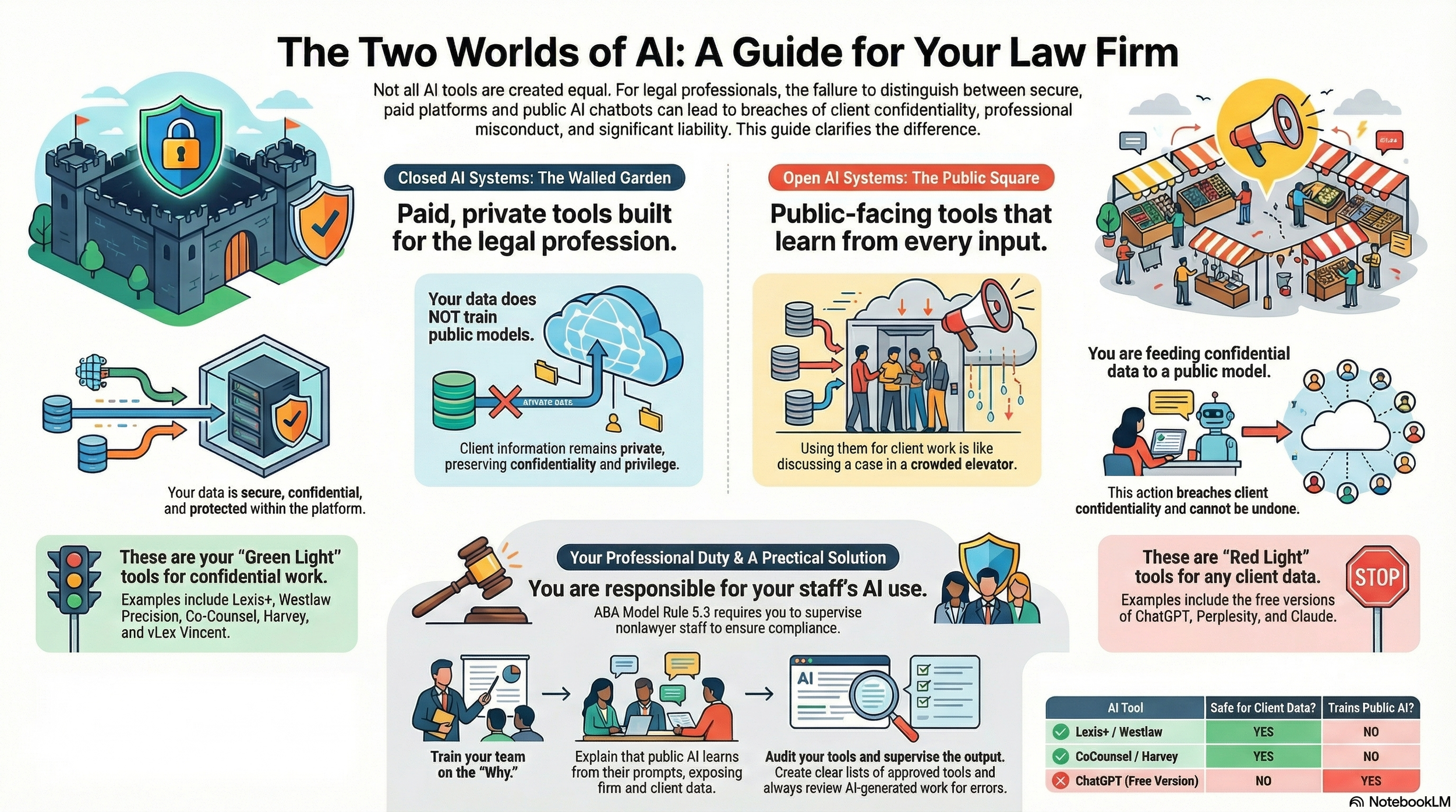
🧪🎧 TSL Labs Bonus Podcast: Open vs. Closed AI — The Hidden Liability Trap in Your Firm ⚖️🤖

Welcome to TSL Labs Podcast Experiment. 🧪🎧 In this special "Deep Dive" bonus episode, we strip away the hype surrounding Generative AI to expose a critical operational risk hiding in plain sight: the dangerous confusion between "Open" and "Closed" AI systems.

Featuring an engaging discussion between our Google Notebook AI hosts, this episode unpacks the "Swiss Army Knife vs. Scalpel" analogy that every managing partner needs to understand. We explore why the "Green Light" tools you pay for are fundamentally different from the "Red Light" public models your staff might be using—and why treating them the same could trigger an immediate breach of ABA Model Rule 5.3. From the "hidden crisis" of AI embedded in Microsoft 365 to the non-negotiable duty to supervise, this is the essential briefing for protecting client confidentiality in the age of algorithms.

In our conversation, we cover the following:

  • [00:00] – Introduction: The hidden danger of AI in law firms.

  • [01:00] – The "AI Gap": Why staff confuse efficiency with confidentiality.

  • [02:00] – The Green Light Zone: Defining secure, "Closed" AI systems (The Scalpel).

  • [03:45] – The Red Light Zone: Understanding "Open" Public LLMs (The Swiss Army Knife).

  • [04:45] – "Feeding the Beast": How public queries actively train the model for everyone else.

  • [05:45]The Duty to Supervise: ABA Model Rules 5.3 and 1.1[8] implications.

  • [07:00] – The Hidden Crisis: AI embedded in ubiquitous tools (Microsoft 365, Adobe, Zoom).

  • [09:00] – The Training Gap: Why digital natives assume all prompt boxes are safe.

  • [10:00] – Actionable Solutions: Auditing tools and the "Elevator vs. Private Room" analogy.

  • [12:00] – Hallucinations: Vendor liability vs. Professional negligence.

  • [14:00] – Conclusion: The final provocative thought on accidental breaches.

RESOURCES

Mentioned in the episode

Software & Cloud Services mentioned in the conversation

TSL Labs 🧪Bonus: 🎙️ From Cyber Compliance to Cyber Dominance: What VA's AI Revolution Means for Government Cybersecurity, Legal Ethics, and ABA Model Rule Compliance!

In this TSL Labs bonus episode, we examine this week’s editorial on how the Department of Veterans Affairs is leading a historic transformation from traditional compliance frameworks to a dynamic, AI-driven approach called "cyber dominance." This conversation unpacks what this seismic shift means for legal professionals across all practice areas—from procurement and contract law to privacy, FOIA, and litigation. Whether you're advising government agencies, representing contractors, or handling cases where data security matters, this discussion provides essential insights into how continuous monitoring, zero trust architecture, and AI-driven threat detection are redefining professional competence under ABA Model Rule 1.1. 💻⚖️🤖

Join our AI hosts and me as we discuss the following three questions and more!

  1. How has federal cybersecurity evolved from the compliance era to the cyber dominance paradigm? 🔒

  2. What are the three technical pillars—continuous monitoring, zero trust architecture, and AI-driven detection—and how do they interconnect? 🛡️

  3. What professional liability and ethical obligations do lawyers now face under ABA Model Rule 1.1 regarding technology competence? ⚖️

In our conversation, we cover the following:

  • [00:00:00] - Introduction: TSL Labs Bonus Podcast on VA's AI Revolution 🎯

  • [00:01:00] - Introduction to Federal Cybersecurity: The End of the Compliance Era 📋

  • [00:02:00] - Legal Implications and Professional Liability Under ABA Model Rules ⚖️

  • [00:03:00] - From Compliance to Continuous Monitoring: Understanding the Static Security Model 🔄

  • [00:04:00] - The False Comfort of Compliance-Only Approaches 🚨

  • [00:05:00] - The Shift to Cyber Dominance: Three Integrated Technical Pillars 💪

  • [00:06:00] - Zero Trust Architecture (ZTA) Explained: Verify Everything, Trust Nothing 🔐

  • [00:07:00] - AI-Driven Detection and Legal Challenges: Professional Competence Under Model Rule 1.1 🤖

  • [00:08:00] - The New Legal Questions: Real-Time Risk vs. Static Compliance 📊

  • [00:09:00] - Evolving Compliance: From Paper Checks to Dynamic Evidence 📈

  • [00:10:00] - Cybersecurity as Operational Discipline: DevSecOps and Security by Design 🔧

  • [00:11:00] - Litigation Risks: Discovery, Red Teaming, and Continuous Monitoring Data ⚠️

  • [00:12:00] - Cyber Governance with AI: Algorithmic Bias and Explainability 🧠

  • [00:13:00] - Synthesis and Future Outlook: Law Must Lead, Not Chase Technology 🚀

  • [00:14:00] - The Ultimate Question: Is Your Advice Ready for Real-Time Risk Management? 💡

  • [00:15:00] - Conclusion and Resources 📚

Resources

Mentioned in the Episode

Software & Cloud Services Mentioned in the Conversation

  • AI-Driven Detection Systems - Automated threat detection and response platforms

  • Automated Compliance Platforms - Dynamic evidence generation systems

  • Continuous Monitoring Systems - Real-time security assessment platforms

  • DevSecOps Tools - Automated security testing in software development pipelines

  • Firewalls - Network security hardware devices

  • Google Notebook AI - https://notebooklm.google.com/

  • Penetration Testing Software - Security vulnerability assessment tools

  • Zero Trust Architecture (ZTA) Solutions - Identity and access verification systems

🎙️Ep. 126: AI and Access to Justice With Pearl.com Associate General Counsel Nick Tiger

Our next guest is Nick Tiger, Associate General Counsel at Pearl.com, Nick shares insights on integrating AI into legal practice. Pearl.com champions AI and human expertise for professional services. He outlines practical uses such as market research, content creation, intake automation, and improved billing efficiency, while stressing the need to avoid liability through robust human oversight.

Nick is a legal leader at Pearl.com, partnering on product design, technology, and consumer-protection compliance strategy. He previously served as Head of Product Legal at EarnIn, an earned-wage access pioneer, building practical guidance for responsible feature launches, and as Senior Counsel at Capital One, supporting consumer products and regulatory matters. Nick holds a J.D. from the University of Missouri–Kansas City, lives in Richmond, Virginia, and is especially interested in using technology to expand rural community access to justice.

During the conversation, Nick highlights emerging tools, such as conversation wizards and expert-matching systems, that enhance communication and case preparation. He also explains Pearl AI's unique model, which blends chatbot capabilities with human expert verification to ensure accuracy in high-stakes or subjective matters.

Nick encourages lawyers to adopt human-in-the-loop protocols and consider joining Pearl's expert network to support accessible, reliable legal services.

Join Nick and me as we discuss the following three questions and more!

  1. What are the top three most impactful ways lawyers can immediately implement AI technology in their practices while avoiding the liability pitfalls that have led to sanctions in recent high-profile cases?

  2. Beyond legal research and document review, what are the top three underutilized or emerging AI applications that could transform how lawyers deliver value to clients, and how should firms evaluate which technologies to adopt?

  3. What are the top three criteria Pearl uses to determine when human expert verification is essential versus when AI alone is sufficient? How can lawyers apply this framework to develop their own human-in-the-loop protocols for AI-assisted legal work, and how is Perl different from its competitors?

In our conversation, we cover the following:

[00:56] Nick's Tech Setup

[07:28] Implementing AI in Legal Practices

[17:07] Emerging AI Applications in Legal Services

[26:06] Pearl AI's Unique Approach to AI and Legal Services

[31:42] Developing Human-in-the-Loop Protocols

[34:34] Pearl AI's Advantages Over Competitors

[36:33] Becoming an Expert on Pearl AI

Resources:

Connect with Nick:

Nick's LinkedIn: linkedin.com/in/nicktigerjd

Pearl.com Website: pearl.com

Pearl.com Expert Application Portal: era.justanswer.com/

Pearl.com LinkedIn: linkedin.com/company/pearl-com

Pearl.com X: x.com/Pearldotcom

ABA Resources:

ABA Formal Opinion 512: https://www.americanbar.org/content/dam/aba/administrative/professional_responsibility/ethics-opinions/aba-formal-opinion-512.pdf

Hardware mentioned in the conversation:

Anker Backup Battery / Power Bank: anker.com/collections/power-banks

Software & Cloud Services mentioned in the conversation:

TSL Labs Bonus Podcast: Google’s Notebook LLM “Deep Dive” on December 1st, 2025, editorial on the the Lawyer’s Defense Against Holiday Scams and ‘Bargain’ Tech Traps!

Listen in as Google's Notebook LLM provides an AI-powered conversation unpacks our December 1st, 2025 editorial examining how the holiday digital marketplace transforms into a lucrative hunting ground for device compromise and credential theft. We explore why attorneys and paralegals—trained to spot hidden clauses and anticipate risk—often abandon professional skepticism when faced with shiny gadgets bearing 70% off stickers. Our discussion arms you with actionable strategies to protect your practice, safeguard client confidentiality, and prevent the kind of security breaches that trigger bar complaints and operational shutdowns. Whether you're a solo practitioner or part of a large firm, this episode delivers the technical insights you need without the jargon.

Join Google's Notebook LLM as we discuss the following three questions and more!

  1. How do bargain tech deals create hidden professional liabilities that extend far beyond wasted money, and what specific technical deficits should lawyers avoid in discount hardware?

  2. What free forensic tools can legal professionals use to distinguish genuine discounts from manipulated pricing schemes, and how do these tools apply procurement-level rigor to personal shopping decisions?

  3. Which three active scam vectors target high-value professionals during the holiday season, and what mandatory four-point protocol ensures comprehensive protection against credential theft and device compromise?

In our conversation, we cover the following:

  • [00:00:00] Welcome to TSL Labs Bonus Episode: AI-powered deep dive on holiday shopping risks

  • [00:01:00] Why legal professionals abandon professional skepticism during holiday sales

  • [00:02:00] The high stakes: credential theft, device compromise, and operational lockdown

  • [00:03:00] The bargain trap: understanding technical debt in cheap vs. inexpensive hardware

  • [00:04:00] Processor bottleneck red flags: older generation chips that consume billable time

  • [00:05:00] Screen resolution hazards: how 1366x768 displays create genuine error risks

  • [00:06:00] RAM deficits and security longevity: when devices become e-waste and compliance gaps

  • [00:07:00] Introduction to forensic price tracking tools for procurement-level shopping

  • [00:08:00] CamelCamelCamel, Keepa, and Honey: free tools that reveal true pricing history

  • [00:09:00] Malwarebytes 2025 holiday scam report: three attack vectors targeting professionals

  • [00:10:00] Scam #1: urgent delivery smishing attacks exploiting package expectations

  • [00:11:00] Scam #2: malvertising minefield—when legitimate ads redirect to cloned fraud sites

  • [00:12:00] Scam #3: gift card emergency scams posing as court clerks and government officials

  • [00:13:00] Bonus threat: social media marketplace fraud and payment protection gaps

  • [00:14:00] The mandatory four-point protocol for holiday shopping protection

  • [00:15:00] Final thoughts: applying contract-reading diligence to every link you click

Resources

Hardware Mentioned in the Conversation

Software & Cloud Services Mentioned in the Conversation

📻 BONUS: Tech-Savvy Lawyer on Law Practice Today Podcast — Essential Trust Account Tips for Solo & Small Law Firms w/ Terrell Turner

🙏 Special Thanks to Terrell Turner and the ABA for having me on the Law Practice Today Podcast, produced by the Law Practice Division of the American Bar Association. We have an important discussion on trust account management. We cover essential insights on managing trust accounts using online services. This episode has been edited for time, but no information was altered. We are grateful to the ABA and the Law Practice Today Podcast for allowing us to share this valuable conversation with our audience.

🎯 Join Terrell and me as we discuss the following three questions and more!

  1. What precautions should lawyers using online services to manage trust accounts be aware of?

  2. How can solo and small firm attorneys find competent bookkeepers who understand legal trust accounting?

  3. What security measures should attorneys implement when using online payment processors for client funds?

⏱️ In our conversation, we cover the following:

00:00 – Introduction & Preview: Trust Accounts in the Digital Age

01:00 – Welcome to the Law Practice Today Podcast

01:30 – Today's Topic: Online Services for Payments

02:00 – Guest Introduction: Michael D.J. Eisenberg's Background

03:00 – Michael's Experience with Trust Accounts

04:00 – Challenges for Solo and Small Practitioners

05:00 – Ensuring Security in Online Services

06:00 – Questions to Ask Online Payment Providers

07:00 – Password Security & Two-Factor Authentication

08:00 – Finding a Competent Legal Bookkeeper

09:00 – Why 8AM Law Pay Works for Attorneys

10:00 – Daily Monitoring of Trust Accounts

11:00 – FDIC Insurance & Silicon Valley Bank Lessons

13:00 – Researching Trust Account Best Practices

15:00 – Closing Remarks & Podcast Information

📚 Resources

🔗 Connect with Terrell

💼 LinkedIn: https://www.linkedin.com/in/terrellturner/

🌐 Website: https://www.tlturnergroup.com/

🎙️ Law Practice Today Podcast – https://lawpracticetoday.buzzsprout.com

📰 Mentioned in the Episode

💻 Software & Cloud Services Mentioned in the Conversation

  • 8AM Law Pay – Legal payment processing designed for trust account compliance – https://www.8am.com/lawpay/

  • 1Password – Password manager for generating and syncing complex passwords – https://1password.com/

  • LastPass – Mentioned as a password manager with noted security concerns – https://www.lastpass.com/

🎙️🎁 TSL Labs Bonus: The Ultimate 2025 Tech Gift Guide for Attorneys — Expert-Curated Gadgets, AI Tools, and Must-Have Devices Every Lawyer Needs!

🎯 In this TSL Labs Bonus episode, we are experimenting with Google’s Notebook LLM to do a “Deep Dive” on our November 24th editorial on the ultimate 2025 tech gift guide for attorneys. We use this AI-powered conversation to unpack the key themes, ethical challenges, and actionable recommendations. Whether you're a solo practitioner, big law associate, or tech-curious partner, this episode delivers expert-curated insights on gadgets, AI tools, and must-have devices that support technological competence as a professional obligation.

If you're a busy legal professional seeking practical tech recommendations that enhance daily practice rather than collect digital dust, join us for this insightful conversation that explores how the right technology investments can improve your practice, safeguard your clients, and help prevent unnecessary bar complaints.

🤔 Join Google AI Deep Dive as they discuss the following three questions and more!

  1. What are the essential low-cost tech gifts under $25 that can make an immediate impact on an attorney's practice, and why do items like cables and tracking devices matter for professional competence?

  2. Which professional-grade tools under $100 deliver the best value for attorneys seeking to fulfill their ethical duty to work smarter and faster through AI integration and productivity enhancements?

  3. Why should premium technology investments over $100—including physical infrastructure like ergonomic chairs—be considered essential to an attorney's professional obligation to their clients?

In our conversation, we cover the following:

[00:00:00] — Episode introduction and TSL Labs Bonus overview

[00:01:00] — Navigating the perfect tech gift for attorneys: unique needs like security, portability, focus, and raw power

[00:02:00] — The three seismic forces driving tech choices: AI integration, cloud-based practice management, and heightened ethical duties

[00:03:00] — Target audience: solo practitioners, big law associates, and tech-curious partners who need technology that lasts

[00:04:00] — Essential low-cost gifts under $25: OWC Thunderbolt 4 USB-C cable and Apple AirTag for security and reliability

[00:05:00] — Productivity essentials: Logitech Pebble M350 silent mouse and Anker 7-in-1 USB-C Hub for presentations

[00:06:00] — AI tools for "forced competence": ChatGPT Plus one-month subscription as a low-risk nudge toward AI exploration

[00:07:00] — Professional grade tools under $100: Apple Pencil (1st Gen) for document annotation and Logitech MX Keys Mini keyboard

[00:08:00] — Focus and noise cancellation: Soundcore Space One headphones with 40+ hours battery life

[00:09:00] — Precision document navigation: Logitech MX Master 3S mouse with horizontal scrolling for wide documents

[00:10:00] — Premium mobile computing sweet spots: iPad Air with M3 chip ($599) and MacBook Air M4 ($999)

[00:11:00] — Physical infrastructure as health technology: Herman Miller Aeron chair ($1,351) for sustained high-quality work

[00:12:00] — Ultra-wide monitor benefits: LG 34" 5K 2K ($315) for seamless document comparison and reduced cognitive strain

[00:13:00] — Virtual practice essentials: Logitech Brio 4K webcam ($160) and Samsung T7 SSD ($109) for secure data management

[00:14:00] — The ultimate organizational hub: CalDigit TS3 Plus dock ($280) with 15 ports for cable clutter elimination

[00:15:00] — Strategic gift-giving advice: Understanding ecosystem (Apple, Windows, Android) and workflow considerations

📚 Resources

🖥️ Hardware Mentioned in the Conversation

Under $25:

  • OWC Thunderbolt 4 USB-C Cable (~$19.99) — Universal cable supporting 40Gb/s data, 100W power delivery, up to 8K video —(https://www.owc.com)

  • Apple AirTag (Single Pack) ($24) — Bluetooth tracking device using Find My network —(https://www.apple.com/airtag)

  • Logitech Pebble M350 Wireless Mouse (~$19.99) — Silent click, 90% noise reduction, 18-month battery — (https://www.logitech.com)

  • Anker 341 USB-C Hub (7-in-1) (~$19.99) — HDMI 4K@30Hz, USB ports, SD card slots — https://www.anker.com)

  • ORICLE 65W USB Travel Power Strip — Flat plug, 4-foot cord, 7-in-1 hub for travel —(https://oricotechs.com)

Under $100:

Premium Over $100:

  • iPad Air with M3 Chip (Starting at $599) — 8-core CPU, 9-core GPU, ideal balance of power and portability — (https://www.apple.com/ipad-air)

  • MacBook Air M4 (Starting at $999) — 10-core CPU, 10-core GPU, up to 18 hours battery life —(https://www.apple.com/macbook-air)

  • Herman Miller Aeron Chair (~$1,351) — Ergonomic office chair with PostureFit SL, three sizes for 1st-99th percentile —(https://www.hermanmiller.com)

  • LG 34" Ultrawide 5K 2K Monitor (~$315) — 3440x1440 resolution, curved display for seamless multitasking — (https://www.lg.com/us/monitors)

  • Logitech Brio 4K Ultra HD Webcam (~$160) — 4K@30fps, RightLight 3 HDR, adjustable 65°/78°/90° FOV — (https://www.logitech.com)

  • Samsung T7 Portable SSD (1TB) (~$109.99) — 1,050MB/s read speed, AES 256-bit encryption, 2m drop resistant — (https://www.samsung.com)

  • CalDigit TS3 Plus Thunderbolt 3 Dock (~$280) — 15 ports, 87W laptop charging, dual 4K display support — (https://www.caldigit.com)

💻 Software & Cloud Services Mentioned in the Conversation

  • ChatGPT Plus ($20/month) — OpenAI's premium AI assistant with GPT-4 access for research and drafting — (https://chat.openai.com)

  • Grammarly Premium (~$96/year on sale; $144/year regular) — AI-powered writing assistant with plagiarism detection —(https://www.grammarly.com)

  • Apple Find My — Location tracking app for AirTags and Apple devices — https://www.icloud.com/find

📌 Disclaimer: Prices mentioned throughout this episode and show notes are approximate and based on manufacturer suggested retail prices around the time of the publication date; actual pricing may vary depending on manufacturer availability, retailer promotions, seasonal sales, and geographic location, and we recommend verifying current pricing before making any purchase decisions.

🎙️ Ep. #125: Transforming Law Practice: Allison Johs on Legal Tech Productivity, AI Ethics & Automation Strategies.

My next guest is Allison Johs, former Chair of the ABA Legal Technology Resource Center and founder of Legal Ease Consulting. 🎯 Allison has spent nearly two decades helping law firms prevent "lawyer meltdown" by guiding them through digital transformation, boosting productivity, and providing practical tech solutions for modern legal professionals. With 15 years of practicing law and experience growing a firm from 15 to over 50 attorneys, Allison brings real-world expertise to the challenges lawyers face when balancing technology adoption with successful client service.

Join Allison Johs and me as we discuss the following three questions and more! 🤔

  1. What are the top three foundational mistakes lawyers make when implementing new legal technology, and how can solo and small firms avoid these pitfalls to ensure their technology investments actually improve their practice rather than just create additional complexity?

  2. What are your top three recommendations for lawyers who want to responsibly integrate AI into their practice while maintaining ethical compliance and ensuring client confidentiality?

  3. What are the top three technology-driven strategies lawyers can implement immediately to automate routine tasks and reclaim billable hours?

In our conversation, we cover the following: ⏱️

  • [00:00:00] – Episode introduction and guest welcome

  • [00:01:00] – Allison's current tech setup: Dell laptop, HP all-in-one desktop, Logitech Brio webcam, Microsoft 365

  • [00:02:00] – Discussion of portable monitors (INNOCN) and dual-screen productivity setups

  • [00:03:00] – Document scanning workflow with ScanSnap scanner and going paperless

  • [00:04:00] – OCR considerations for different practice areas, Adobe Acrobat for occasional OCR needs

  • [00:05:00]Mistake #1: Not considering roles of all people who will use the technology in the firm

  • [00:06:00] – Including staff input during technology selection and implementation

  • [00:07:00] – Coaching resistant employees through technology adoption

  • [00:08:00] – Addressing legitimate objections vs. fear of change; demonstrating value to staff

  • [00:09:00]Mistake #2: Not checking how new technology integrates with existing systems

  • [00:10:00] – Hidden costs of technology transitions: running parallel systems for 6-8 months

  • [00:11:00] – Budgeting for duplicate CRM/LPM subscriptions during migration

  • [00:12:00]Mistake #3: Failing to appropriately invest in ongoing training

  • [00:13:00] – Training new hires and keeping up with subscription software updates

  • [00:14:00]AI Recommendation #1: Thoroughly investigate how AI tools handle data, security, and training

  • [00:15:00]AI Recommendation #2: Setting and strictly enforcing AI usage policies; mandatory human review

  • [00:16:00] – The importance of reviewing AI outputs—lawyers should know precedents in their practice area

  • [00:17:00]AI Recommendation #3: Start with non-client-facing AI work (internal processes, marketing, financials)

  • [00:18:00] – Ethical considerations: using AI on published court decisions for legal analysis

  • [00:19:00] – Using AI to find contrary precedents and distinguishing cases

  • [00:20:00] – Duty to supervise: real-world consequences when AI use goes wrong

  • [00:21:00]Automation Strategy #1: Appointment booking tools (Calendly, Microsoft Bookings)

  • [00:22:00]Automation Strategy #2: Templates, document assembly, AI chatbots for client intake

  • [00:23:00]Automation Strategy #3: Automated time tracking and AI-powered billing review

  • [00:23:30] – Text Expander discussion: saving 2-5 hours weekly on repetitive typing

  • [00:24:00] – Allison's top automation tools: Calendly, Microsoft Power Automate, Microsoft Bookings

  • [00:25:00] – Discovering hidden features in Microsoft 365 (Ben Schorr webinar reference)

  • [00:26:00] – Using AI for travel planning: Google AI for trip itineraries, Perplexity AI for route optimization

  • [00:27:00] – Maximizing productivity during travel and conference attendance

  • [00:28:00] – Where to find Allison: websites, social media, and YouTube channel

Resources 📚

Connect with Allison Johs:

Mentioned in the Episode:

  • 📖 ABA Legal Technology Resource Centeramericanbar.org/groups/departments_offices/legal_technology_resources

  • 📖 How to Do More in Less Time (2nd Edition, 2023) – ABA Law Practice Division book co-authored by Allison Johs - https://www.amazon.com/How-More-Less-Time-Productivity/dp/1639052283

  • 📖 Make LinkedIn Work for You: A Practical Handbook for Lawyers and Other Legal Professionals – Co-authored with Dennis Kennedy - https://www.amazon.com/Make-LinkedIn-Work-You-Professionals/dp/1734076321

  • 👤 Ben Schorr – Microsoft 365 expert, now with Affinity Consulting Group - https://www.affinityconsulting.com/team/ben-m-schorr/

  • 🏛️ Universal Migrator – CRM/LPM data migration tool - https://www.universalmigrator.com/

Hardware Mentioned in the Conversation:

  • 💻 Dell Laptop - https://www.dell.com/en-us/shop/dell-laptops/scr/laptops?_gl=1*78tbrz*_up*MQ..*_gs*MQ..&gclid=EAIaIQobChMIgerxro6QkQMVdUpHAR0BUBUOEAAYASAAEgJ_R_D_BwE&gclsrc=aw.ds

  • 🖥️ HP All-in-One Desktop Computer - https://www.hp.com/us-en/shop/vwa/desktops/form=All-in-One

  • 🖥️ INNOCN Portable Monitor (1080p mobile screen) – innocn.com

  • 📷 Logitech Brio Webcam (4K with built-in microphone) – logitech.com/brio

  • 🖨️ HP Printer - https://www.hp.com/us-en/shop/vwa/printers

  • 📄 Fujitsu ScanSnap Scanner (duplex document scanner) – scansnap.com

Software & Cloud Services Mentioned in the Conversation:

🎙️ TSL Labs! Google AI Discussion of MTC: 🚨‼️ Emergency BOLO! 🚨‼️ Lawyers on the Go: Essential Tech Strategies for Air Travel During the Government Shutdown ✈️

📌 Too Busy to Read This Week's Editorial?

Join us for an emergency professional deep dive into essential tech strategies for air travel during government shutdowns and travel disruptions. 🛫 This AI-powered roundtable unpacks Michael D.J. Eisenberg's critical editorial with actionable intelligence on real-time flight tracking, data security protocols, connectivity redundancy, and power management. Whether you're a legal professional navigating travel chaos or anyone managing disruptions during system-wide stress, discover how to transform from reactive scrambling to proactive control—turning travel crises into manageable projects you command. Learn the five professional-grade rules that separate those who navigate disruptions from those who get derailed.

In our conversation, we cover the following:

  • 00:00:00 – Introduction: Welcome to Tech Savvy Lawyer Labs Emergency BOLO

  • 00:01:00 – Travel Chaos as the New Normal: System Volatility & Professional Vulnerability

  • 00:02:00 – Flight Schedule Control: The Illusion & Reality of Travel Disruptions

  • 00:02:00 – Extreme Volatility in Air Travel: Cascading Flight Cancellations & Customer Service Chaos

  • 00:02:00 – Real-Time Flight Tracking Strategy: Flightradar24 & FlightAware Intelligence Systems

  • 00:02:00 – Backup Flight Monitoring: Multi-Carrier Surveillance Strategy (Delta, United, American)

  • 00:03:00 – Proactive Intelligence vs. Reactive Response: One-Hour Lead Time Advantage

  • 00:03:00 – Early Rebooking Strategy: First and Second Choice Flight Selection

  • 00:03:00 – Trusted Traveler Programs: TSA PreCheck & Time Investment ROI

  • 00:03:00 – TSA PreCheck Value: $78 for Five Years & Security Line Efficiency

  • 00:03:00 – Global Entry: $100 for Five Years with International Customs Acceleration

  • 00:04:00 – Trusted Traveler Planning: Background Checks, Interviews & Months-Ahead Application

  • 00:04:00 – Public WiFi Malpractice Alert: Data Security & Vulnerability Assessment

  • 00:04:00 – Personal Mobile Hotspot: Cellular Encryption Over Public Networks

  • 00:05:00 – Dual Carrier Coverage: eSIM Technology & Connectivity Insurance

  • 00:05:00 – Dual SIM Implementation: T-Mobile & Verizon Redundancy Strategy Without Two Phones

  • 00:05:00 – eSIM Digital Technology: Two Active Lines on One Device

  • 00:05:00 – Prepaid Data Plan Strategy: Coffee-Price Monthly Cost for Connectivity Backup

  • 00:06:00 – VPN Non-Negotiables: Encrypted Tunnel & Automatic Connection Protocol

  • 00:06:00 – VPN Automatic Startup: Device Initialization & All-Device Coverage (Phone, Tablet, Laptop)

  • 00:06:00 – International Travel Security: VPN Encryption & Surveillance Protection

  • 00:07:00 – TSA-Approved Power Banks: 100 Watt-Hour Specifications & 27,000 mAh Ceiling

  • 00:07:00 – Laptop Charging: 100-Watt USB-C Power Bank Requirements (MacBook Pro)

  • 00:07:00 – Multi-Device Charging: Simultaneous Laptop, Phone & Tablet Power Delivery

  • 00:07:00 – Smart Power Display: Charging Speed Monitoring & Juice Rationing

  • 00:07:00 – Surge Protector Safety: Airport Outlet Protection & Device Insurance

  • 00:08:00 – Airport Lounges: Priority Pass Access & Productivity Sanctuaries (1,300+ Worldwide)

  • 00:08:00 – Travel Credit Card Benefits: Complimentary Lounge Visits Strategy

  • 00:08:00 – Conference Call Chaos: Professional Communication Environment Solutions

  • 00:08:00 – Noise-Canceling Headphones: Sony XM5 & Bose QuietComfort Professional Focus

  • 00:08:00 – Battery Life Requirements: 30-40 Hour Endurance for Extended Delays

  • 00:09:00 – Offline Access Mandate: Pre-Departure Critical File Downloads

  • 00:09:00 – Six-Hour Offline Capability: Zero-Connectivity Work Strategy

  • 00:09:00 – Adobe Scan App: OCR Technology & Mobile Document Management

  • 00:10:00 – Adobe Ecosystem Syncing: Cross-Device Workflow & E-Signature Integration

  • 00:10:00 – Apple Ecosystem Continuity: iPhone, iPad & MacBook Seamless Integration

  • 00:10:00 – FileVault Encryption & Face ID: Built-In Security Non-Negotiables

  • 00:11:00 – Five Professional-Grade Rules: Pre-Travel Checklist & Crisis Preparation

  • 00:11:00 – Rule One: Full Device Charge Before Departure

  • 00:11:00 – Rule Two: Offline Maps & Critical Files Downloaded Locally

  • 00:11:00 – Rule Three: Screenshot Everything (Boarding Passes, Hotel, Car Rental)

  • 00:11:00 – Rule Four: Distributed Charger Storage Across Multiple Bags for Backup Power

  • 00:11:00 – Rule Five: Share Itinerary with Emergency Contact

  • 00:11:00 – Post-Crisis Integration: Permanent Daily Workflow Implementation

  • 00:11:00 – The Bigger Question: Crisis Tools as Permanent Professional Standards

  • 00:12:00 – Transition to AI Ethics Discussion: Hidden AI Crisis in Legal Practice Teaser

  • 00:14:00 – Conclusion: Tech Savvy Lawyer Labs Roundtable Summary & Resources

Resources 📚

Mentioned in the episode:

Hardware mentioned in the conversation:

Software & Cloud Services mentioned in the conversation:

🎙️ Ep. # 124: AI Governance Expert Nikki Mehrpoo Shares the Triple E Protocol for Implementing Responsible AI and Legal Practice While Maintaining Ethical Compliance and Protecting Client Data.

My next guest is Nikki Mehrpoo. She is a nationally recognized leader in AI governance for law practices, known for her practical, ethical, and innovation-focused strategies. Today, she details her Triple-E Protocol and shares key steps for safely leveraging AI in legal work.

Join Nikki Mehrpoo and me as we discuss the following three questions and more!

  1. Based on your pioneering work with “Govern Before You Automate,” what are the top three foundational steps every lawyer should take to implement AI responsibly, and what are the top three mistakes lawyers make with AI?

  2. What are your top three tips or tricks when using AI in your work?

  3. When assessing the next AI platform from a service provider, what are the top three questions lawyers should be asking?

In our conversation, we cover the following:

  • 00:00:00 – Welcome and guest’s background 🌟

  • 00:01:00 – Current tech setup and cloud-based workflows ☁️

  • 00:02:00 – Privacy and IP management, not client confidentiality 🔐

  • 00:03:00 – Document deduplication with Effingo 📄

  • 00:04:00 – Hardware: HP Omni Book 7 Laptop, HP monitors, iPhone 💻📱

  • 00:05:00 – Efficiency tools: Text Expander, personal workflow shortcuts ⌨️

  • 00:06:00 – Balancing technology innovation and risk management ⚖️

  • 00:07:00 – Adapting to change, ongoing legal tech education 🧑‍💻

  • 00:08:00 – Triple-E Framework: Educate, Empower, Elevate 🚀

  • 00:09:00 – Governance, supervision duties, policy setting 🛡️

  • 00:10:00 – Human verification as a standard for all legal AI output 🧑‍⚖️

  • 00:12:00 – Real-world examples: AI hallucinations, bias, and due diligence ⚠️

  • 00:13:00 – IT vs. AI expertise, communicating across teams 🛠️

  • 00:14:00 – Chief AI Governance Officer, governance in legal innovation 🏛️

  • 00:15:00 – Global compliance, EU AI Act, international standards 🌐

  • 00:16:00 – Hidden AI in legacy software, policy gaps 🔎

  • 00:17:00 – Education as continuous legal responsibility 📚

  • 00:18:00 – Better results through prompt engineering 🔤

  • 00:19:00 – Verify, verify, verify: never trust without review ✔️

  • 00:20:00 – ABA Formal Opinion 512: standards for responsible legal AI 📜

  • 00:21:00 – Nikki’s Triple-E Protocol, governance best practices 📊

  • 00:22:00 – Data origin, bias, and auditability in legal AI systems 🧩

  • 00:23:00 – Frameworks for “govern before you automate” in legal workflows 🔒

  • 00:24:00 – Importance of internal hosting and zero retention policies 🏢

  • 00:25:00 – Maintaining confidentiality with third-party AI and HIPAA compliance 🤫

  • 00:26:00 – Where to find Nikki and connect 🌐

Resources

Connect with Nikki Mehrpoo

Mentioned in the episode

Hardware mentioned in the conversation

Software & Cloud Services mentioned in the conversation





